
Setting up GoHighLevel for an agency means configuring the agency account (domain, DNS, email and phone), then each client sub-account: pipeline, custom fields and tags, calendars, forms, the four core workflows, funnels, and, if you resell the platform, SaaS mode and snapshots. In the order below it takes two to four weeks for a first client; most problems later come from steps skipped at the start. This guide goes through each step with the menu paths, the mistakes we see most often in audits, and when it is worth handing the build to a GoHighLevel setup agency instead.
The order that works
- Agency account: plan, white-label domain, DNS, email sending domain, phone and A2P registration.
- Sub-account: pipeline and stages, custom fields, tag naming rule.
- Calendars and forms.
- Workflows: new lead, missed-call text back, appointment reminders, review request.
- Funnels and website, Stripe.
- Snapshot of the finished sub-account; SaaS mode only after that.
- Test with test contacts, then publish.
What GoHighLevel is and why agencies use it
GoHighLevel is a CRM and marketing automation platform that includes the tools an agency would otherwise buy separately: contacts and pipelines, texting and email, calendars, a funnel and website builder, reputation tools and reporting. For an agency the structural advantage is that one agency account holds many client sub-accounts, each with its own contacts and settings, and the whole thing can be white-labelled and resold.
- CRM and pipelines. Contacts, opportunities and stages in one place, per sub-account.
- Workflow automation. Email, SMS and calls triggered by events such as a form submission or a missed call.
- Funnels and websites. Landing pages, forms and checkout without a separate page builder.
- SaaS mode. White-label the platform and bill clients for access, on the plan that supports it.
- Reputation tools. Review requests and monitoring.
The platform does not set itself up. The value comes from the structure you build in it, which is what the rest of this guide covers.
- 1Agency account and white-label domain
- 2DNS and email authentication
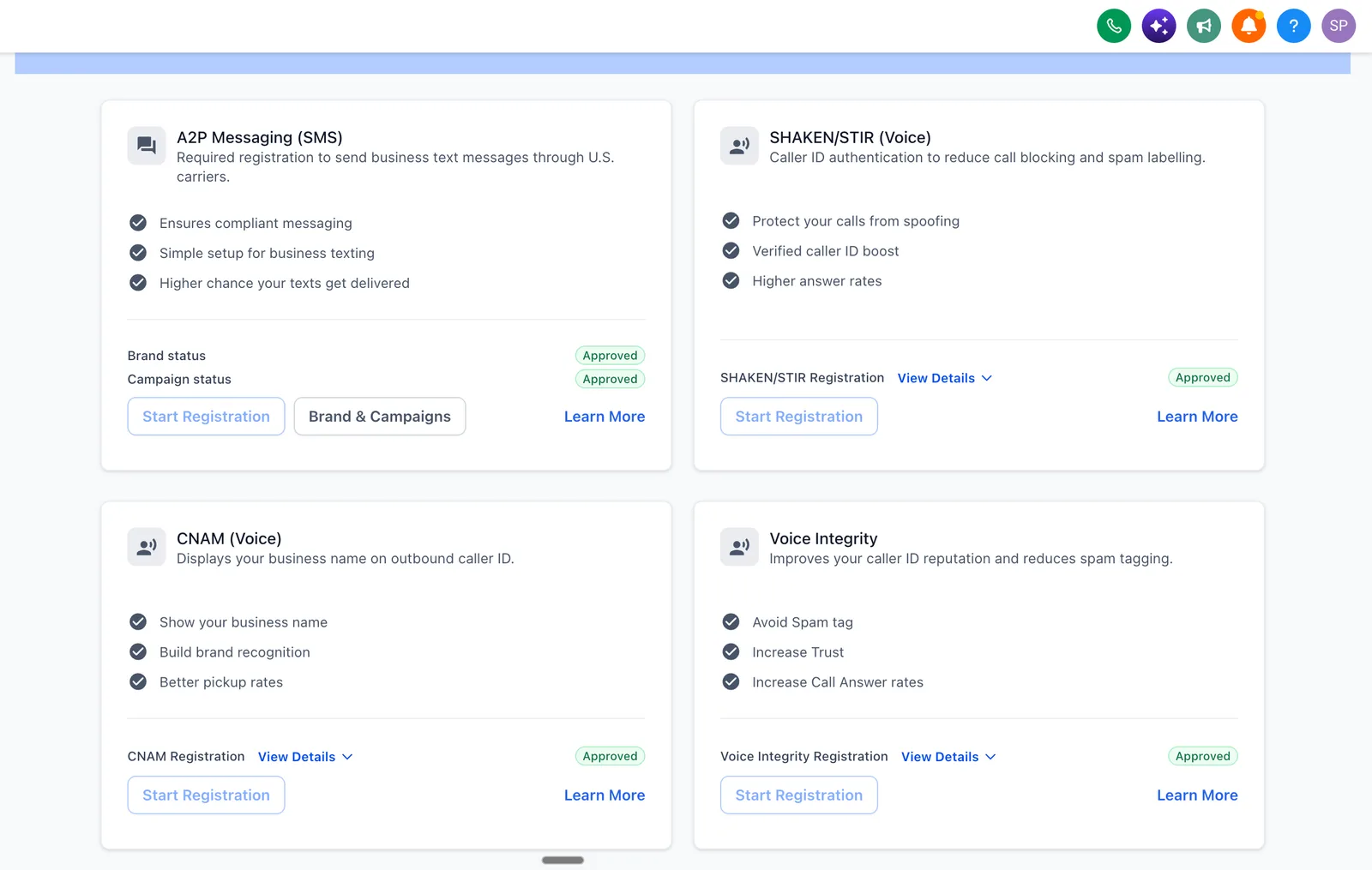
- 3A2P registration
- 4Sub-account pipeline and fields
- 5Calendars
- 6The four core workflows
- 7Funnels
- 8Snapshots and SaaS mode
Source: the rollout plan described in this guide
Step-by-step GoHighLevel setup for agencies
Step 1: agency account configuration
The agency account is the control layer. Every sub-account inherits its domain, sending and phone configuration, so mistakes here repeat for every client.
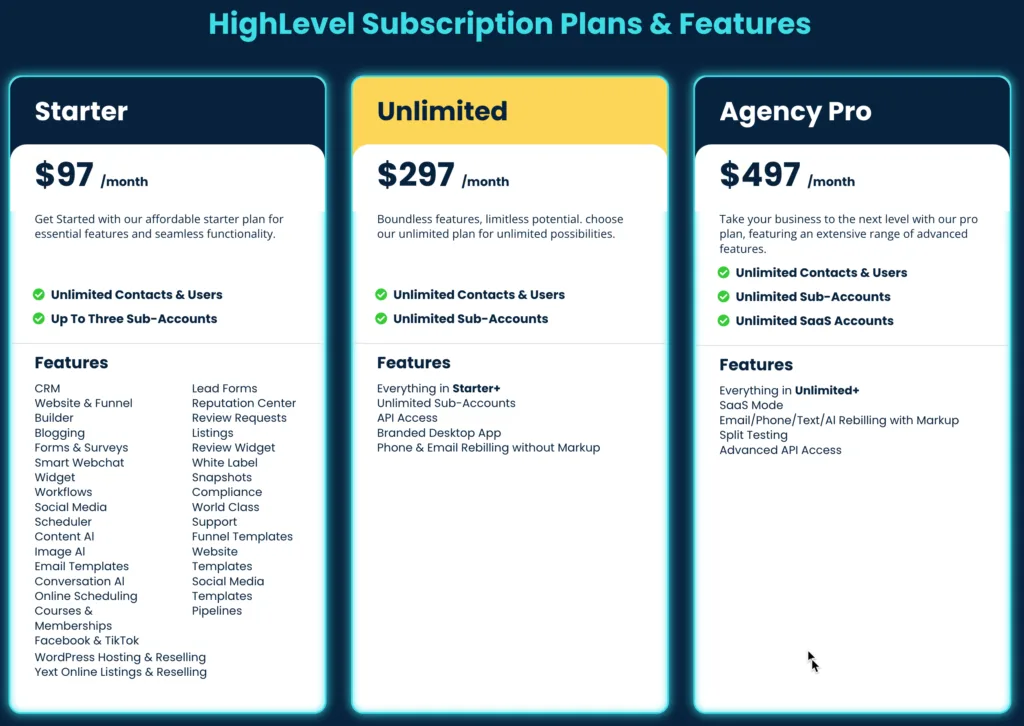
- Choose the plan.Agency Unlimited ($297 a month at the time of writing) gives unlimited sub-accounts. SaaS mode and rebilling sit on the $497 plan. Confirm both on HighLevel's pricing page and in the HighLevel pricing guide.
- White-label the domain.Add a CNAME record in your registrar so the app loads on app.youragency.com, then enter the subdomain under Whitelabel Domain in the agency settings. HighLevel says SSL is issued automatically once DNS points to the correct CNAME (whitelabel domain help article). Confirm it before sharing the link.
- Authenticate email.Set up a dedicated sending domain with SPF, DKIM and DMARC; HighLevel's email authentication article says Gmail and Yahoo require DKIM and DMARC authentication for senders. Use HighLevel's built-in email service or connect your own provider.
- Set up phone and A2P.Use HighLevel's phone system or connect your own Twilio account. Register the A2P 10DLC brand and campaign for US texting; HighLevel says campaign registration is required after brand approval before you can send SMS from standard 10-digit US local numbers (A2P registration guide).
- Connect Stripe.Needed for funnel checkout, invoices and SaaS subscriptions.
DNS takes time. HighLevel's whitelabel domain article says DNS changes may take up to 30 minutes to propagate. Verify every record before the first client campaign goes out.
Step 2: CRM and pipeline setup
The pipeline is how you see the state of every deal. Map your real sales process on paper first, then build only the stages that exist.
- Create stages that reflect how deals move, each with an entry rule.
- Add custom fields only for facts you will filter on, such as budget, timeline and service interest.
- Write the tag convention down before the first lead (for example
source-facebook,service-seo). - Set ownership rules so each new opportunity is assigned, not left in a queue.
- Add stage-change notifications by email or Slack for the stages that need a human.
An example pipeline for a marketing agency:
| Stage | Enters when | Automation |
|---|---|---|
| New inquiry | Form submitted or inbound call | Assign owner, send first text and email |
| Discovery call | Call booked | Confirmation and reminders |
| Proposal sent | Proposal delivered | Follow-up task after two days |
| Contract signed | Payment received | Start onboarding workflow |
| Active client | Work under way | Monthly check-in task |
Step 3: calendars and forms
Create one calendar per service or per person who takes bookings, set availability and buffers, and sync each user's Google or Outlook calendar. Connect the calendar to a form or booking page and check that the appointment status changes are what your reminder and no-show workflows trigger on. Double-bookings usually come from a missing calendar sync or from timezone settings per user.
Step 4: the four core workflows
These four cover most of what a new client needs. Each needs a trigger, waits, an exit condition and a test.
| Workflow | Trigger | What it does | Exit when |
|---|---|---|---|
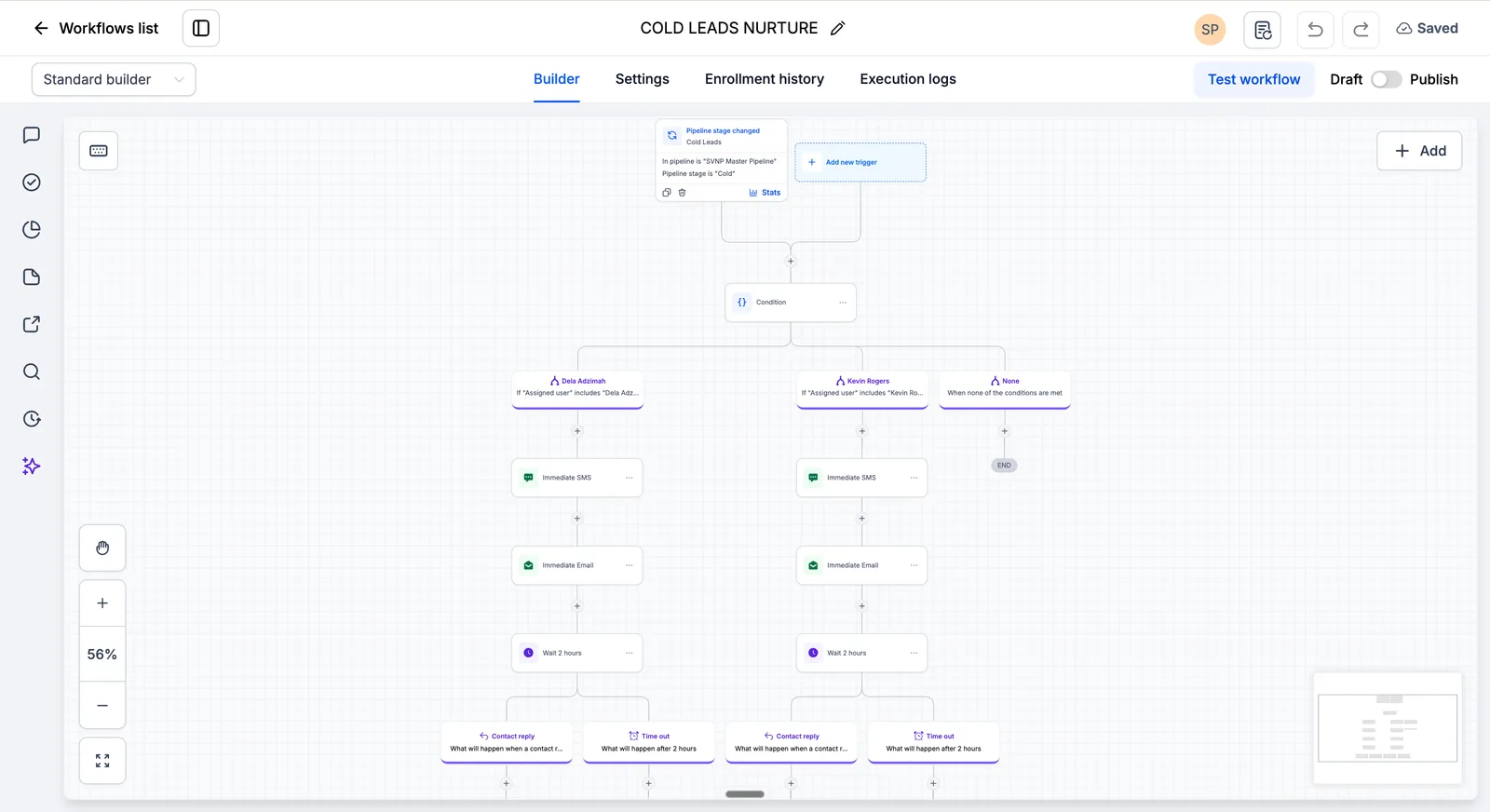
| New lead response and nurture | Form submitted or contact created | Tags the source, assigns an owner, sends a text and email, then follows up over several days with waits between | Contact replies, books or opts out |
| Missed-call text back | Inbound call unanswered | Sends a text within a minute with a booking link | Contact replies or books |
| Appointment reminders | Appointment booked | Reminder the day before and a short one a couple of hours before, with the link or address | Appointment completes or is cancelled |
| Review request | Opportunity moves to won or complete | Waits a couple of days, emails the review link, texts if there is no click | Review link clicked or sequence ends |
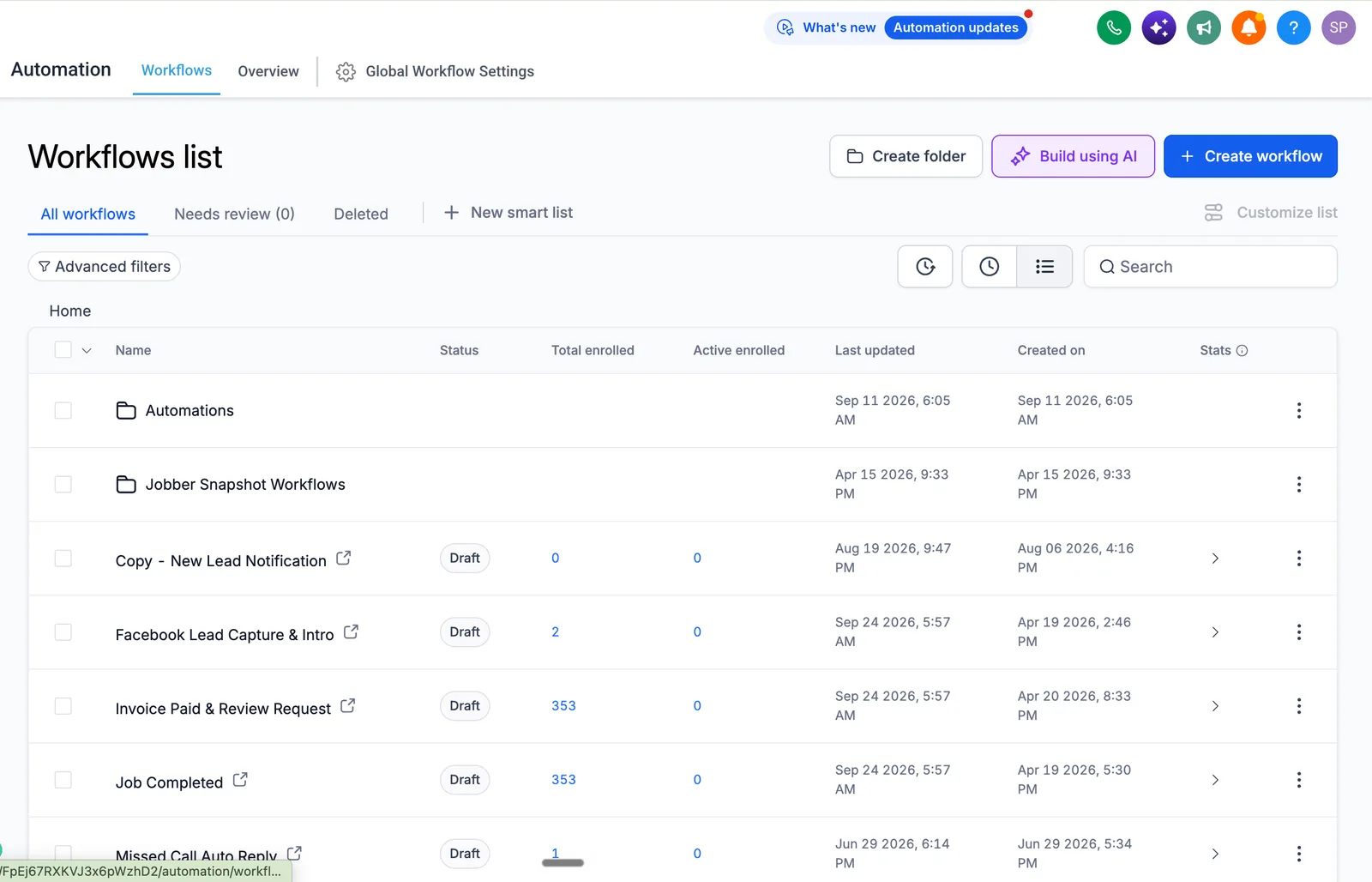
Test before you publish. Push test contacts through each path and read the execution log. A workflow that works for one perfect contact can fail on a lead with no phone number or one who is already enrolled elsewhere.
Step 5: funnels and website
- Start from a template or a snapshot and change the branding and copy.
- Keep the form short: name, email and phone is usually enough to start a conversation.
- Embed the calendar so a visitor can book on the same page.
- Connect Stripe if the page takes a deposit or payment.
- Install your tracking tags so source and conversion events reach your reports.
Test headlines and offers one change at a time and give each version enough visits to mean something before you switch.
Step 6: SaaS mode and snapshots
A snapshot saves the structure of a finished sub-account (workflows, funnels, calendars, forms, emails, triggers and custom fields, per HighLevel's snapshot article) so you can deploy it to a new client. SaaS mode lets you sell access to the platform under your own brand. Build and test the snapshot first, then switch SaaS mode on. If an import stalls or loads only part of the account, the checks are in why a snapshot import gets stuck or fails.
- Enable SaaS mode in the agency settings, on the plan that includes it.
- Build one snapshot per niche, tested end to end.
- Define tiers and what each includes.
- Configure Stripe billing and failed-payment handling.
- Build the onboarding: welcome email, short training and a kickoff call.
Price tiers are your decision, not HighLevel's; common agency price points run from a few hundred dollars a month upward. Subtract HighLevel's plan and usage charges when you work out margin. For the full version of this step, see SaaS mode setup.
Common GoHighLevel setup mistakes
| Symptom | Usual cause | Fix |
|---|---|---|
| Emails land in spam or do not send | Sending domain not authenticated; new domain sending at volume | Check SPF, DKIM and DMARC, warm the domain gradually. See emails going to spam |
| Workflow does not trigger | Trigger filter too narrow, or the contact is already enrolled and re-entry is off | Check enrolment history and the execution log with a fresh test contact. See workflows not triggering |
| Security warning on the white-label domain | Wrong CNAME or SSL not issued yet | Re-check the record, allow propagation, confirm SSL in settings |
| Contacts get the same message two or three times | Overlapping workflows without exit conditions | Add exit rules and filters; audit active workflows monthly |
| Reports and stages mean nothing | Stages do not reflect the real process | Map the sales conversation first and rebuild the stages |
| Double-booked appointments | No calendar sync or wrong timezone per user | Enable sync, add buffers, verify timezones. See calendar not syncing |
| Texts blocked or not delivered | A2P registration missing or rejected | Fix the brand or campaign and resubmit. See A2P rejected |
DIY or hire help?
| Factor | DIY | Expert-led |
|---|---|---|
| Time | Our estimate: 40 to 60 hours for a first client, spread over weeks | A few weeks, with your input at approval points |
| Cost | Your time, plus mistakes made on live leads | A scoped fee; see the pricing page for bands |
| Risk | Higher; you find the quirks yourself | Lower; the quirks are known in advance |
| Records | Usually none | Account map and recorded training |
| Support | Self-managed | 30 days after launch, then optional monthly plan |
The comparison is a judgment, not a measured result. To estimate your own, multiply the hours you would spend by what an hour of your time is worth, then add what a month of broken follow-up would cost. If that exceeds a scoped fee, hiring is cheaper.
Book a free strategy call and we will map the build with you.
What a complete GoHighLevel setup covers
Use this as a checklist. A setup is finished when every area below is configured and tested, whether you do it or someone else does.
| Area | What has to be configured |
|---|---|
| Agency and technical settings | White-label domain, SSL, sending domain and authentication, phone numbers and A2P registration |
| CRM structure | Pipelines and stages, custom fields, tags, user permissions, dashboards |
| Automation | Lead response, missed-call text back, reminders and review requests, each tested with test contacts |
| Funnels and booking | Landing page, forms, calendar booking, Stripe, thank-you page |
| SaaS settings (if you resell) | SaaS mode, snapshot, pricing tiers, recurring billing, onboarding |
| Records | A written account map and recorded training for each role |
When to hand the setup to someone else
Hand the build over when a missed lead costs real money, when you have no time for the 40 to 60 hours (our estimate) a first client can take, or when you want it tested and documented by someone who has done it before. Done-for-you setup means a team does the whole project for you, with a written plan, tests and a handover. What that costs, and what moves the price, is on the GoHighLevel setup cost page. The rest of our GoHighLevel guides and fixes cover the problems that come up after launch.
GoHighLevel setup in 30 days: a week-by-week roadmap
| Week | Focus | What is done by the end |
|---|---|---|
| 1 | Foundation | Agency account, white-label domain, email domain authentication, A2P registration submitted |
| 2 | Structure | Pipeline and stages, custom fields and tags, calendars and forms (see pipeline setup and calendar setup) |
| 3 | Workflows | The four core workflows below, each tested with test contacts |
| 4 | Test and launch | Every path tested with the Execution Logs open, staff trained, the account documented |
Email and SMS deliverability before you send anything
Do the unglamorous part first, because it decides whether anything else is read. Authenticate your sending domain (SPF, DKIM and a DMARC policy), warm it up, and register for A2P 10DLC before texting US numbers. If registration is rejected, see why A2P registration fails and how to fix it; if emails land in spam, see GoHighLevel emails going to spam. Current registration and usage fees are in SMS and email costs.
The four core workflows to build first
| Workflow | What it does | Guide |
|---|---|---|
| Speed to lead | Assigns an owner and texts a new lead within a minute | Speed to lead |
| Appointment reminders | Confirms and reminds before each appointment | Appointment reminders |
| Missed call text back | Texts a caller you did not answer, once | Missed call text back |
| Review requests | Asks every customer after the job | Review requests |
Sources and further reading
Checked at the time of writing; prices, features and policies change. Checked 2026-10-19. Facts about HighLevel features and prices on this page come from HighLevel's own help center and pricing pages:
- HighLevel: A2P 10DLC campaign registration guide (modified September 11, 2026), for campaign registration before US texting
- HighLevel: Appointment Status workflow trigger
- HighLevel pricing page for plan prices, sub-accounts and SaaS mode
- HighLevel pricing guide for rebilling on the $497 plan
- HighLevel: whitelabel domain for the desktop web app (modified August 14, 2026) for the CNAME, SSL and propagation statements
- HighLevel: email authentication and DMARC (modified June 30, 2026)
- HighLevel: creating snapshots (modified October 16, 2026) for what a snapshot includes and excludes
Frequently asked questions about GoHighLevel setup
How long does GoHighLevel setup take?
In our estimate, a DIY setup for a first client takes 40 to 60 hours spread over two to four weeks, depending on how comfortable you are with DNS, email and workflow logic. An expert-led single-location build typically takes a few weeks including testing and training. SaaS mode with custom snapshots adds time.
How much does GoHighLevel setup cost?
Doing it yourself costs $0 plus your time, and HighLevel bills its own plan and usage separately. Having it done for you with us costs $500 to $4,000 for a basic or single-location build, $3,500 to $5,000 for white label and SaaS, and a custom quote for multi-location. See GoHighLevel setup cost for what moves the price.
Is GoHighLevel good for agencies?
Yes, it is built around the agency model: one account, many client sub-accounts, white-labelling and a way to resell. It suits agencies that want one platform for CRM, messaging and funnels. It is less suited to teams that only need a simple email tool.
Can I sell GoHighLevel as SaaS?
Yes, SaaS mode on the plan that includes it lets you white-label the platform and bill clients for access, with rebilling for usage. You set the prices; HighLevel bills you for the plan and usage, and the difference is your margin.
What is a GoHighLevel snapshot?
A snapshot is a saved copy of a sub-account's structure: workflows, funnels, calendars, forms, emails, triggers and custom fields. You deploy it to a new sub-account instead of rebuilding. HighLevel says contacts, appointments and conversations are not included (snapshot article), so test the snapshot before you rely on it. See what a med spa snapshot includes and leaves out for a worked example of what that testing catches.
Do I need technical skills to use GoHighLevel?
The interface is approachable, but the first setup needs comfort with DNS records, email authentication, phone registration and workflow logic. Many agencies hire help for the first build and then run the account themselves with the documentation.
What is the best GoHighLevel plan for agencies?
Agency Unlimited ($297 a month at the time of writing) is the usual starting point because it includes unlimited sub-accounts. If you plan to resell under your own brand and rebill usage, the $497 plan includes SaaS mode. Check HighLevel's pricing page, since plans change.
How do I connect Twilio to GoHighLevel?
If you use your own Twilio account rather than HighLevel's phone system, enter your Twilio credentials in the phone integration settings (follow HighLevel's current Twilio help article for the exact menu path), then send a test text from a sub-account. Keep numbers and registrations separate per client so records stay clean.
What should I set up first in a new GoHighLevel account?
The agency-level items: the white-label domain, email authentication and phone registration. They take the longest to propagate or be approved, and every sub-account depends on them. Build the first sub-account's pipeline while you wait for A2P approval.