
Our GoHighLevel implementation process
Our GoHighLevel implementation process has ten steps. Each one ends with something written that you can read before the next starts.
- Discovery
A working session on how leads arrive, who handles them, what a sale and a repeat sale look like, which tools stay and which go.
You receive: Discovery notes and a scope outline.
- Audit
If an account or another CRM exists: every pipeline, field, workflow, calendar, form, integration and sending domain, read with the Execution Logs.
You receive: Audit report, findings ranked by impact.
- Architecture
The account on paper: pipelines and stages, fields and tags, calendars, lead sources and routing, the workflow list with triggers and exits, the questions the dashboard must answer.
You receive: Architecture document you sign off before any build.
- Build
CRM structure, calendars, forms, phone and email setup, in a staging sub-account first where a change is risky.
You receive: Configured account with a change log.
- Automation
Workflows built one job each, with message copy, consent and quiet-hour rules, duplicate filters and stage-based exits.
You receive: Workflow inventory with a one-line description of each.
- Integration
Payments, calendars, lead sources, websites and internal tools connected: native first, webhooks second, API where needed.
You receive: Integration map with the data flow for each connection.
- Testing
Test contacts through every path: form, missed call, booking, reschedule, no-show, won, lost. Deliverability tests on the sending domain.
You receive: Test log with pass or fix per scenario.
- Launch
Lowest-risk workflows first, forms and numbers switched on a schedule, old and new watched side by side if migrating.
You receive: Launch checklist, signed off.
- Training
Recorded walkthroughs for each role, plus the written map of the account.
You receive: Recordings and the account map.
- Optimization
A 30-day review of response times, stage conversion, reply rates and workflow logs; then monthly changes under a support plan.
You receive: Monthly note: what changed, what moved, what is next.
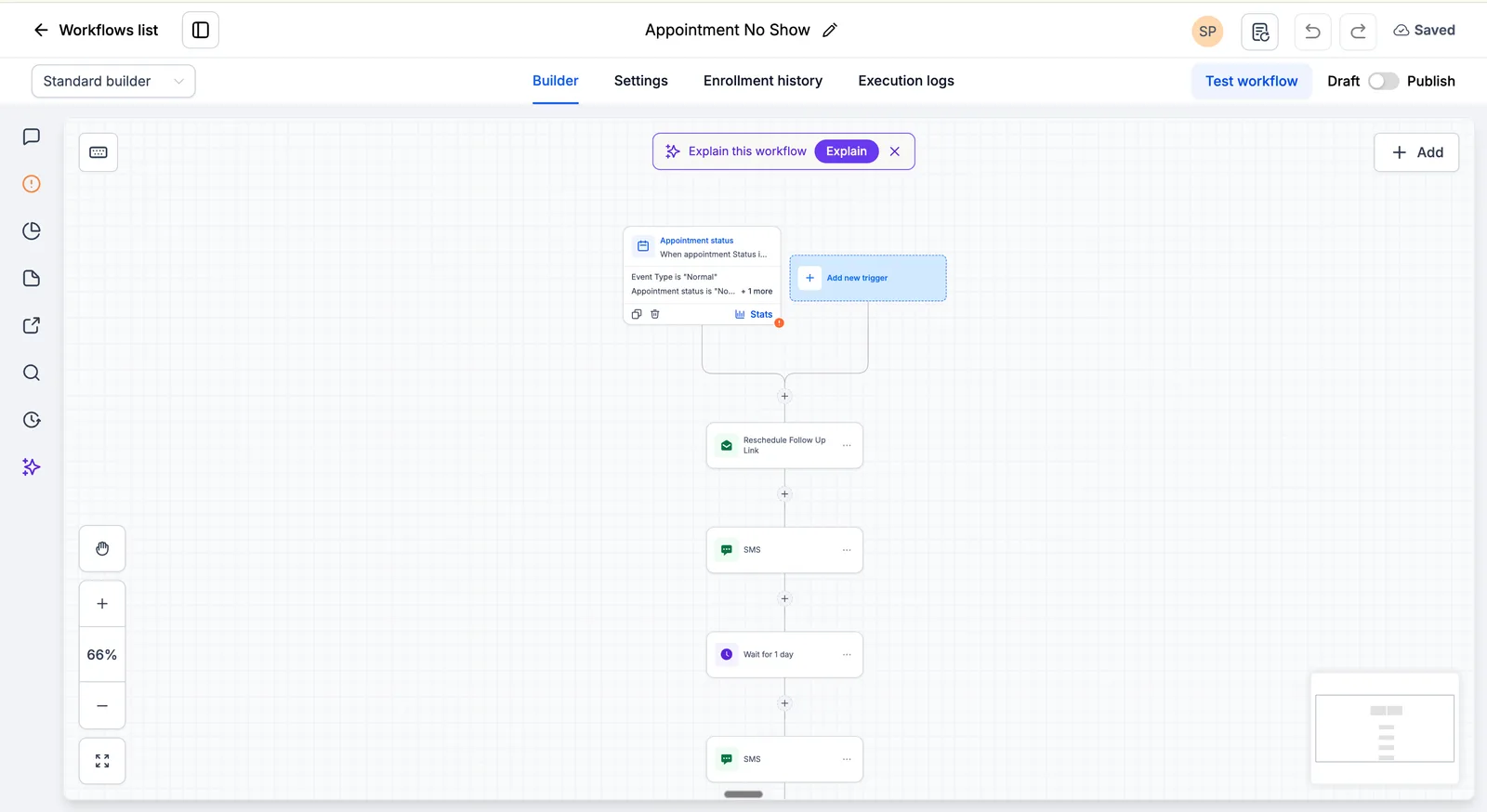
Step 7 of the GoHighLevel implementation process: testing means Execution Logs, not a demo
Every workflow has a Test workflow button and an Execution logs tab. We push test contacts through each trigger and read the log line by line: which step ran, which was skipped, and why. The test log you receive is a list of those runs with a pass or a fix against each scenario.
Understand, design, build, test
Accounts fail when the platform is bought before the requirements are clear, automation is built before the process is mapped, and workflows are published before they are tested. The order above is the fix.
- Understand
- Design
- Build
- Test
- Launch
- Improve
How long each kind of project takes
| Project | Typical time | What takes the time |
|---|---|---|
| One location, one sales process | Three to five weeks | Architecture sign-off, texting registration, testing |
| Migration from another CRM | Six to ten weeks | Field mapping, import validation, a parallel run |
| Multi-location | Six to ten weeks | Routing, roles and a shared snapshot |
What the GoHighLevel implementation process looks like week by week
For one location with one sales process, the ten steps fall into roughly five weeks. Migrations and multi-location builds stretch the middle weeks; the order stays the same.
| Week | What happens | What you approve |
|---|---|---|
| Week 1 | Discovery call, audit of any existing account, A2P 10DLC brand registration submitted on day one because carrier approval takes the longest | Discovery notes, scope outline |
| Week 2 | Architecture written: pipelines, fields, calendars, routing, the workflow list with triggers and exits, the dashboard questions | The architecture document |
| Week 3 | Structure built: fields, pipelines, calendars, forms, phone and email set up, sending domain authenticated; integrations connected | Nothing yet; you can watch the change log |
| Week 4 | Workflows built one job each; message copy reviewed with you; test contacts pushed through every path with Execution Logs open | Message wording, then the test log |
| Week 5 | Launch in stages, lowest risk first; recorded training per role; the account map handed over; 30-day review booked | Launch checklist |
Three things that go wrong when the order is skipped
Texting registered last. A2P 10DLC approval is the slowest step in any US build and it depends on paperwork, not on us. When it is started in week four, the whole system is finished and nobody can send a text. We submit it in week one, with the legal name copied from the IRS letter so it is not rejected for a mismatch.
Workflows before pipelines. A workflow exits when the opportunity reaches a certain stage. If the stages are renamed or merged after the workflows exist, the exits silently stop matching and customers who already booked keep getting follow-up texts. Approving the pipeline on paper first costs an hour and avoids that.
Migration without a parallel run. Switching the old CRM off the day the import finishes means the first missed field or broken automation is found by a customer. We run both for a short period, compare, then switch off.
What you need to give us
- Access to the GoHighLevel account, or to the CRM you are leaving, with permission to read workflow logs.
- One person who can approve the architecture document and the message wording without a committee.
- The IRS letter (CP-575 or 147C) and the business website, for the A2P 10DLC registration.
- Your Google Business Profile login if calls and reviews are part of the build.
- The people who will use the system, for the recorded training in the last week.
Platform facts on this page are checked against the HighLevel help center.
The process in numbers
- 1Discovery
- 2Audit
- 3Architecture
- 4Build
- 5Automation
- 6Integration
- 7Testing
- 8Launch
- 9Training
- 10Optimization
Source: the rollout plan described in this guide
Source: our process page
About the process
Do small projects go through all ten steps?
They go faster, but none is skipped. A troubleshooting job still starts with an audit and ends with a test log and documentation, because that is what stops a fix creating the next problem.
What do we need to provide?
Access to the account or the current CRM, one person who can approve the architecture document, your preferences for message wording, and the people who will use the system, for training.
How long does the whole process take?
Three to five weeks for one location with one sales process; six to ten for migrations or multi-location builds. Architecture and testing take the most calendar time, deliberately.
What happens if something breaks after launch?
Launch includes a support window. After that, a monthly support plan covers troubleshooting, changes and optimization. In both cases the account map says what each workflow does.
Who approves the architecture document?
You do, or someone you nominate. Nothing is built until it is approved, because changing a pipeline after workflows exist is more expensive than changing a document.
Can we pause between stages?
Yes, each stage ends with a deliverable you review, so you can pause, adjust scope or stop. Payment is staged to match.
Step one is a 30-minute call.
You leave it with discovery notes and a scope outline, whether or not you continue with us.
Free 30-minute call with a free account audit. Every price is a custom quote in writing. No obligation.