
Last Updated: October 2026 | Reading Time: 11 minutes
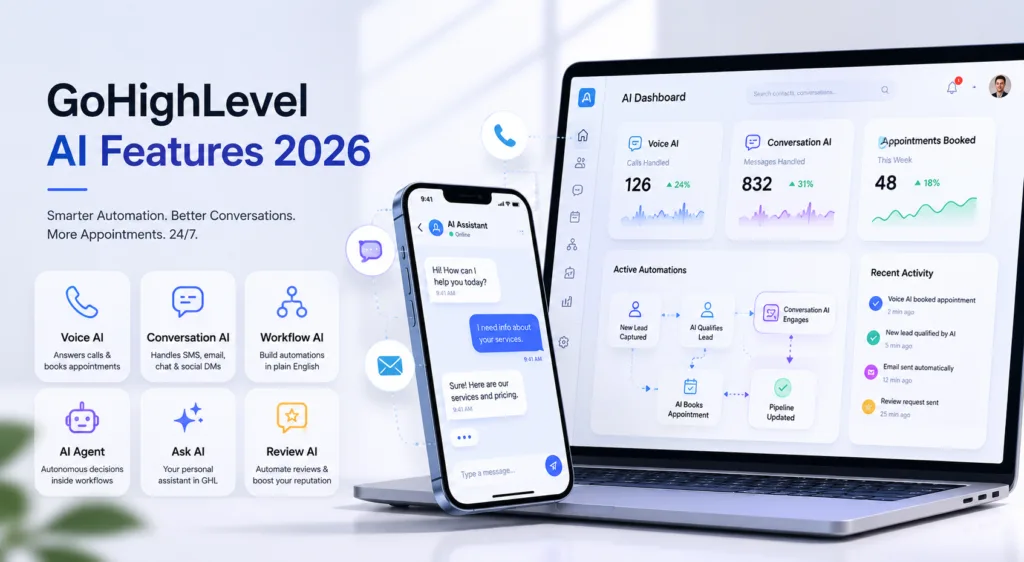
GoHighLevel has shipped a long list of AI features across 2025-2026 (its AI tools help article lists 14 AI products), and most users have no idea what half of them do. Voice AI that answers calls and books appointments. Conversation AI that handles SMS, email, Facebook, and Instagram replies automatically. Workflow AI that generates entire automations from a single sentence. An AI Agent that makes autonomous decisions inside your workflows. This guide covers every single one.
At HighLevel Automation Team, we design, build, and implement GoHighLevel automation systems for businesses across every industry. We’ve seen the AI features transform how companies handle leads, follow-ups, and customer communication, but only when they’re set up correctly. This guide shows you exactly what’s available, how much it costs, and how to use each feature so you actually get results instead of just paying for AI credits that do nothing.
What Is GoHighLevel AI? A Quick Overview
GoHighLevel AI refers to the collection of artificial intelligence tools built directly into the HighLevel platform. Unlike third-party AI tools that require separate subscriptions and integrations, these features are native, they work inside your CRM, workflows, conversations, and funnels without leaving the platform or connecting through Zapier.
The AI Employee suite includes three core tools: Voice AI (automated phone calls), Conversation AI (automated messaging across SMS, chat, and social), and Review AI (automated review management). Beyond that, GoHighLevel has added Workflow AI Builder, AI Agent actions in workflows, Ask AI with scheduled tasks and blog drafting, AI-powered funnel and website building, and AI content generation for email and social media.
Check each vendor's current AI features and usage costs before comparing. That said, having the features and knowing how to use them are two completely different things. Let’s break down every tool.
Source: HighLevel pricing page, checked October 18, 2026
1. GoHighLevel Voice AI: Your 24/7 AI Receptionist
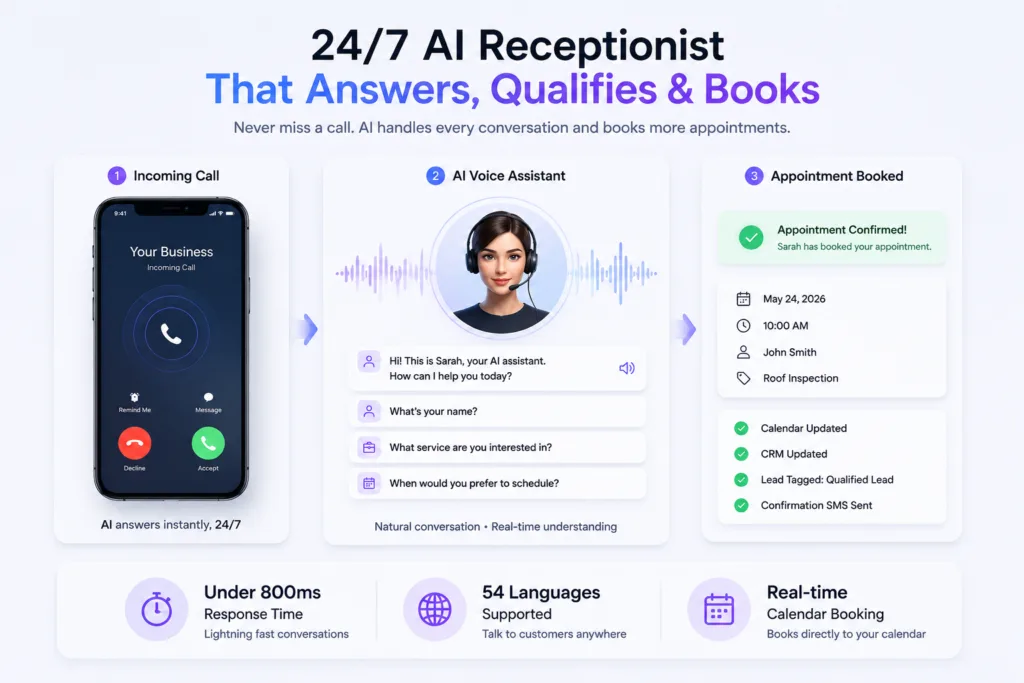
Voice AI is GoHighLevel’s most impressive feature in 2026. It answers inbound calls, qualifies leads through natural conversation, books appointments directly into your calendar, and transfers complex calls to your human team, all without a human ever touching the phone.
How Voice AI Works
When a prospect calls your business number, Voice AI picks up. It introduces itself with a name and persona you configure. It asks qualifying questions based on your business. It checks real-time calendar availability. It books appointments on the spot. If the conversation goes beyond its scope, it transfers to a human agent with full context.
You choose the voice and language for each agent; HighLevel's multi-language article lists 53 languages plus a Multilingual option that covers English and Spanish. Call quality varies with the voice, the prompt and the connection, so run test calls before going live.
What Conversation AI Can Do
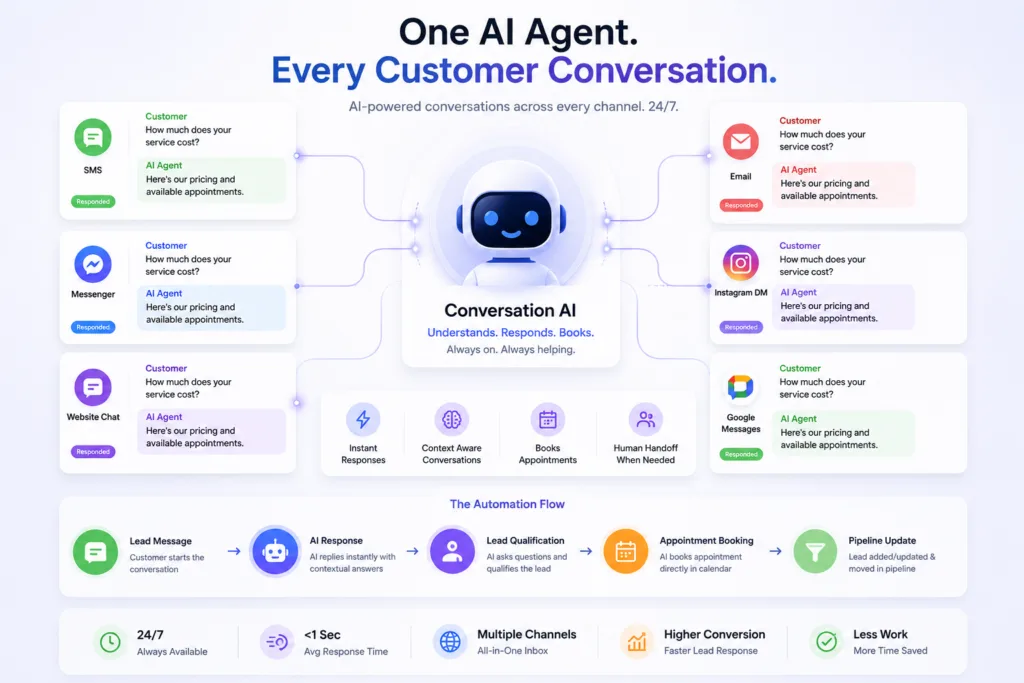
- Answer FAQs about your services, pricing, and availability
- Qualify leads by asking follow-up questions based on your criteria
- Book appointments directly in your GoHighLevel calendar during the conversation
- Hand off to a human agent when the conversation requires it
- Maintain context across multiple replies without repeating questions
- Adjust tone based on prior user inputs for natural flow
- Operate in “Suggestive” mode (recommend responses for humans to approve) or “Auto-Pilot” mode (send automatically)
What’s New in the Workflow AI Builder
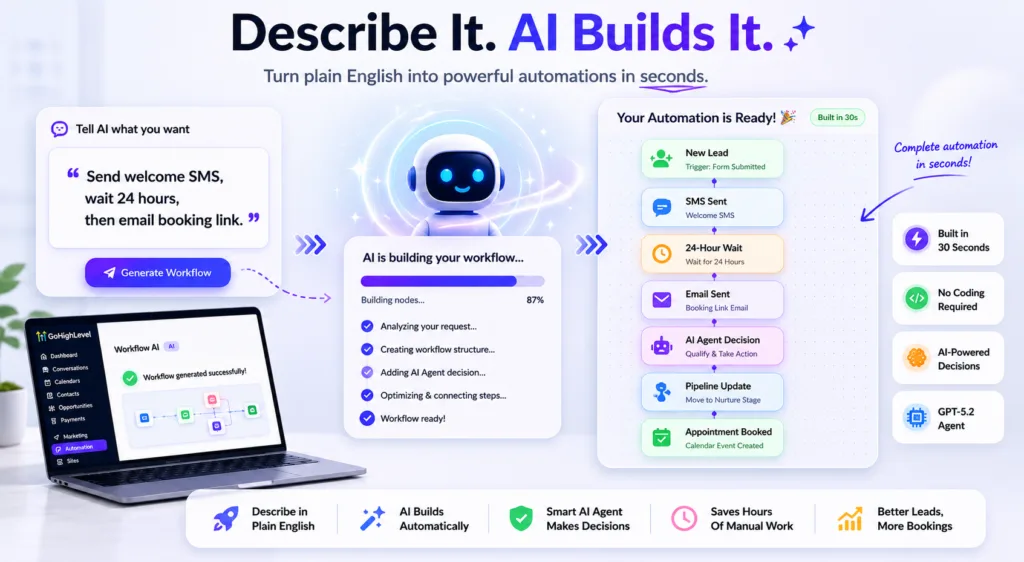
- Live streaming progress cards, watch the workflow build in real time (see HighLevel's AI Builder changelog entry)
- Multi-step changes in one request, “rename, add a 24-hour wait, and turn off re-entry” in one prompt
- Session memory, “make that 48 hours instead” works as a follow-up
- Clarifying Agent, AI asks up to three questions about missing details before building, reducing revisions (see the changelog entry)
- Chat Mode, plan workflows without committing, then build when ready
Workflow AI Builder is free on all plan tiers (fair use), according to HighLevel's AI product pricing article. Premium workflow actions such as Decision Maker, Intent Detection, Summarize Text and Translate are $0.01 per execution.
4. AI Agent: Autonomous Decision-Making in Workflows
The AI Agent action inside workflows takes automation to a completely new level. Unlike standard workflows that follow rigid if/then logic, the AI Agent can reason, plan, and execute multiple actions autonomously, all within a single workflow step.
You give the agent instructions in plain language, provide access to tools (SMS, email, tags, custom fields, calendar, search), and let it decide the sequence and inputs at runtime. A single AI Agent action can replace many manually configured workflow steps.
AI Agent Use Cases
- Lead qualification: Agent reads lead data, checks criteria, decides if qualified, moves to appropriate pipeline, sends personalized SMS, all autonomously
- Pipeline tracking: Agent checks on opportunities weekly, sends context-aware messages based on how long they’ve been in each stage
- Meeting prep: Agent enriches contact data, checks calendar, and sends a pre-meeting brief to the sales rep
- Customer onboarding: Agent creates tasks in ClickUp or Asana, sends welcome sequence, assigns team members, triggered when a deal closes
Each AI Agent execution costs LLM tokens based on the model selected plus any premium tool executions. HighLevel's AI product pricing article lists the per-model token rates and notes that AI Agent actions can reduce execution costs through automatic token optimisations. Check the current rates and which actions are billed before you build.
5. Ask AI: Your Personal GoHighLevel Assistant
Ask AI is GoHighLevel’s built-in AI assistant that helps you complete tasks inside the platform. It answers questions about features, guides you through complex setups, and, can draft blog posts, build course products and run scheduled tasks, according to the Ask AI help article.
What Ask AI Can Do in 2026
- Generate complete SEO-friendly blog post drafts from a prompt (see the blog generation changelog entry)
- Create course products, categories, lessons, quizzes and offers
- Run scheduled tasks, set recurring AI prompts that fire daily or weekly with human approval before execution
- Answer questions about GoHighLevel features, settings, and best practices
- Voice input, using the microphone icon in the Ask AI bar
- Persistent memory, Ask AI remembers preferences and facts you share over time
- Reference URLs and images for blog content context, and multi-language blog drafts (per the blog generation changelog entry)
6. AI Funnel Builder & Website Builder
GoHighLevel’s AI-powered funnel and website builder generates complete pages from a simple text description. Describe your offer, target audience, and desired outcome, the AI assembles layout, copy, sections, and CTA blocks in minutes.
The output is fully editable in the standard drag-and-drop builder. HighLevel's AI product pricing article lists Funnel & Website AI as free, up to 1,000 prompts a day per location.
Need professionally designed landing pages that convert? Our landing page design services go far beyond what AI alone can do, we build conversion-optimized pages with copy psychology, A/B testing, and deep CRM integration.
7. AI Content Generation: Email, Social & Review Management
Email AI Assistant
The email builder now includes an AI assistant that writes subject lines, body copy, and CTAs. HighLevel's changelog also describes Content AI quick actions in the email builder that shorten, simplify or fix your text. Email AI is free (fair use) on every plan.
Social Media AI
The social planner now includes AI generation for posts across Facebook, Instagram, and Google Business Profile. Check in your account which social AI options are available. For comment-to-DM flows on Instagram, Facebook and TikTok, and how they compare with a dedicated tool, see can GoHighLevel replace ManyChat.
Review AI
Part of the AI Employee suite, Review AI automatically requests reviews after appointments, pulls in reviews from the platforms you connect, and drafts replies you can approve or send automatically. On pay-per-use it is $0.01 per sent AI-assisted reply, and it is unlimited (fair use) on the AI Employee Growth and Unlimited plans, according to the AI product pricing article.
GoHighLevel AI Pricing Summary 2026
Prices below are taken from HighLevel's AI product pricing article (page last modified October 13, 2026). Phone System charges apply to calls on every plan, and HighLevel says rates may change, so confirm the in-app prices before you quote them.
| Feature | Pay-per-use | AI Employee Growth ($50/mo per location) | AI Employee Unlimited ($97/mo per location) |
|---|---|---|---|
| Voice AI (inbound, outbound, widget) | Voice Engine $0.045/min plus a text-to-speech rate (for example $0.015/min for OpenAI TTS) plus LLM tokens | 100 minutes a month, then pay-per-use | Unlimited (fair use) |
| Conversation AI | Token cost | 1,000 Agent responses a month | Unlimited (fair use) |
| Reviews AI | $0.01 per sent reply | Unlimited (fair use) | Unlimited (fair use) |
| Content AI | $0.063 per image; $0.0945 per 1,000 words | Unlimited (fair use) | Unlimited (fair use) |
| Workflow AI | Free (fair use); premium actions $0.01 per execution | Same | Same |
| AI Agent (Agent Studio) | Token cost | Token cost | Token cost |
| Ask AI | Token cost | Usage included | 3x usage included |
| Funnel & Website AI | Free (1,000 prompts a day per location) | Free | Free |
May 2026: a large month of GoHighLevel updates
May 2026 brought a long list of releases. Beyond the AI features already covered, these are the significant updates HighLevel published in its changelog that month:
- Company Custom Values Everywhere, Company fields (standard and custom) now available in the custom value picker across emails, workflows, contracts, Conversation AI, and more. This makes the Company object more useful than basic record-keeping.
- Company Smart Lists, Saved Company views with filters, sorting, and export. Think Smart Lists for the Company object.
- AI Agent Knowledge Base Search, AI Agent can now search your knowledge base in real time during workflow execution, fetching only relevant chunks instead of cramming everything into the system prompt.
- AI Agent Update Custom Value, AI Agent can write directly to custom values, replacing complex If/Else trees.
- Ask AI Blog Generation, Full SEO-friendly blog drafts from chat with multi-language support.
- Chat Widget Lazy Loading, “Load on user interaction” toggle delays chat widget loading until a visitor scrolls or clicks, improving page speed.
- Advanced Workflow Builder, Drag-and-drop visual canvas with sticky notes, color coding, keyboard shortcuts, tidy-up auto layout, delinked nodes (multiple workflows on one canvas), and go-to triggers.
- Workflow AI Improvements, Live streaming, session memory, clarifying agent, chat mode, point and edit, faster generation (under 30 seconds).
- Email Domain Send Protection, Automatic stop on inactive/unverified domains with clear error in Conversations.
- New Web Templates, Versatile, professional templates for websites, sales funnels, and email campaigns.
- Ad Template Library, Multi-level ad campaign previews for Meta, Google, and LinkedIn.
- Shopify OAuth App, One-click Shopify integration without API tokens or developer setup.
- Rental Listings in Snapshots, Short-term rental configurations can now be included in snapshots.
- Math Operation for Company and Custom Object workflows.
- Custom Modal Height for embedded forms.
- Gradient Backgrounds for form, survey, and quiz buttons.
HighLevel ships updates every week, so check the changelog for anything newer than this page.
The #1 Problem With GoHighLevel AI: Configuration
Having AI features and getting AI features to work properly are two different things. Most businesses enable Conversation AI with zero training and wonder why it gives generic answers. They turn on Voice AI without configuring qualifying questions and get poorly qualified leads. They use Workflow AI to build automations but don’t test them, and sequences break silently.
The AI features in GoHighLevel are genuinely powerful, but they require proper setup to deliver results. Training data needs to be curated. Voice AI scripts need to match your brand voice. Workflow AI outputs need testing before going live. AI Agent tools need to be scoped correctly so the agent can’t take actions it shouldn’t.
This is where professional implementation makes the difference between AI that saves you 20 hours a week and AI that frustrates your team and confuses your leads.
At HighLevel Automation Team, we implement GoHighLevel AI systems that actually work. Our automation services cover Voice AI configuration with custom scripts and qualifying logic, Conversation AI training with your actual business data, Workflow AI build-out with full testing, and AI Agent setup with proper tool scoping.
Which GoHighLevel AI Features Should You Use First?
Not every business needs every GoHighLevel AI feature, so we would try them in this order, starting with what is quickest to test:
- Conversation AI for lead response, Fast first response matters, and automating the first reply means leads are answered in seconds instead of hours. Start here.
- Workflow AI for automation building, Use plain English prompts to build your first follow-up sequences. It’s free and takes minutes instead of hours.
- Voice AI for after-hours calls, If you are a service business missing calls overnight, this is the quickest to justify; count the missed calls first.
- AI Agent for lead qualification, Once basic workflows are running, add AI Agent actions to replace complex If/Else trees.
- Ask AI scheduled tasks for recurring content, Set up weekly lead summaries, content drafts, and reports that generate automatically.
Sources and further reading
Checked at the time of writing; prices, features and policies change. Checked 2026-10-19.
- HighLevel: AI Product Pricing (help article, modified October 13, 2026) for plan prices, included usage and per-unit rates
- HighLevel: AI Tools in HighLevel (help article) for the list of AI products
- HighLevel: Voice AI multi-language support for supported languages
- HighLevel: Web Call testing for Voice AI (modified June 19, 2026)
- HighLevel: Ask AI assistant (help article, modified October 14, 2026)
- HighLevel changelog for AI Builder, Clarifying Agent and Ask AI blog generation updates
Frequently Asked Questions About GoHighLevel AI
Is GoHighLevel AI free?
Workflow AI Builder is free on all plan tiers (fair use). Conversation AI, Voice AI, and Review AI are available on a usage basis, with included limits on AI Employee Growth ($50/month per enabled location) or unlimited fair-use usage on AI Employee Unlimited ($97/month per enabled location). Ask AI usage is included on both paid AI Employee plans. Funnel & Website AI is free up to 1,000 prompts a day per location. Source: HighLevel AI product pricing.
Does GoHighLevel have AI voice calling?
Yes, Voice AI answers inbound calls, qualifies leads, and books appointments automatically. It supports 53 languages plus a Multilingual option (see the multi-language article). You can test an agent with Web Call without buying, assigning or provisioning a phone number (see the Web Call help article), but Web Call does not validate real phone routing, so test by phone before going live.
Can GoHighLevel AI write blog posts?
Yes, Ask AI can generate complete SEO-friendly blog post drafts from a prompt with title suggestions, structured headings, long-form paragraphs, and multi-language support. You draft in the chat window, edit, and publish without leaving GoHighLevel.
How much does GoHighLevel AI Employee cost?
AI Employee Unlimited is $97/month per enabled location. It includes unlimited (fair use) Voice AI, Conversation AI, Reviews AI and Content AI, plus 3x included Ask AI and AI Studio usage. Phone System charges still apply to calls, and Agent Studio stays pay-per-use. Growth is $50/month with included limits, and pay-per-use has no monthly fee. Source: HighLevel AI product pricing.
Is GoHighLevel AI worth it?
For a business that handles a lot of inbound communication (calls, texts, email, social) the case is easy to test. Count the hours your team spends answering routine messages and the calls you miss after hours, price those against the AI add-on and its usage charges, and run a short pilot on one channel before you roll it out. Results depend on how well the AI is configured and what you let it handle.
Can GoHighLevel AI integrate with my existing tools?
Yes, GoHighLevel connects with other tools via native integrations, Zapier, and custom API connections. Check the integration you need in HighLevel's marketplace before you plan around it.
Do I need technical knowledge to use GoHighLevel AI?
Basic AI features like Conversation AI and Workflow AI are designed to be used by non-technical business owners with proper training and documentation. Advanced features like the AI Agent and custom API integrations benefit from professional setup. Our team handles the technical configuration so you focus on running your business.
Ready to Implement GoHighLevel AI Correctly?
GoHighLevel has built one of the most impressive AI platforms available for small and medium businesses at any price point. But the tools alone don’t deliver results, proper implementation and configuration do.
At HighLevel Automation Team, we’ve been building GoHighLevel systems since before AI was part of the platform. Our CRM automation services now include:
- Voice AI setup with custom personas, qualifying scripts, and calendar integration
- Conversation AI training with your business data, product info, and FAQs
- Workflow AI-generated automation with manual review and optimization
- AI Agent configuration with proper tool scoping and safety rules
- AI-powered funnel building with conversion copywriting
- Integration of all AI features with your existing pipelines and processes
Our 14-person team includes CRM architects, automation engineers, integration specialists, and QA testers. Every AI system we build is tested before launch and includes post-launch monitoring and support.
We work on GoHighLevel only, so we know what works, what doesn’t, and how to set up GoHighLevel AI so it actually produces results instead of just burning AI credits.
Book a Free 30-Minute Strategy CallNot ready to book yet? See our GoHighLevel setup agency service or see how we build automation workflows that combine AI with proven CRM structure.
Related Reading
- GoHighLevel Pipeline Mistakes That Are Killing Your Sales
- what a GoHighLevel expert does and how to hire one
- GoHighLevel Setup for Agencies: Complete Step-by-Step Guide (2026)
- How We Structure GoHighLevel for 50,000-ft Business Operations
- GoHighLevel case study library
,
Features, limits and prices change often; confirm on HighLevel's pages before you budget.