GoHighLevel for Optometrists: Patient Recall, No-Show Recovery & Practice Automation
By Yash Patel — Founder, HighLevel Automation Team
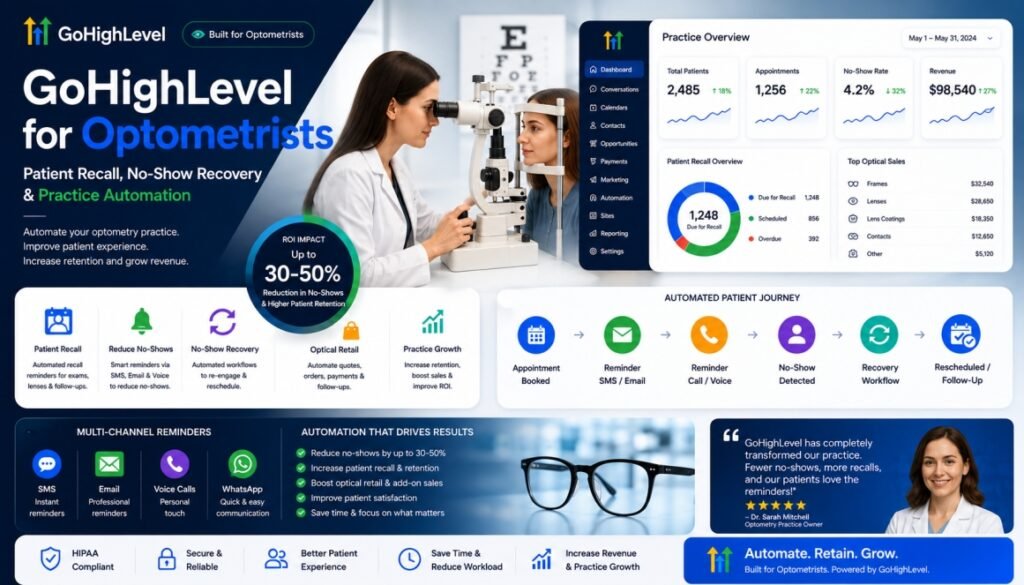
GoHighLevel for optometrists is a CRM and marketing-automation layer that helps eye-care practices manage patient inquiries, appointment reminders, recall, no-show recovery, reactivation, reviews, and selected optical follow-up — alongside, not instead of, the practice’s optometry EHR. This guide covers when the combination works, what it costs, and how to build it.
Yes — GoHighLevel (GHL) is a strong fit for optometry when you use it as the recall-and-retention engine alongside your optometry EHR, not as a replacement for it. It automates the patient-communication, recall, and optical-retail layer of an eye care practice: annual-exam recall, appointment reminders, no-show recovery, contact lens reorder prompts, review requests, missed-call recovery, and benefits-expiration outreach. Whether it produces positive ROI depends on your patient base, baseline recall rate, appointment volume, and implementation quality.
Last updated: August 2026. Research reviewed: peer-reviewed studies indexed in PubMed, systematic reviews on appointment reminders, The Vision Council market data, GoHighLevel official documentation, and HHS guidance at the time of writing. All pricing, plan eligibility, and BAA statements are “at the time of writing” and subject to change. This is an operational guide, not legal or medical advice — confirm compliance obligations with a healthcare attorney before routing PHI through any platform.
This guide is the recall-focused playbook most optometry “GHL for optometry” articles skip. It covers the patient-recall math, the no-show economics, the contact-lens reorder and benefits-expiration layer, the exact optometry practice automation workflows to build, how to stay HIPAA-eligible, what it actually costs, and the pipeline an eye care practice should run — based on systems we have configured for optometrists and healthcare clinics across North America. If you’re deciding whether to DIY or hand it to an expert, our done-for-you GoHighLevel setup service covers the difference at the end.
What’s in This Guide
- Who GoHighLevel for Optometry is best for (and who it isn’t)
- GoHighLevel for Optometry: feature table
- Patient lifecycle & how GHL fits an optometry practice
- The recall leak: why 25–35% of patients don’t return
- The no-show problem: the math that justifies GHL alone
- The automation decision tree + governance anatomy
- How the automation works: speed-to-lead, no-show recovery & the recall engine
- AI voice for optometry clinics
- GHL vs. RevolutionEHR, OfficeMate, Jelo, Solutionreach & eye care software
- HIPAA-eligible vs. HIPAA-certified & communication compliance
- GHL cost, recall-ROI, implementation levels & the leak calculator
- Implementation: the 7-step path & 8-week roadmap
- The architecture & technical team behind the build
- The KPI dashboard
- When GHL is / isn’t a fit
- Optometry automation glossary
- FAQ
- The ROI flywheel, DIY vs. done-for-you & conclusion
- Research methodology & source notes
Key Takeaways
- Industry analyses commonly report substantial optometry patient attrition between recommended visits, with estimates around 25–35%, and 32% not returning for an annual exam without a recall reminder — treat these as industry benchmarks rather than universal clinical rates (Jelo, 2026; SchedulingKit, 2026). Optometry is a recall-driven specialty: the annual exam cadence — not acute symptoms — is the primary revenue engine.
- SchedulingKit’s industry analysis reports that 61% of overdue patients schedule after an automated recall message and 48% higher return rates for multi-channel (text + email + call) practices, and that only 26% of practices still rely on manual recall (SchedulingKit, 2026) — treat these as industry benchmarks rather than universal optometry rates. The same analysis pegs automated recall at roughly $78,000 in recoverable annual revenue per practice (model, SchedulingKit).
- No-show evidence is peer-reviewed, not vendor marketing: a 2026 systematic review and meta-analysis of 10 RCTs found reminders improved outpatient attendance by ~11% overall (SMS RR 1.14) (Al-Turbag et al., JHMP); at London’s Moorfields Eye Hospital, reminders cut no-shows from 18.1% to 11.2% (cited in MDPI review, 2025).
- GHL is HIPAA-eligible, not HIPAA-certified — you need the $297/month HIPAA add-on plus a signed BAA before PHI flows through it; a workflow that does not handle PHI may not require the HIPAA configuration, but whether a particular message or data flow involves PHI is fact-specific and should be determined by the practice with its compliance counsel. The HIPAA-eligible GoHighLevel distinction is covered in depth below.
- Eye care has an optical retail layer most specialties lack: approximately 45 million U.S. adults wear contact lenses, according to CDC-linked public-health data (CDC, Vision Health Initiative), the U.S. optical industry is worth ~$69.5 billion (The Vision Council, 2026), and vision-plan benefits expiring December 31 are a precise, high-converting recall trigger GHL can automate.
Quick Answers
Five direct answers to the questions this article is really being asked — written so the first sentence is extractable for featured snippets and AI answer engines:
Is GoHighLevel good for optometry? Yes. It is best used as the communication, recall, and retention layer alongside an optometry EHR — not as a replacement for the clinical system.
Can GoHighLevel automate optometry patient recall? Yes. A clinician-defined recall date set at the exam can trigger a multi-step, multi-channel communication workflow with booking-based exit rules.
Does GoHighLevel replace RevolutionEHR or OfficeMate? No. Keep clinical records, refraction, prescriptions, and billing in the optometry EHR; GHL runs the patient-facing communication and optical-retail layer beside it.
Can GoHighLevel recover no-shows? Yes. Appointment-status triggers launch separate no-show recovery and rescheduling workflows, distinct from cancellation handling.
Can GoHighLevel automate contact-lens reorders? Yes, provided the reorder information and consent are in the patient record and the message content stays non-clinical (or routes through the HIPAA-protected configuration).
Who GoHighLevel for Optometry Is Best For
GoHighLevel earns its cost in practices where patient communication, recall, and reactivation are the bottleneck — not the clinical record. It is best for:
- Independent optometry practices (1–3 locations) running on a manual recall process
- Multi-location optometry and optical groups that want per-location pipelines with consolidated reporting
- Optical practices with a retail layer (frames, contact lenses) that want reorder and benefits-expiration automation
- Contact-lens-heavy practices losing refill revenue to online retailers
- Practices with high no-show rates or weak recall follow-through
- Practices already on RevolutionEHR, OfficeMate/ExamWRITER, Eyefinity, Crystal PM, or MaximEyes that want a communication layer beside the EHR
- Practices that want automated patient reactivation for dormant lists
Who GoHighLevel for Optometry Is NOT For
- Practices looking for a clinical EHR — GHL does not store exam notes, refraction, prescriptions, or clinical decision support
- Practices needing prescribing or diagnostic software
- Practices expecting GHL to replace insurance billing or practice management
- Practices that don’t have usable appointment, recall, and contact data to automate in the first place
GoHighLevel for Optometry: Features
A quick capability table before the deep dive — what GHL can and cannot do for an eye care practice:
| Feature | GHL role |
|---|---|
| New patient follow-up (speed-to-lead) | Yes — instant SMS/email reply, booking link |
| Appointment reminders | Yes — multi-touch text + email + call |
| Recall automation | Yes — clinician-defined recall-date ladder |
| No-show recovery | Yes — first-hour text + reschedule link + waitlist backfill |
| Missed-call text-back | Yes — after-hours and busy-desk recovery |
| Review requests | Yes — post-visit Google review automation |
| Contact-lens reorder reminders | Yes — reorder-date field + one-tap order link |
| Benefits-expiration campaigns | Yes — vision-plan benefit naming with Dec 31 trigger |
| AI phone answering | Yes — qualify, book, route; never diagnose |
| Reactivation of dormant patients | Yes — sparse long-term win-back touches |
| Clinical records | No — stays in your optometry EHR |
| Prescriptions | No — stays in your optometry EHR |
| Medical billing | No — stays in your optometry EHR / PM |
| Clinical diagnosis | No — clinical judgment stays with the optometrist |
What GoHighLevel Does NOT Replace
| Capability | Stays in your optometry EHR |
|---|---|
| Clinical documentation | Refraction, exam notes, diagnosis, treatment plan |
| Prescription management | Eyeglass and contact lens prescriptions |
| Medical billing | Insurance claims, EOBs, payments |
| Clinical decision support | Guideline-based care in the EHR/PM workflow |
Think of GHL as the patient-communication and revenue-recovery layer — not the clinical system. It becomes valuable precisely when your EHR already works but the reminder, recall, reorder, and reactivation layer doesn’t.
Patient Lifecycle Architecture: The Map Everything Else Hangs Off
The bottom line: GoHighLevel provides one centralized communication and automation layer across lead capture, booking, recall, reactivation, and selected optical workflows — running beside, not inside, your optometry EHR, which remains the clinical system of record.
Optometry’s revenue engine is different from every acute-care specialty. Patients rarely feel urgency — their vision hasn’t noticeably changed, so the 12-month gap between visits gives them 365 days to forget about your practice. Unlike a medical condition that drives patients back, the annual exam is a scheduled return driven entirely by your recall system. One missed recall can turn into 2–3 years of absence, which is why optometry loses an estimated 20–30% of its patient base to attrition each year.
In short (architecture): GoHighLevel runs five layers for every optometry build — lead capture, booking and reminders, visit day, the post-visit engine, and recall and retention. Every patient flows down the layers; recall and retention loops back into booking, so the system never stops working a single patient record.
The critical insight for optometry: the recall date is set at the exam, by the optometrist, not six months later from a spreadsheet. The recall interval should always come from the optometrist’s documented clinical recommendation. It may be shorter or longer than 12 months depending on the patient’s clinical situation — so when the doctor finalizes the exam, the clinician-defined recall date is written to the patient record in the same workflow. GHL then runs the entire outreach sequence off that date automatically — which is exactly what most manual recall systems fail to do. The automation follows the clinician, not the calendar.
The Recall Leak: Why 25–35% of Patients Don’t Return
Why this matters: industry analyses commonly report substantial optometry patient attrition between recommended visits, with estimates around 25–35%; treat this as an industry benchmark rather than a universal clinical rate. The gap typically comes down to operational gaps — missing recall data, no benefits-expiration trigger, single-channel reminders, and zero follow-up on non-responses. GoHighLevel closes all of them automatically.
Recommended eye-exam frequency varies according to age, risk factors, clinical history, and professional guidance — the AOA publishes exam-frequency guidance for adults (at least every two years for healthy low-risk adults, more frequently for at-risk patients and those 65+). The operational point for automation is simpler: practices should use each patient’s documented clinical recall interval from the optometrist rather than applying a universal 12-month rule — and that per-patient date is exactly what GHL stores and acts on. Yet practices don’t convert even a well-documented recall recommendation into appointments automatically. Jelo (2026) attributes the leak to those four operational gaps.
Sources: SchedulingKit Optometry Industry Statistics, 2026 (61%, 32%, 44% text preference, 26% manual); Intellivizz, 2026 (50–65% vs 30–40% schedule-within-30-days).
The math that makes this urgent for a practice owner: Jelo’s analysis models a 2-doctor practice seeing 30 patients a day at ~7,500 visits per year, with industry-average exam-plus-optical revenue near $280 per visit (AOA practice benchmarks). A 30% no-return rate is over 2,000 missed exams annually — a leak well into six figures. A receptionist can manually recall roughly 60 patients a week, but a 2-doctor practice generates ~145 recall obligations per week. The manual math does not close; automation scales with volume, not headcount.
Implementation lesson from our own builds: the single biggest recall failure we see is not bad software — it’s incomplete recall data. In practices we’ve configured, the recall date field was empty for 20–40% of active patients because the front desk never set it during checkout. Before you spend on any recall platform, audit how often your EHR actually records a recall date. Automation multiplies whatever your data quality is — clean the field first, then turn on the ladder.
The No-Show Problem: The Math That Justifies GHL Alone
What the evidence shows: appointment reminders measurably reduce no-shows — and the evidence is peer-reviewed, not vendor marketing. A 2026 systematic review and meta-analysis of 10 randomized controlled trials (8,236 participants) found appointment reminders improved outpatient attendance by roughly 11% overall (risk ratio 1.11), with SMS reminders at RR 1.14 and telephone reminders at RR 1.11; the authors found no significant publication bias. Eye-care-specific studies show the same pattern — Moorfields Eye Hospital cut no-shows from 18.1% to 11.2%. GoHighLevel automates that reminder sequence at your exact appointment cadence.
| Setting (study) | No-show before | No-show after reminders | Source |
|---|---|---|---|
| Moorfields Eye Hospital, London (eye care) | 18.1% | 11.2% | MDPI Applied Sciences review, 2025 |
| Geneva University Hospitals primary care & HIV clinics | 11.4% | 7.8% | MDPI Applied Sciences review, 2025 |
| Royal Children’s Hospital, Melbourne | 19.5% | 9.8% | MDPI Applied Sciences review, 2025 |
| Outpatient mental health clinic, Poland | 18.55% | 7.01% | MDPI Applied Sciences review, 2025 |
| Penn Medicine high-risk outpatients (text + automated call) | 11.3% | 9.6% | NEJM Catalyst, 2025 |
GHL applies this layered logic to your schedule: booking confirmation, 48-hour/24-hour/2-hour reminders, same-day rebook links, and a no-show recovery workflow that fires the moment an appointment is marked missed. Whether it pays for itself depends on your numbers — for many practices, recovering even a fraction of missed visits covers the software cost. Use your own appointment volume and average visit value to compute the break-even point (worked example below).
Implementation lesson from our own builds: practices that gate no-show recovery behind the front desk lose most of its value. The workflow must be fully automatic at minute zero — the moment the appointment is marked missed, the patient receives a first-hour text with a reschedule link. In the builds we’ve configured, this one change (full automation of the recovery trigger) recovered measurably more visits than any reminder-cadence tweak — because a patient who just missed is reachable for roughly 60–90 minutes, then goes quiet.
The Optical Retail Layer: Contact Lens Reorders & Benefits Expiration
Beyond reminders: beyond recall and reminders, GoHighLevel automates the retail half of optometry — contact lens reorders on a fixed supply cycle and vision-plan benefits expiring December 31 — which most practices leave as manual, last-minute work.
This is where optometry automation diverges from most other healthcare niches — and where the biggest under-automated revenue sits. Eye care is part medical practice, part retail business. The U.S. optical industry was valued at $69.5 billion in 2025 (The Vision Council), approximately 45 million U.S. adults wear contact lenses according to CDC-linked public-health data (CDC, Vision Health Initiative), and the U.S. contact lens market alone is roughly $5.8 billion (Morgan Reed Insights, 2026). Frames, lenses, and contact lens sales ride on the exam appointment — which is why every recalled patient is worth far more than the exam fee.
| Optical revenue stream | How GHL automates it | Why it matters |
|---|---|---|
| Contact lens reorders | Reorder-date field on the patient record; automated SMS/email at refill due date with a one-tap order link; escalation to a call if no response | Contact lens supply runs on a fixed cycle — a precise, high-intent automation trigger that also protects your dispensing margin from online retailers |
| Vision-plan benefits expiration | Benefit-expiration date tracked per patient (typically Dec 31); recall message names the exact benefit the patient will lose | Patients return at measurably higher rates when the message names the actual benefit they’ll forfeit (VSP, EyeMed, Davis, NVA) |
| Frame / lens follow-up | Post-dispensing touchpoint (fit check at 1 week, adjustment reminder at 1 month, anti-reflective/blue-light upsell at 2 years) | Optical sales are higher-margin than exams; the dispensing event is a natural upsell moment most practices never automate |
| FSA / HSA messaging | Seasonal campaign (“use it before you lose it”) targeting patients with expiring flex spending balances | Q4 messaging converts benefits and FSA dollars into Q4 exams — a predictable annual push |
PHI vs non-PHI in the optical layer matters for compliance architecture, not for whether automation runs. A reorder message that says “your contact lenses are due for a refill” with an order link is generic and typically non-PHI. A message that says “your monthly dailies for astigmatism are due” references a prescription and is generally treated as PHI. Design the copy accordingly: keep the standard automated touches non-clinical, and route any message that references a prescription or condition through the HIPAA-add-on-protected configuration. Either way, the workflow can run — the PHI decision determines which GHL configuration carries it, not whether you can automate it.
Combined with the exam-recall engine, this is the layer that turns “a reminder system” into an actual revenue system. Many practices still rely on basic recall functionality or separate communication tools; GHL adds a more flexible multi-channel orchestration layer — a named-benefits, channel-switching sequence that ends in a booked appointment and a dispensed product — then requests the review that feeds your next new-patient flow.
How GoHighLevel Automation Works for an Optometry Practice
In short: GoHighLevel should not be configured as a collection of unrelated campaigns. A properly designed optometry system is a state-based decision tree that follows each patient’s lifecycle — lead acquisition, booking, appointment management, attendance, post-visit engagement, recall, reactivation, and optical follow-up. Every stage has its own trigger, decision rules, exit conditions, and human escalation path. When automation is built this way, one patient can never receive a new-patient SMS, a recall SMS, an appointment reminder, and a reactivation campaign at the same time — because the tree decides which workflow owns the patient at any given moment.
The tree above is the production logic, not a marketing diagram. Every node is a state, every arrow is a transition, and every decision node has an explicit exit — including “stop messaging.” Below it, the tree is broken into the ten branches you actually build as GoHighLevel workflows.
| Branch | Entry state | Decision node | Exit condition | Human escalation |
|---|---|---|---|---|
| 1 · New lead | Lead | Duplicate? Existing patient? | Consent opt-in + welcome sent | Unresponded at 24h |
| 2 · Booking & reminders | Status = booked | Status-checked before each send | Confirmed / rescheduled | Front-desk confirm call on request |
| 3 · Reschedule | Status = rescheduled | Kill old reminder clock? New date set? | New reminder clock on new date | Confirmation sent to patient |
| 4 · Cancellation vs no-show | Status = cancelled / no-show | Cancelled → waitlist; no-show → recovery | Rebooked / rescheduled | No-show at 2h task |
| 5 · Post-visit | Status = attended | Review, referral, recall date, CL, optical | Each sub-sequence completes | Low-rating review follow-up |
| 6 · Recall engine | Recall date = due | Booked at any ladder step? | Booking → recall stops | Human call at +30 |
| 7 · Benefits / CL / optical | Plan anniversary / reorder date | Already in recall ladder? | Order placed / benefits used | Call on order request |
| 8 · Dormant reactivation | 13+ months since visit | Response at any ladder step? | Rebooked / opted out | Human call at 18–24 months |
| 9 · Global control | Any outbound send | Opt-out? Already booked? Human active? | Send + log with priority P0–P5 | Pause on human-active |
| 10 · Human escalation | Fixed failure points | Which escalation point fired | Task created · messaging stops | Front desk takes over |
Branch 1 · The New Lead Decision
Every new lead enters as one state — lead — and the first thing the tree does is normalize it: create or update the contact, dedupe by name/phone/email, and record consent status. If a duplicate is found, the tree merges and suppresses instead of firing a second welcome sequence; this is the single biggest source of “why is this patient getting double texts” tickets in optometry builds. If the contact is an existing patient, the tree routes them to the recall, CL, benefits, and dormant branches — never to the new-patient flow. New patients get the consent opt-in and a welcome SMS/email within five minutes, then the tree moves to the response decision.
Branch 2 · Booking, Confirmation & Reminders
The appointment branch is event-driven: the trigger is appointment status = booked, not a date. Confirmation fires immediately with the practice’s booking link and a one-tap confirm. Reminders run at 48h, 24h, and 2h before the visit — but every reminder first re-checks the current status (the “status-checked reminder” pattern) so a cancelled or rescheduled appointment never receives a reminder. Each reminder carries a confirm/rebook action so the patient can fix their slot without calling the front desk.
Branch 3 · Rescheduled Appointments — Kill the Old Clock, Start a New One
Rescheduling is a first-class event, not a footnote of cancellation. When status = rescheduled, the tree kills the old reminder clock — otherwise a patient who moved to Thursday still gets “your appointment is tomorrow” on the wrong day — updates the appointment data, and starts a fresh reminder clock from the new date (confirmation → 48h/24h/2h). The failure this prevents is subtle and common: GHL’s appointment-status behavior treats a reschedule as a new appointment, so the reminder sequence must be re-triggered from the new date, not continued from the old one.
Branch 4 · Cancellation vs No-Show — Two Different Trees
These are deliberately separate branches. A cancellation frees a slot, so the tree runs the soft-rebook text (“we understand things come up”) and immediately fires the waitlist backfill to sell the freed time. A no-show means the patient still intends to come — the tree runs a first-hour recovery text with a reschedule link and escalates to a front-desk task at 2h; it does not touch the waitlist. Mixing these two is the most common build error, because it poisons the waitlist with patients who do not actually want the slot.
Branch 5 · Completed Visit → The Post-Visit Engine
When status = attended, the tree fires the post-visit engine in sequence: the review request (Google Business Profile focus), the referral ask, the recall-date write-back to the EHR/PM, the contact-lens reorder date, and the optical/eyewear follow-up. Each sub-sequence has its own exit — once a review is submitted the review workflow stops; once a referral reply arrives, the referral workflow stops. No patient receives all five messages at once; they are spaced by event, not by time.
Branch 6 · The Recall Engine
Recall is the highest-value branch and the one most often built wrong. The trigger is the clinician-defined recall date set at the exam — commonly 12 months, but the interval should come from the optometrist’s documented clinical recommendation — and the ladder runs 45d/30d/14d/7d before, on the due date, then +7/+14/+30 after. The critical rule is visible in the diagram above: every recall message must include a booking CTA, and the instant a patient books, the recall ladder stops. After +30, the tree escalates to a human call; if the patient books from that call, the recall branch exits. This one rule — the booking exit — is what separates a recall system that schedules exams from one that merely sends reminders.
Branch 7 · Benefits, Contact Lenses & Optical
Three evergreen campaigns live off the same contact record. The benefits-expiration push runs on the patient’s own plan dates — Q4 “use it or lose it” and named-plan expiry — and drives exams in the fourth quarter. The contact-lens reorder fires when the reorder date is due: refill reminder, order link, call escalation, and it captures the CL margin before online competitors do. The optical/eyewear upsell follows a completed exam with a frame-and-lens offer. All three are time-triggered on the patient’s own dates and share the same suppression rule: a patient inside the recall ladder is never simultaneously in the benefits push.
Branch 8 · Dormant Reactivation
At 13+ months since the last visit, the patient enters the dormant branch: a long ladder at 6/12/18/24 months with value-and-benefits messaging, and a real human call scheduled on the calendar at month 18–24. Reactivation is the only branch where the system books a phone call instead of sending another text — because a 24-month-dormant patient does not respond to a 25th message. Every dormant step still respects opt-out, already-booked, and human-active gates before it sends.
Branch 9 · Global Suppression, Priority & Collision Control
Every branch in the tree checks the same three global gates before sending anything — the gate below wraps every outbound message:
Workflows carry priorities P0–P8 so a collision resolves deterministically: P0 appointment reminders always beat P4 recall, which beats P7 benefits. This gate is why one patient never receives three messages at once — the tree collapses competing branches before anything goes out.
Branch 10 · Human Escalation — Where the Tree Stops
The tree is not an everything-automated system; it is an everything-triggered system that knows when to hand off to a human. Escalation points are fixed: unresponded lead at 24h, no-show at 2h, recall at +30, dormant at 18–24 months, waitlist slot found. At each escalation the workflow stops messaging, creates a front-desk task, and the human takes over. Automation resumes only where the tree says it can — which is exactly the behavior your staff and your compliance posture want from an optometry build.
Workflow Governance: The Anatomy Every Workflow Should Have
A recall or reminder workflow that fires from a dirty trigger will message the wrong patients, message the same patient twice, or — worse — message patients who opted out. Every optometry workflow should contain the same ten components.
In optometry the two guard rails that break most DIY builds are benefits naming (generic “time for your exam” converts worse than “your last exam was January 14 and your VSP benefits reset December 31” — Jelo) and channel sequencing (single-channel SMS- or email-only recall loses 10–15 points versus a 2- or 3-channel sequence).
How the Automation Works: Speed-to-Lead, No-Show Recovery & the Recall Ladder
Speed-to-Lead: The 5-Minute Window
| Response time | Contact probability | What GHL does |
|---|---|---|
| < 5 minutes | Fastest conversion window — instant automated replies beat delayed manual responses | Instant SMS trigger on form submit + missed-call text-back |
| 1 hour | ~7x more likely to qualify a lead than waiting longer — and ~60x more likely than a 24-hour delay (Oldroyd, McElheran & Elkington, HBR 2011) | AI voice callback or human escalation |
| 24+ hours | ~60x less likely to qualify than contacting within an hour (same HBR study) | Sequences should have converted or requalified by now |
Optometry No-Show Recovery: The First Hour After the Missed Visit
GHL’s Appointment Status trigger fires on appointment = no-show and runs this sequence automatically. Note the difference from cancellation: a no-show gets a recovery attempt first (the patient still intends to come), and only after ~2 hours of no response does the freed slot move to waitlist backfill. A cancellation, by contrast, pushes to waitlist immediately — that split is workflow #3 vs #4 above.
The Recall Engine: A Production-Grade Escalation Ladder
This is the flagship optometry workflow and the one most worth building correctly. Recall outreach should follow a named, escalating sequence — not a single postcard or email. In production builds we stage the ladder so each touch has a distinct angle, a different channel, and an escalating human trigger. Timings below reference the clinician-defined recall date; your build should read that date from the patient record (usually via your EHR’s recall field synced through the integration bridge) rather than assuming 12 months for every patient.
| Stage | Timing | Channel | Message logic |
|---|---|---|---|
| 1 | 45 days before recall date | SMS + email | Soft pre-recall “your exam is coming up” with booking link; starts the pipeline without urgency |
| 2 | 30 days before | SMS + email | Names the recall interval and benefits (expiration if within 90 days); direct schedule link |
| 3 | 14 days before | SMS | Dropped delivery times (morning for families, lunch break for offices); same link, different angle |
| 4 | 7 days before | SMS + email | “This month” framing; availability nudges (new-patient slots, evening slots) |
| 5 | Recall due date | SMS + email | “Your exam is due” + benefits expiration named if within 90 days + direct schedule link |
| 6 | +7 days past due | SMS | Different angle (“still wearing prescription X?”) rather than a repeat of touch 5 |
| 7 | +14 days past due | SMS + email | Value framing: expired prescription, contact lens supply status, frame warranty timing |
| 8 | +30 days past due | SMS + email + call (high-value) | Benefits push (Q4 or plan anniversary): names the exact vision-plan benefit expiring Dec 31 |
| 9 | Month 6 overdue | Email + voicemail drop | Sparse, low-frequency reactivation; changed phone number detection before send |
| 10 | Month 12 overdue | Email + postcard | Annual re-engagement; “still on our books” check |
| 11 | Month 18–24 overdue | Email + human call | Human escalation: front-desk call, win-back offer if practice policy allows |
| 12 | Month 24+ | Tag + cleanup | Lapsed status; removed from active recall funnel, moved to suppression/win-back list |
Practice owners can expect a 6–12 point return-rate lift within the first two recall cycles after switching from manual to automated multi-channel recall (Jelo, 2026 — one industry analysis), and recall response rates of 50–65% within 30 days versus 30–40% for manual recall (Intellivizz, 2026). Treat both as planning benchmarks rather than universal rates or guarantees — your results will vary with list hygiene, message compliance, and channel mix. Every point of return rate on a 2,000-patient active list is real exam and optical revenue.
Recall copy and PHI: the safest production pattern is to keep the automated exam-recall messages non-PHI — “your next exam is due” plus a booking link, with a benefits-expiration nudge (“your VSP benefit resets Dec 31”) — and let the patient’s own knowledge of their prescription stay with them. Anything that names a specific condition, prescription, or clinical finding should move to the HIPAA-add-on-protected configuration or to a human call. This is a content-design decision made with your attorney; it determines which GHL configuration carries which workflow, not whether recall automation can run.
Failure Handling: What Happens When Automation Can’t Complete
Optometry workflows must fail loudly, not silently. The exception rate — the % of workflow runs needing human intervention — is the single most important health metric in a GHL build. A recall sequence that silently stops sending is worse than none, because you believe the system is working while patients quietly churn.
The rule for optometry specifically: recall, reminders, reorders, review requests, and benefits pushes are automation. Anything the patient answers with a clinical question, a complaint, or a request to speak to staff escalates to a human immediately — never let an AI hold a clinical conversation.
AI Voice for Optometry Clinics: Inbound, Recall, and Consent
The practical effect: GoHighLevel’s AI voice can answer when the front desk is busy, qualify and book new patients, run recall calls for patients who won’t text, and cover missed calls — with a hard boundary that clinical questions escalate to a human.
GHL’s AI voice layer handles three optometry jobs well: answering when the front desk is busy (new patient qualification and booking), recall calls to high-value or older patients who don’t respond to text, and missed-call recovery. It should never diagnose, discuss prescriptions, or advise on eye health.
This is what converts “I called and no one answered” into “booked while you were with a patient.” Our done-for-you GoHighLevel setup builds the AI voice layer, consent management, and A2P registration together — because the three only work as a system when configured as one.
The AI Escalation Tree: What AI Handles vs. What Must Reach a Human
The boundary is the whole point of an AI voice layer in healthcare. The AI routes, books, reminds, and follows up — it does not diagnose or advise. Every conversation first answers one question: is this scheduling/admin, or is this clinical?
The Optometry Pipeline in GoHighLevel
GHL is the marketing and retention layer; your EHR (RevolutionEHR, OfficeMate/ExamWRITER, Eyefinity, Crystal PM, MaximEyes) remains the clinical and billing source of truth. The pipeline below is what a GHL optometry account should run:
| Stage | Entry | Automation firing | Exit |
|---|---|---|---|
| New Lead | Form, call, walk-in | Instant reply, qualification, booking link | Appointment scheduled |
| Unqualified / Not Ready | No booking after lead sequence | Nurture sequence (value content, benefits education), requalify | Booked, or lapsed to suppression after N touches |
| Scheduled | Booking confirmed | Confirmation + reminder sequence | Attended, or no-show/cancel branch |
| No-Show | Appointment marked no-show | First-hour recovery text + reschedule link | Rescheduled, or → waitlist backfill after 2h no response |
| Canceled | Appointment marked canceled | Soft rebook attempt + immediate waitlist backfill of freed slot | Rebooked, or returns to recall queue |
| Active Patient | Exam completed | Review request, optical follow-up, recall date set | Recall date due (clinician-defined interval) |
| Recall Due | Recall date passed | Recall ladder (12 stages), benefits push, waitlist | Rebooked |
| Dormant | 13+ months no visit | Reactivation ladder, human call at month 18–24 | Rebooked or archived |
| Archived / Suppressed | Opt-out, DNC, month 24+ no response | Removed from active funnels; win-back only via permission | Terminal state |
Workflow priority prevents collisions: if a patient is due for both a CL reorder and an exam recall in the same week, the recall sequence wins and the reorder message is suppressed — one event, one channel owner. In production builds we apply an explicit collision matrix so every workflow pair has a documented winner, rather than letting the two automations race each other. The general rule: an appointment outcome (attend/cancel/no-show) always outranks a marketing/retention nudge; within retention, recall outranks reorder; and no two workflows message within 24 hours of each other.
| Collision | Winner | Loser behavior | Why |
|---|---|---|---|
| CL reorder vs. exam recall (same week) | Exam recall | Reorder deferred 14 days / merged into recall message | Recall drives the exam, and the reorder rides the visit; two messages in one week burn consent |
| Recall due vs. benefits push | Recall ladder (stage 5/8 folds in benefits copy) | Standalone benefits campaign suppressed for that contact | Named-benefit messaging is a recall tool, not a separate campaign |
| No-show recovery vs. reminder | No-show recovery | All reminder workflows stop on status change | Exit conditions must fire on the status transition or the patient gets a “reminder” after missing |
| Review request vs. recall due | Review request (within 48h of visit) | Recall waits until review cycle completes | Post-visit reviews are time-sensitive; recall can wait days |
| Opt-out / DNC fires mid-sequence | Suppression always | All active workflows terminate for that contact | Compliance over revenue, always |
The Global Automation Control Layer
The guardrail principle: every outbound optometry workflow — recall, reminder, reorder, benefits, reactivation — must pass the same control gate before a message sends. This is the layer that separates a professional GHL build from “a bunch of workflows”: one registry of what a patient is eligible for, one priority engine that picks the single owner, and one set of exit conditions that stop a workflow the moment its goal is met.
Every outbound automation event checks, in order:
- Opted out / DNC? Yes → stop and log. Compliance wins over revenue, always.
- Human actively handling this patient? Yes → suppress all automation for that contact until the human closes the thread.
- Valid data? Phone, email, consent, and the trigger field (recall date / reorder date / benefits date) present and correct? No → create a data task, never send on guesses.
- Higher-priority workflow already active? Yes → this workflow waits or merges (the priority table below decides the winner).
- Does the message contain PHI? Yes → it only sends through the HIPAA-add-on-protected configuration (or a human call).
- Consent sufficient for this message type? Marketing/promotional requires documented consent; appointment-related transactional messages follow their own rules.
- Send → log → wait for outcome. Booked, replied, or error → execute the matching exit path.
Workflow Priority: One Owner per Patient, P0–P5
When a patient is simultaneously overdue for recall, has benefits expiring, has a contact-lens reorder due, and just booked an appointment, exactly one workflow messages them. The priority engine — not the send timestamps — decides which. We deliberately keep it to six tiers instead of nine:
| Priority | Tier | Wins over | Example |
|---|---|---|---|
| P0 | Compliance / Stop | Everything | Opt-out, DNC, PHI violation, human takeover — terminates all active workflows for that contact |
| P1 | Appointment | P2–P5 | Booked, confirmed, rescheduled, cancelled, no-show — the appointment outcome owns the patient |
| P2 | New lead | P3–P5 | New inquiry, missed call, booking-in-progress — speed-to-lead matters most for a fresh lead |
| P3 | Recall | P4–P5 | Recall due, overdue — the exam-recall ladder is the practice’s core revenue engine |
| P4 | Revenue / Optical | P5 | Contact-lens reorder, benefits expiration, frame follow-up — rides the visit when possible |
| P5 | Reactivation / Nurture | — | Dormant-patient win-back, generic nurture — lowest priority, waits for a free message slot |
What “wins” means in practice: the loser is not deleted — it is deferred or folded into the winner’s message. A benefits push folds into the recall ladder’s stage-5 copy. A contact-lens reorder waits until the recall sequence exits. No two workflows message the same patient within 24 hours of each other, unless one of them is a P0 compliance event. That rule alone stops the “three texts in one week” problem patients complain about.
Exit Conditions Are Non-Negotiable
Every workflow ships with a documented exit condition. If a workflow has no exit, it does not launch:
| Outcome | Exit action |
|---|---|
| Booked | Exit lead / recall / reactivation immediately |
| Cancelled | Exit the reminder tree; enter the rebook + waitlist-backfill branch |
| Rescheduled | Kill the old reminder clock; create a new one on the new appointment date |
| No-show | Exit normal reminders; enter the first-hour recovery branch |
| Patient replied | Pause automation; hand the thread to a human |
| Human active | Suppress all automation for that contact |
| Opted out / DNC | Global suppression across every workflow and channel |
| Invalid data | Data-cleaning task; no message sent |
| Completed | Log and close |
| Error | Alert, retry once, then a human task — failed automation must never fail silently |
The Optometry Automation Data Model
The data reality: automation reliability is data reliability. The minimum patient data model below is what every workflow reads — if a field is missing, the workflow that depends on it cannot run.
You can build beautiful workflows, but they only work when the fields they read are populated and current. These are the minimum fields every optometry GHL build needs before the first workflow ships:
| Field | Purpose | Workflow that reads it |
|---|---|---|
| Patient ID | EHR ↔ GHL record matching | All syncs via Zapier/Make |
| First name | Message personalization | Every outbound message |
| Phone / Email | Channel delivery | SMS + email workflows |
| Consent status | Messaging gate | Global control layer |
| Opt-out / DNC status | Compliance suppression | Global control layer |
| Human-owner status | Suppress automation while staff is active | Global control layer |
| Appointment status | Booked/confirmed/rescheduled/cancelled/no-show | Reminder, no-show, cancellation, reschedule workflows |
| Appointment date / time | Reminder timing | Reminder engine |
| Clinician recall date | Recall trigger | Recall ladder |
| Last visit date | Dormancy calculation | Reactivation workflow |
| Benefits expiration date | Vision-plan reset (typically Dec 31) | Benefits-expiration workflow |
| Contact-lens reorder date | Refill cycle | CL reorder workflow |
| Location | Multi-location routing | Location-specific reminders, staffing |
| Preferred channel | Channel sequencing | Recall and reminder ladders |
| Source | Attribution | Reporting / ROI |
If the data isn’t reliable, the automation isn’t reliable. This is why the very first step of every implementation is a data audit — not a workflow build. We populate and validate these fields before the first workflow ships, because every one of the workflows in this guide reads at least two of them.
GoHighLevel vs. RevolutionEHR, OfficeMate, Jelo, Solutionreach & Eye Care Software
The bottom line: GoHighLevel is not a replacement for your optometry EHR — it replaces and consolidates the patient-communication stack (reminders, recall, reorders, reviews, campaigns) that most practices run as 2–4 disconnected tools, and bridges to the EHR via Zapier or Make. The honest comparison:
| Tool | What it is | Gap GHL fills / how they coexist |
|---|---|---|
| RevolutionEHR | Cloud optometry EHR + PM | Clinical records, refraction, billing stay here. GHL runs the communication/recall layer; sync via Zapier/Make (no native first-party integration identified at the time of writing) |
| OfficeMate / ExamWRITER (Eyefinity) | Server-based PM + EHR | Clinical + practice management source of truth; GHL adds SMS recall, reorders, reviews, funnels |
| Eyefinity Encompass | Cloud EHR (VSP ecosystem) | Same split: clinical in EHR, engagement in GHL |
| Jelo | Optometry recall/comms app | Recall specialist — but recall-only. GHL adds funnels, reviews, AI voice, e-commerce, and full CRM at comparable cost |
| Solutionreach | Patient engagement/reminders platform | Reminder specialist with optometry integrations; GHL consolidates reminders + recall + CRM + funnels + AI in one platform |
| NexHealth / Weave / Tebra | Patient communication + scheduling platforms | Competitive comms layers; GHL’s edge is the all-in-one price and the funnel/CRM/AI stack on top |
| GoHighLevel | CRM + SMS/email automation + booking + reviews + AI voice + funnels | Consolidates the engagement stack; NOT an EHR — clinical data stays out of it |
Integration note: at the time of writing we did not identify a native first-party GHL integration with the eye care EHRs reviewed for this article — plan on Zapier or Make as the bridge (contact and appointment sync), and keep the EHR as the clinical source of truth. EHR vendors do publish their own integrations with comms platforms, but those platforms don’t give you GHL’s funnel/CRM/AI stack.
GoHighLevel vs. Your Optometry EHR: The Capability Split
The single most useful way to see the split is column by column. Clinical records, prescriptions, and billing live in the EHR; patient communication, recall, marketing, and retail follow-up live in GHL:
| Capability | GoHighLevel | Optometry EHR (RevolutionEHR / OfficeMate / Eyefinity) |
|---|---|---|
| Clinical records, refraction | No | Yes — source of truth |
| Prescription management | No | Yes |
| Insurance billing | No | Yes |
| Recall communication | Yes — automated ladder | Basic letters/portals only |
| Appointment reminders (SMS/email) | Yes — multi-channel | Limited/third-party |
| Marketing automation & funnels | Yes — strong | No |
| CRM & lead capture | Yes | Limited |
| Contact-lens reorder automation | Yes | Reorder reminders via portal only |
| AI voice | Yes | No |
| Review & referral requests | Yes | No |
GoHighLevel vs. Specialized Patient Communication Platforms
Most optometry practices already pay for a patient-communication tool (Solutionreach, Jelo, NexHealth, Weave, Tebra) in addition to their EHR. The honest column-by-column comparison — verify each vendor’s current feature set at the time of writing, as these platforms change frequently:
| Capability | GoHighLevel | Specialized patient communication platform (Solutionreach / Jelo / NexHealth / Weave / Tebra) | Optometry EHR (RevolutionEHR / OfficeMate / Eyefinity) |
|---|---|---|---|
| Clinical records | No | No | Yes — source of truth |
| Recall communication | Yes — automated ladder with booking exit | Yes — recall is their core specialty | Basic letters/portals only |
| Appointment reminders (SMS/email) | Yes — multi-channel | Yes | Limited/third-party |
| Marketing automation & funnels | Yes — full funnels, campaigns, landing pages | Basic campaigns only | No |
| AI voice | Yes — inbound, recall, consent | Emerging, varies by vendor | No |
| Optical retail workflows (CL reorders, benefits expiration) | Yes — custom fields + workflows | Partial (recall-focused) or via add-ons | Reorder reminders via portal only |
| CRM & lead capture | Yes — full CRM with pipelines | Limited | Limited |
| Custom workflow logic | Yes — visual builder, conditions, waits | Limited to preset templates | No |
What this means in practice: if you already pay a comms platform, GHL replaces that line item while adding the funnel, CRM, AI voice, and retail-retention layers the comms platforms don’t have. If you only need reminders, the comms specialist may be cheaper — GHL’s all-in-one pricing only pays off once you use more than one or two of its layers. Re-validate each vendor’s current feature set and pricing at the time of writing.
Source of Truth Architecture
The rule that keeps the whole system reliable in healthcare: the EHR is the clinical source of truth; GHL is the communication source. Neither replaces the other — they exchange patient and appointment data, and each owns the domain the other shouldn’t touch:
Why this matters for optometry: clinical records, refraction, and prescriptions are created in the EHR and never re-entered into GHL. GHL reads what it needs (names, phones, appointment status, recall date) through the integration layer and writes engagement outcomes (booked, attended, rebooked) back. This keeps one authoritative copy of every clinical fact — and it is also the pattern that keeps PHI handling defensible.
The Optometry Automation Health Score
Here is the framework we use to score an existing optometry automation system before we touch it — 0–100, weighted toward the things that silently break. It doubles as a pre-launch checklist: if any line scores low, the system is not ready to run:
| Category | Weight | What it checks |
|---|---|---|
| Data quality | 20 | Recall dates, reorder dates, consent, phones, and opt-outs populated and current |
| Trigger reliability | 15 | Every workflow fires on a real trigger (appointment status, date, form), not a guess |
| Suppression / collision controls | 15 | Priority table exists, one owner per patient, no double-sends, 24h spacing |
| Consent / compliance | 15 | A2P registration, documented consent, opt-out handling, HIPAA add-on decision made |
| Recall performance | 15 | Return-on-time vs. baseline, booking-exit working, benefits fold-in firing |
| No-show recovery | 10 | First-hour recovery active, reschedule links live, waitlist backfill correct |
| Reporting / attribution | 10 | KPI dashboard live, exception rate watched, source attribution tracked |
How to use it: score each category 0–100, multiply by the weight, sum to a 0–100 total. A score under 70 means the system is losing revenue to silent failures; 70–85 is functional but has known gaps; 85+ is running the way a production optometry build should. This is our proprietary framework — built from the same implementation experience referenced throughout this guide — and it is the first thing we produce in an audit.
Want to know what your practice is actually losing before deciding whether automation is worth it? Use the recall-leak calculator above — the numbers it produces are the dollar target any build, DIY or done-for-you, should be held against.
What We Learned Building Optometry Automation Systems
Beyond the published research, four patterns show up repeatedly in the optometry systems we have built and run for practices:
- Recall data quality is the whole game. The automation is only as good as the recall dates, benefit-expiration dates, and reorder dates in the patient record. In nearly every build, the first month is spent cleaning those fields — do not expect the workflow to fix bad data. Budget the cleanup into the project.
- Benefits naming is the highest-leverage copy change. The same recall sequence with a generic “time for your exam” converts measurably worse than one that names the benefit and expiration. If you only A/B test one thing, test the benefits line.
- The no-show problem is a data-trigger problem, not a messaging problem. Practices that struggle with no-show recovery usually aren’t marking appointments no-show consistently in the PM — the workflow fires off a status it never receives. Confirm the PM’s status flags feed GHL before tuning message copy.
- Collision and suppression rules decide whether patients trust the system. The builds that generate complaints are the ones that message the same patient twice or ignore an opt-out. An extra 30 minutes spent on priority rules at build time saves the support tickets later.
HIPAA-Eligible vs. HIPAA-Certified: What Optometry Practices Actually Need
The HIPAA summary: GoHighLevel is HIPAA-eligible, not HIPAA-certified. If PHI flows through a workflow, enable the $297/month HIPAA add-on and sign a BAA in-platform; a workflow that does not handle PHI may not require the HIPAA configuration, but whether a particular message or data flow involves PHI is fact-specific and should be determined by the practice with its compliance counsel.
Optometry practices handle PHI: names tied to prescriptions, diagnoses (glaucoma, diabetic retinopathy, dry eye), exam details, and insurance data. The compliance question is whether that PHI flows through GHL.
GoHighLevel is HIPAA-eligible, not HIPAA-certified — no software is “HIPAA certified.” Out of the box, GHL is not configured for PHI. To route PHI through it you enable the $297/month HIPAA add-on (applied account-wide, at the time of writing) and sign a BAA directly in-platform (no support ticket) — HighLevel’s official HIPAA compliance documentation covers the sign-up, automatic activation, and BAA handling. The HIPAA add-on also includes compliance tools like consent management and data-processing terms that your practice’s BAA obligations may require.
Many optometry practices run GHL for workflows that are typically non-PHI — new-patient inquiry follow-up, review requests, general recall messages without clinical content, CL reorder reminders without clinical content. A workflow that does not handle PHI may not require the HIPAA configuration. But whether a given message carries PHI depends on its content: a message that references a diagnosis, a prescription, a treatment, or a condition is generally treated as PHI, in which case the add-on + BAA are the defensible configuration. The borderline cases are decided by your practice and a healthcare attorney, not by a blanket rule — the pattern to follow is keep clinical content out of marketing messages, and route PHI-aware messages through the protected configuration.
This is not legal advice — have your healthcare attorney confirm which of your optometry workflows carry PHI. The penalty figures shown in the decision tree follow the HHS Office for Civil Rights HIPAA enforcement framework; the inflation-adjusted tiers and calendar-year caps are published by HHS (HHS OCR — HIPAA privacy rule penalties) and should be checked at the time of writing. For the baseline decision framework most practices use, and the compliance architecture we build on every healthcare account, our HIPAA-compliant healthcare automation case study walks through a live implementation.
What GoHighLevel Actually Costs an Optometry Practice
The cost summary: at the time of writing GHL runs $97–$497/month (Starter, Unlimited, Agency Pro) plus usage-based SMS/email, and the HIPAA add-on is $297/month if you route PHI — a total HIPAA stack of $394–$794/month. Done-for-you setup typically lands in a $300–$3,000 one-time range.
| Plan | Price (at time of writing) | Typical optometry fit |
|---|---|---|
| Starter | $97/month | Single-location practice; recall + reminders + reviews |
| Unlimited | $297/month | Multi-location practices, higher SMS volume, additional sub-accounts |
| Agency Pro | $497/month | Optometry groups / franchises / agencies managing multiple locations |
| HIPAA add-on | $297/month (adds to ANY base plan) | Required before routing PHI; BAA signed in-platform |
| SMS/email usage | Usage-based (varies with volume) | Recall + reminder volume drives this; most single practices land in a predictable monthly band |
| Done-for-you setup | $300–$3,000 one-time (range we have seen in our own healthcare builds, not a market study) | Scope-dependent: recall ladder + reminders + reviews is the low end; full + AI voice + integration is the high end |
Total HIPAA cost at the time of writing: $394/month (Starter + add-on), $594/month (Unlimited + add-on), or $794/month (Agency Pro + add-on). These are the GoHighLevel published prices (base plans + HIPAA add-on) as of August 2026, subject to change.
GoHighLevel for Optometry Pricing: Implementation Levels
Setup cost is scoped by how much of the automation you want live on day one. We typically price optometry implementations in three levels (one-time, range we have seen in our own healthcare builds, not a market study):
| Level | One-time setup (approx.) | What’s included |
|---|---|---|
| Basic | $300–$600 | Recall ladder + appointment reminders + review requests; single location; standard templates |
| Growth | $900–$1,500 | Everything in Basic, plus no-show recovery, cancellation + waitlist backfill, contact-lens reorder automation, benefits-expiration campaigns, and Zapier/Make sync to your EHR |
| Advanced | $2,000–$3,000 | Everything in Growth, plus AI voice agent (after-hours + missed-call recovery), multi-location sub-account architecture, custom data model and reporting, staff training, and a 30-day go-live support window |
Monthly subscription is separate from setup: $97–$497/month for the platform plus usage-based SMS/email, and the $297/month HIPAA add-on only if you route PHI. A Basic build on a Starter plan (no HIPAA add-on) lands at roughly $400/month all-in; an Advanced build on Unlimited with the HIPAA add-on lands near $900/month all-in before SMS/email usage. Re-validate these figures at the time of your purchase — GoHighLevel updates pricing periodically.
Run Your Own Recall ROI: A Worked Example
Use this model with your own numbers — it’s arithmetic on sourced inputs, not a guarantee. Illustrative planning model, not a forecast: the outputs below are what the recovery looks like under stated assumptions, not what your practice will actually realize.
| Line | Input | Example value (2-doctor practice) |
|---|---|---|
| Active patient list | Patients seen in last 24 months | 2,000 |
| Current return-on-time | Baseline recall rate | 60% (below the 70–80% good-practice band, Jelo) |
| Return rate after automation | Expected lift from multi-channel + benefits messaging | 72% (+12 points) |
| Recovered exams per year | 2,000 × 12% | 240 |
| Revenue per visit | Exam + optical/CL dispensing (commonly used benchmark) | $280 |
| Incremental annual revenue (model) | 240 × $280 | ~$67,200/year |
| Annual GHL cost (Starter + usage) | $97 × 12 + SMS/email | ~$1,500–$2,500 |
Even at a conservative 6-point lift, the same practice recovers 120 exams ≈ $33,600/year — an order of magnitude over software cost. SchedulingKit’s analysis pegs the average recoverable recall revenue at ~$78,000 per practice per year (model). And because each recalled patient also dispenses frames or contact lenses, the exam-fee math understates the total. That is why recall automation is the first workflow every optometry GHL build should ship. All of these figures are illustrative planning models — your capture rate, visit value, and eligibility rules will differ.
How Much Is Your Recall Leak Costing Your Practice?
Before deciding whether to build anything, put a dollar number on the problem — it makes the ROI decision concrete rather than theoretical. This is a fill-in-the-blank planning model using sourced inputs; run it with your own numbers, and treat the output as an illustrative estimate of the opportunity rather than a revenue guarantee.
| Input | Your number | How to find it |
|---|---|---|
| Active patient list (seen in last 24 months) | ____ | EHR report |
| Current recall return rate | ____% | Returning within the clinician-set interval; baseline in week 1 |
| Estimated unbooked recalls per year | Active list × (100% − return rate) | Arithmetic on your list |
| Revenue per visit (exam + optical + CL) | $____ | Commonly used benchmark is ~$280; your EHR/POS average is more accurate |
| Optical/CL capture rate | ____% | % of exam patients who dispense; industry range 30–60% |
| Annual leak estimate (illustrative model) | Unbooked recalls × revenue per visit | This is the estimated opportunity automation attacks — apply reactivation eligibility rules before treating it as recoverable |
Worked example: 2,000 active patients × 60% current return = 800 patients who fall outside the assumed return-rate benchmark. This is the theoretical recall opportunity, not necessarily fully recoverable revenue — some patients will have moved, changed providers, no longer need the service, be clinically not due, have incomplete records, or have intentionally discontinued care. Apply your actual reactivation eligibility rules to that pool. At $280 per visit, even a 12-point recovery (240 exams) is roughly $67,200/year in new revenue — which is why the recall ladder is the first workflow every build starts with. Illustrative planning model, not a guarantee: your capture rate, visit value, and eligibility rules will differ.
Setting Up GoHighLevel for an Optometry Practice: The 7-Step Path
Most single-location practices can have appointment reminders and review requests live within one to two weeks; a full recall ladder plus optical-retail automation and integrations typically takes four to eight weeks.
| Step | What happens | Timeline |
|---|---|---|
| 1. Audit | Baseline no-show rate, return-on-time rate, churn, current recall process, PHI workflows, consent status | Week 1 |
| 2. Architecture | Pipeline stages, custom fields (recall date, benefits expiration, reorder date, payer), tags, workflow map | Week 1–2 |
| 3. Consent & A2P | Consent capture, opt-out handling, A2P 10DLC registration, HIPAA add-on + BAA if PHI routing | Week 2 |
| 4. Core build | Speed-to-lead, reminders, no-show recovery, review requests | Week 2–4 |
| 5. Recall + optical | Recall ladder, CL reorder, benefits push, reactivation, referral workflow | Week 4–6 |
| 6. Integration | Zapier/Make bridge to EHR/PM; waitlist backfill; staff training | Week 6–7 |
| 7. Launch & observe | Test every workflow, then monitor exception rate, return rate, no-show rate weekly | Week 8 → ongoing |
If you’d rather not run this build yourself — the audit, the consent architecture, the A2P registration, the HIPAA decision made correctly — we do this as a done-for-you GoHighLevel setup for healthcare practices, scoped to optometry specifically. For the related recurring-visit playbook in another healthcare niche, see our GoHighLevel for Chiropractors guide — the reminder, recall, and reactivation principles carry over almost exactly.
Who Should Be Responsible for an Optometry Automation Build?
This guide covered what to build. This section covers how it works under the hood and who keeps it running — the technical layer that turns a GoHighLevel account into a reliable system rather than a set of workflows that slowly breaks.
The Automation Architecture Tree: How the System Works Under the Hood
Every optometry automation we ship decomposes into five layers. Read the tree from the root up: the CRM is the trunk, and every workflow hangs off a branch. If a piece doesn’t fit a branch, it doesn’t belong in the system.
The rule of the tree: the workflow layer (2) is the only place business logic lives. It reads from the data layer (1), fires messages through the communication layer (3), respects the compliance layer (4), and reports into the dashboard (5). No layer talks around another.
Who Should Own the Seven Responsibilities
Every optometry implementation needs these seven responsibilities covered — in-house, by a specialist agency, or split. A small practice may combine several into one person or vendor; a multi-location group may staff all seven. The roles are what matter, not the org chart:
| Technical role | What they do in an optometry build | When you interact |
|---|---|---|
| CRM Architect | Designs pipelines, custom fields, tags, and the data layer; owns the architecture and data model | Architecture phase; quarterly reviews |
| Automation Engineer | Builds the decision tree — triggers, waits, conditions, exit logic; prevents collisions and duplicates | Build phase; new workflow requests |
| Integration Specialist | Zapier/Make bridge to RevolutionEHR / OfficeMate / Eyefinity; waitlist sync; webhooks | Integration phase; API changes |
| Compliance Reviewer | A2P registration, consent capture, opt-out handling, HIPAA add-on + BAA decision, TCPA-safe messaging | Setup + whenever you add PHI workflows |
| Quality Assurance Tester | Runs test leads through every workflow before launch; verifies no duplicate sends, correct suppression, clean exits | Pre-launch; after every major change |
| Client Success Manager | Watches the KPI dashboard, exception rate, and no-show/recall trends; flags problems before you notice | Monthly reporting; ongoing |
| Support Engineer | Fixes anything that breaks after launch — usually within 24 hours, critical issues within hours | When something needs fixing |
A specialist agency may combine several of these roles depending on project size — all seven responsibilities should be covered, although one person or vendor may own multiple responsibilities in a smaller practice. The automation engine is identical across healthcare niches; only the fields, triggers, and message copy change.
How the Technical Team Helps You Long-Term: The Support Tree
Automation decays without upkeep — consent rules change, carriers change A2P requirements, staff turns over, EHR APIs update. Long-term value comes from a support structure with clear levels:
Why this matters: automation systems decay — consent rules change, carriers change A2P requirements, front-desk processes drift, EHRs update their APIs. A build without ongoing upkeep slowly breaks as those things change; one with a technical team behind it stays reliable because the same people who built it are watching it.
The KPI Dashboard: What Tells You the System Is Working
Every KPI below is defined first, then set against a target. The values in the table are internal planning targets — operational starting points for your own practice, not published industry standards. Only the figures with an inline citation come from a named external source; the rest are starting assumptions you should calibrate against your own baseline in week 1 and track as a delta, not an absolute.
| Metric | Definition / formula | Internal planning target | Where it comes from |
|---|---|---|---|
| Recall success rate | Patients recalled & booked ÷ patients whose recall date passed | 80–90% (industry benchmark, Smart Vision Health) | GHL pipeline: Recall Due → Rebooked |
| Recall response rate | Recalled patients who reply or book ÷ total recalled | 50–65% within 30 days (Intellivizz, 2026) | Recall ladder campaign analytics |
| No-show rate | No-shows ÷ scheduled appointments | < 8% (internal planning target; measure your own baseline) | GHL appointment reports |
| Chair recovery rate | Slots backfilled via waitlist/recovery ÷ freed slots (no-show + cancel) | 30–50% of freed slots recovered (internal planning target) | No-show + cancel workflow logs |
| Recall revenue recovered | Recovered exams × average revenue per visit | Measured in dollars, monthly | Recall pipeline × AOA visit-value benchmark |
| Net new patient growth | (New patients − churned patients) ÷ active base | > 10% annually (internal planning target) | GHL source attribution |
| Churn rate | Patients inactive 13+ months ÷ active base | < 15% for independents (internal planning target) | Last-visit-date segmentation |
| Workflow exception rate | Workflow runs requiring human intervention ÷ total runs | < 5% of runs (internal planning target) | GHL workflow logs |
| Review velocity | New reviews per 30 days | Rising month-over-month | Review pipeline |
| Speed-to-lead | Time from inquiry to first reply | < 5 minutes on new inquiries | Lead timing log |
Note: recall success rate (80–90%) measures booked-and-attended patients among all those recalled over a full cycle, while recall response rate (50–65%) measures replies or bookings within 30 days — different denominators, both useful. The 30-day response number is the faster signal; the cycle-level success number is the revenue number.
When GHL Is / Isn’t a Good Fit for Optometry
| Situation | Fit | Notes |
|---|---|---|
| Independent practice, 1–3 locations | Strong | Recall is the business model; GHL automates it end-to-end |
| Multi-location / group practice | Strong — Unlimited plan | Per-location pipelines, sub-accounts, consolidated reporting |
| Large optical retail operation (Luxottica-style) | Moderate | GHL works for patient comms; enterprise retail stacks may prefer native systems |
| Needs a clinical/EHR replacement | Poor fit | GHL is not an EHR; clinical records, refraction, billing stay in RevolutionEHR/OfficeMate/ExamWRITER |
| No current no-show or recall problem | Weak | Small patient list + no dormant list may not justify cost yet |
| No one to run the automations | Poor fit | An unmanaged GHL account is worse than none — plan for ownership or a managed partner |
GHL is not the answer if you’re looking for an EHR. It becomes valuable when your EHR already works but your patient communication, recall, and optical-retail layer doesn’t — which is the situation this entire guide assumes.
Multi-location groups get the most out of the architecture. Run a sub-account per location so each clinic owns its recall ladder, waitlist, and staff inbox while you get consolidated cross-practice reporting; keep the recall, no-show, and chair-recovery KPIs per-location rather than blended, so one weak clinic doesn’t hide behind three strong ones. The recall engine and workflow set scale from a single location to a group without a rebuild — the tree’s data and workflow layers are identical, only the fields and calendars differ.
Optometry Automation Glossary
Short definitions of the terms used throughout this guide, so the architecture reads clearly for both practitioners and AI retrieval:
| Term | Definition |
|---|---|
| A2P 10DLC | Application-to-Person messaging over standard 10-digit long codes; the U.S. carrier registration system for business SMS, required before automated texts send |
| DNC / opt-out | Do-Not-Call registry and the patient’s request to stop contact — both must be honored and logged in the workflow |
| Return-on-time | The % of patients who return for their recommended exam within the recall interval set by the optometrist; the core optometry recall KPI |
| Benefits-expiration trigger | Recall messaging that names the vision-plan benefit a patient will forfeit (typically Dec 31); measurably lifts conversion |
| State machine | The model in which a patient is always in exactly one state (e.g., Active → Recall Due → Lapsed) and every workflow moves them between states |
| Exception rate | The % of workflow runs requiring human intervention — a health check that rises when triggers or conditions break |
| Chair recovery rate | The % of freed slots (no-show + cancellation) that get backfilled via waitlist or recovery — the “empty chair” KPI |
| Recall revenue recovered | Recovered exams × average revenue per visit — the dollar value of recall automation |
| Trigger | The event that starts a workflow (e.g., recall date due, appointment status = no-show) |
| Workflow | The automated sequence a trigger runs (messages, waits, conditions, actions) |
| Pipeline | The visible stages a contact moves through (New Lead → Scheduled → Active → Recall Due → Dormant → Archived) |
| Contact | A patient or lead record in the CRM |
| Suppression | A rule that stops a message (opt-out, duplicate, invalid number, consent missing, recent-contact window) |
| Consent | Documented permission to contact; its absence blocks outbound messages |
| API / Webhook | How systems exchange data programmatically (GHL ↔ EHR via Zapier/Make) |
| Middleware | Zapier, Make, or custom glue that bridges systems without a native integration |
| EHR / PM | Electronic health record / practice management — the clinical source of truth (RevolutionEHR, OfficeMate/ExamWRITER, Eyefinity) |
| Source of truth | The system that owns definitive data for a given domain (EHR for clinical, GHL for engagement) |
| PHI | Protected health information — health information that identifies or could reasonably identify an individual (e.g., a name combined with a diagnosis, prescription, or treatment detail); HIPAA obligations attach when a covered entity or its business associate holds or transmits it |
| AI voice agent | An AI that answers, qualifies, books, and routes calls on your behalf |
| Auto-dialer | Automated outbound calling; must pass consent, opt-out, and segmentation gates |
| Human escalation | Routing a conversation to a person when clinical, sensitive, or complex |
| Exit condition | The rule that stops a workflow once its goal is met (e.g., rebooked = stop) |
| Workflow collision | Two automations messaging the same patient at once; prevented by priority + exit rules |
| Lead scoring | Ranking contacts by readiness so limited staff time goes to the best leads |
| Attribution | Tracing a patient from source → booking → exam → optical revenue |
Frequently Asked Questions
Is GoHighLevel good for optometry practices?
Yes. Optometry is a recall-driven specialty — the annual exam cadence, not acute symptoms, is the revenue engine. GHL automates exactly that: annual-exam recall, appointment reminders, no-show recovery, contact lens reorder prompts, review requests, and benefits-expiration outreach. It does not replace your optometry EHR (RevolutionEHR, OfficeMate/ExamWRITER, Eyefinity); it runs the patient-communication and optical-retail layer alongside it.
Can GoHighLevel reduce optometry no-shows?
Yes — and the evidence is peer-reviewed. A 2026 systematic review and meta-analysis of 10 RCTs found reminders improved outpatient attendance by ~11% overall (SMS RR 1.14) (Al-Turbag et al., JHMP). At London’s Moorfields Eye Hospital specifically, reminders cut no-shows from 18.1% to 11.2% (cited in the 2025 MDPI review). GHL’s multi-touch sequence applies that layered logic to your schedule. Whether it pays for itself depends on your numbers — use your own appointment volume and average visit value to compute the break-even.
Does GoHighLevel replace RevolutionEHR or OfficeMate?
No. Your optometry EHR/PM handles clinical records, refraction, insurance billing, and practice management — the clinical layer. GHL handles everything patient-facing: inquiry follow-up, reminders, recall, contact lens reorders, reviews, and reactivation. The two run alongside each other, with Zapier or Make as the bridge. At the time of writing we did not identify a native first-party GHL integration with the eye care EHRs reviewed for this article, so plan on middleware.
Can GoHighLevel automate optometry patient recall?
Yes — and this is the flagship optometry use case. GHL stores the clinician-defined recall date set at the exam, then runs a multi-channel escalation ladder: 45/30/14/7 days before the due date, the due date itself, then +7/+14/+30 days past due, a benefits-expiration push naming the exact vision-plan benefit (typically expiring Dec 31), and sparse long-term reactivation touches through month 24. One industry analysis reports a 6–12 point return-rate lift within two recall cycles versus manual recall (Jelo, 2026), and recall response of 50–65% within 30 days (Intellivizz, 2026) — treat both as planning benchmarks, not guarantees.
Is GoHighLevel HIPAA compliant by default for optometry?
Not by default. GoHighLevel is HIPAA-eligible, not HIPAA-certified — no software is “HIPAA certified.” Out of the box it is not configured for PHI; to route PHI through it you enable the $297/month HIPAA add-on (applied account-wide, at the time of writing) and sign a BAA. If a workflow does not handle PHI, the HIPAA add-on may not be required for that workflow — but every practice should determine its own configuration and obligations with its compliance counsel rather than rely on a blanket rule. Clinical data stays in your HIPAA-compliant EHR either way.
Can GoHighLevel automate contact lens reorders?
Yes. GHL tracks a reorder-date field per patient and sends an automated SMS/email at refill due time with a one-tap order link, escalating to a call if unanswered. This creates a timely opportunity to retain contact-lens reorder revenue that might otherwise move to competing retailers — a meaningful slice of the roughly 45 million U.S. adults who wear contact lenses (CDC, Vision Health Initiative).
How much does GoHighLevel cost for an optometry practice?
At the time of writing: $97/month Starter (single location), $297/month Unlimited (multi-location), plus usage-based SMS/email costs that vary with volume. The HIPAA add-on is $297/month if you route PHI. Done-for-you setup typically runs $300–$3,000 one-time depending on scope (the range we have seen in our own healthcare builds, not a market study).
Can an AI voice agent actually book appointments for an optometrist?
Yes — for scheduling and qualifying, not for clinical judgment. GHL’s AI voice agent can answer calls when the desk is busy (including after hours), qualify callers by visit type (new exam, contact lens check, annual recall, frame adjustment), book straight into your calendar, and send a missed-call text-back when the front desk can’t answer. Anything clinical escalates to a human immediately. The boundary is the whole point: AI routes, books, reminds, and follows up — it does not diagnose or advise.
Does GoHighLevel work with Zapier and optometry software?
Yes. We did not identify a native first-party integration for the eye care EHRs reviewed in this article, but Zapier and Make bridge contact and appointment sync with RevolutionEHR, OfficeMate/ExamWRITER, Eyefinity, Crystal PM, MaximEyes, and others. Most practices keep the EHR as the clinical source of truth and sync scheduling/contact data into GHL.
Can GoHighLevel store clinical records or prescriptions?
No — and it shouldn’t. GHL is the marketing, communication, and retail layer; clinical records, refraction, prescriptions, and billing stay in your optometry EHR (RevolutionEHR, OfficeMate/ExamWRITER, Eyefinity, Crystal PM). Putting clinical notes in GHL is both a data-integrity and a compliance mistake — the EHR is the clinical source of truth, and GHL holds the patient-facing layer alongside it.
Do outbound AI calls or texts need patient consent?
Yes. The consent burden is on your practice, not the software. You need documented patient consent before sending marketing or promotional outreach, you must honor opt-outs immediately, and AI outbound calls should identify themselves as AI where required by applicable federal or state rules — do not treat an existing patient relationship as blanket permission. A2P 10DLC registration keeps messages deliverable — it does not replace consent management. Confirm specifics with your attorney.
Can GoHighLevel recover canceled or no-show appointments?
Yes — and the two are built as separate workflows. A cancellation triggers a soft rebook attempt plus an immediate waitlist backfill of the freed slot. A no-show triggers a first-hour recovery text with a reschedule link, and only after ~2 hours of no response does the freed slot move to waitlist backfill. This split matters: a canceled patient has said they’re out; a no-show still intends to come, so the messaging is different.
Does GoHighLevel replace Solutionreach or similar patient-communication tools?
GoHighLevel can replace or consolidate some patient-communication functions provided by tools such as Solutionreach, depending on the practice’s EHR, workflow requirements, integrations, and compliance configuration. In practice, GHL can combine the reminder, recall, review-request, and campaign functions that practices often run across Solutionreach, PatientPop, Demandforce, or similar tools into one platform at a predictable subscription price. The comparison depends on your volume and EHR — check your EHR’s native recall/reminder module first, then price GHL against the total of your current tools plus the revenue you expect to recover.
What is the best CRM for an optometry practice?
For most optometry practices, the best CRM is the one that automates the recall-and-retention layer your EHR does not cover. GoHighLevel can be a strong fit for independent and mid-size optometry practices that primarily need CRM, recall, communication, and automation capabilities — it combines the CRM, marketing automation, and AI calling in one platform at a predictable price. Where it wins: unified recall, reminders, reviews, and AI voice in one subscription. Where it doesn’t: it is not an EHR, so clinical records and billing stay separate, and a practice whose EHR’s native recall module already covers its needs may not need GHL at all. Compare GHL against the recall module inside your own EHR first, then against specialized patient-communication tools like Solutionreach, and pick the platform whose total cost (subscription plus setup) is lower than the revenue you expect to recover.
Does GoHighLevel send optometry appointment reminders?
Yes. GHL sends automated appointment reminders by SMS, email, and voice call at whatever cadence you set — typically 72/48/24 hours before a scheduled visit. Reminders can be paused or escalated when a visit is rescheduled or canceled, and the no-show recovery workflow takes over if the patient does not attend. The evidence base for layered reminders is peer-reviewed: a 2026 meta-analysis of 10 RCTs found reminders improved outpatient attendance by roughly 11% overall (SMS RR 1.14) (Al-Turbag et al., JHMP).
What automation should an optometry practice set up first?
Start with the workflows that protect the most revenue per hour of setup: (1) new-patient speed-to-lead — instant text response plus a booking link; (2) appointment reminders — multi-touch text and email; (3) no-show recovery — first-hour text with a reschedule link; (4) annual-exam recall — the clinician-defined recall-date ladder. Add optical-retail automation (contact lens reorders, benefits-expiration pushes) once the recall engine is stable. The order matters: each earlier workflow feeds booked visits, and booked visits make every later workflow worth building.
Will duplicate workflows text a patient twice?
Only if the build is sloppy. A professional build includes duplicate protection: workflows key off a single appointment or recall-date record, tags prevent a workflow firing twice on the same trigger, and workflow priority suppresses collisions (e.g., a contact lens reorder message is suppressed while an exam recall sequence is active). If a patient books online and the front desk schedules them at the same time, the system should send one reminder, not three.
The ROI Flywheel: Why the System Compounds
Every workflow in this guide feeds the next one, which is why the whole system beats the sum of its parts. This is the flywheel an optometry GHL build actually runs:
Each loop turns faster as reviews and referrals feed the top — automation is the engine, not the product.
This is why the compounding matters. GHL is more than “automation software” in this architecture — it becomes the patient-lifecycle system for an eye care practice. Each workflow compounds into the next: fewer no-shows → more completed exams → better recall → more optical dispensing → more reviews → more new patients. The KPI dashboard in this guide is what tells you the flywheel is actually turning.
DIY vs. Done-for-You: An Honest Comparison
The question is usually not whether to automate — it’s who builds it. Here’s the honest split based on what we see practices actually face:
| Consideration | DIY (build it in-house) | Done-for-you (agency / specialist) |
|---|---|---|
| Cost | GHL subscription only (plus your time) | Subscription + one-time build fee |
| Time to live | Weeks to months; depends on who owns it | 1–3 weeks if scope and access are clear |
| Who learns the system | You (or a staff member) — deep ownership | You receive training, but the builder knows the platform |
| Compliance handling | You own A2P, consent, HIPAA decisions | Built into scope; you still own final legal responsibility |
| Risk of half-built workflows | High — trigger/exit bugs are easy to miss | Lower — patterns come from repeated builds |
| Best for | Practices with a technically capable owner/staff and time | Practices that want it live without a dedicated build owner |
A healthy middle path: DIY the parts you can run and verify (reminders, review requests), and bring in specialist help for the parts that are easy to get wrong (recall ladder exit conditions, EHR sync via middleware, collision rules, A2P + HIPAA decisions). You keep the plan either way.
Conclusion
Optometry is a recall-driven, retail-augmented recurring-care business. The three levers are the same everywhere: cut the no-shows (measure your own baseline), carry patients through the recall cycle on the optometrist-defined interval with a benefits-aware multi-channel ladder, and automate the optical layer — contact lens reorders and benefits expiration — that most practices leave on the table.
The right question isn’t whether an eye care practice needs “more automation.” It’s whether the practice can identify where patients and optical revenue are being lost, assign each problem to a specific workflow, measure the baseline, and stop the automation when the outcome is achieved. Where those gaps exist, GoHighLevel can serve as a powerful communication, recall, and retail layer alongside the clinical EHR.
Research Methodology & Source Notes
This guide was written in August 2026 and reviewed against the sources below at the time of writing. Claims are labeled by type so you can weigh them yourself:
- Current / platform (2026, checked against official documentation): GoHighLevel pricing, HIPAA add-on and BAA documentation, Appointment Status workflow trigger docs, AI voice capabilities; Google’s review policy; A2P/TCPA-related requirements; current HHS guidance. These change, so they carry “at the time of writing” and were checked against official pages, not third-party summaries.
- Foundational / peer-reviewed research: 2026 systematic review and meta-analysis of appointment reminders across 10 RCTs (Al-Turbag et al., Journal of Hospital Management and Health Policy); the 2025 MDPI Applied Sciences review of automated appointment systems (including Moorfields Eye Hospital data); NEJM Catalyst Penn Medicine IVR + text trial (2025); the AOA Comprehensive Adult Eye and Vision Examination guideline and AOA exam-frequency guidance; HHS OCR penalty structure.
- Primary/industry data (Tier 2): The Vision Council Market inSights 2025 ($69.5B optical market, 94% of adults using eyewear); IBISWorld eyeglasses & contact lens stores; Jelo optometry recall analysis (2026); SchedulingKit Optometry Industry Statistics (2026); Intellivizz recall automation data (2026); Smart Vision Health churn benchmarks; 2020 Magazine recall-cost analysis; CDC contact lens wearer count; Women In Optometry workforce data.
- Modeled figures: Recall-ROI, revenue-at-risk, reactivation recovery, and KPI ranges are labeled “model,” “estimate,” or “planning model” throughout — they are arithmetic on sourced inputs, not guarantees. Run them with your own patient list and visit value.
- Our own work: Where we reference “systems we have configured,” that refers to HighLevel Automation Team’s healthcare practice implementations — original experience, not a published dataset.
Where a statistic could not be independently verified, we label it as an estimate, a model, or a benchmark to be measured locally rather than presenting it as established fact. This article is not legal or medical advice — confirm compliance obligations with a healthcare attorney before routing PHI through any platform.
For a related read on how the same automation architecture plays out in another recurring-visit healthcare niche, see how we build GoHighLevel systems for chiropractors — the reminder, recall, and reactivation principles carry over almost exactly, minus the optical retail layer.
Related reads in this topic cluster: our GoHighLevel setup agency guide covers the done-for-you path end-to-end; the HIPAA-compliant healthcare automation case study walks a live implementation; and our healthcare GHL build shows how the same compliance-first architecture is applied for optometry and other healthcare practices. This optometry guide is the eye-care playbook in that cluster.
If you’d like this done for your practice, start with an Optometry Automation Assessment: we map your recall, no-show, and optical-retail numbers to a scoped build — the ten core workflows, the pipeline, the A2P registration, and the HIPAA decision made correctly — and you keep the plan either way. We build done-for-you GoHighLevel systems for optometry and other healthcare practices across North America. (Prefer a self-serve path? HighLevel Automation Team offers the same done-for-you setup with scaled delivery options.)
Get your Optometry Automation Assessment →
About the Author
Yash Patel — Founder, HighLevel Automation Team
Yash has spent 5+ years building GoHighLevel systems exclusively for healthcare practices, having personally configured automation infrastructure for 25+ clinics, doctor’s offices, med spas, and specialty practices across North America — the same original implementation experience referenced in this guide’s methodology. His work focuses on HIPAA-aware CRM architecture, appointment-booking automation, and patient reactivation systems that produce measurable revenue outcomes. He specializes in optometry, dental, chiropractic, and medical-spa patient-lifecycle automation, including recall and optical-retail systems for eye care. You can connect with him on LinkedIn.
Expertise: GoHighLevel CRM · Healthcare Marketing Automation · HIPAA-Aware Architecture · Patient Lifecycle Systems · Optometry Recall & Optical Retail Automation
Editorial review: This guide was written by Yash Patel and reviewed against primary sources (GoHighLevel’s official pricing and HIPAA documentation, HHS.gov OCR guidance, and the peer-reviewed literature linked inline) before publication. Statistics are attributed to their sources and dated to publication time; forward-looking figures are labeled as benchmarks or models rather than guarantees.