
A GoHighLevel setup agency should hand you a tested account, not a finished dashboard. HighLevel Automation Team's done-for-you GoHighLevel setup runs seven steps: audit what exists, write the pipeline, field and workflow design in a document you approve, build it in your account, test every path, train your team and support it for 30 days. Basic setup and single-location builds are $500 to $4,000 one-time, white label and SaaS $3,500 to $5,000, quoted in writing after a free 30-minute call, usually three to five weeks, and you own the account. This page is for businesses that want the setup done for them. If you want to set GoHighLevel up yourself, or set up your own agency account, use the GoHighLevel setup guide. If you want advice and a plan before deciding, see our GoHighLevel consultant service; if you want the team to keep building and supporting the account after setup, see our GoHighLevel agency service.
What you get
- An audit of what exists, with findings ranked by impact.
- An architecture document: pipelines and stages, fields and tags, calendars, lead sources and routing, and the workflow list with triggers and exit rules.
- The build, including the sending domain, A2P 10DLC registration and consent capture.
- A test log from running test contacts through every path with the execution log open.
- Recorded training per role and a written map of the account.
- 30 days of post-launch support, and a monthly support plan if you want one.
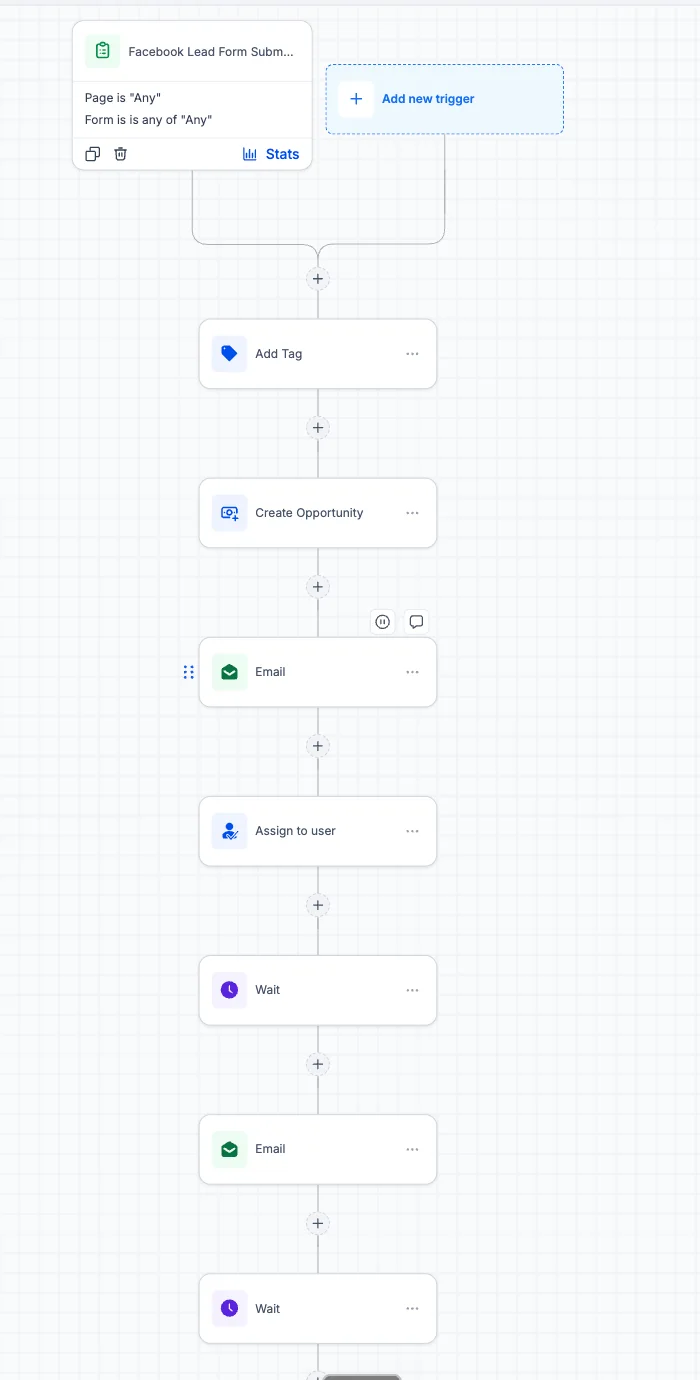
How our GoHighLevel setup agency runs a project
The order is fixed because each step feeds the next. Nothing is built until the document in step two is approved.
- Discovery and audit
How leads reach you, who owns them, what a win is. If you have an account already, we read it first: workflow status, enrolment history, field and tag sprawl.
- Architecture
The written design: pipelines, fields, tags, calendars, sources, routing and the workflow list. You approve it before we build.
- Build
Account structure, phone and email setup, A2P registration, forms and workflows in your account, not ours.
- Test
Test contacts pushed through every path (form, missed call, booking, reschedule, no-show, won, lost) with the execution log open.
- Train and hand over
Recorded walkthroughs per role and a written account map.
- Support
30 days after launch, then a monthly plan if you want one.
The process page shows the same sequence with what you receive at each stage.
Source: our process page
Source: our pricing page; owner price ladder of October 16, 2026. Multi-location is a custom quote
How a GoHighLevel system is architected
A working account has four layers. Most broken accounts are missing the second or the third. The setup guide has the menu paths for each one.
| Layer | What it does | What goes wrong without it |
|---|---|---|
| 1. Lead capture and intake | Every lead enters through a tracked source and is tagged by source on entry | A lead without a source tag is a lead you cannot attribute |
| 2. Qualification and pipeline logic | Stages match your sales process, each with an entry rule and an exit rule, and moves happen on real events | Staff stop updating the pipeline and reports stop meaning anything |
| 3. Follow-up and nurture automation | Sequences stop on a reply, slow down when there is none and hand over when the contact books; one job per workflow | Contacts get duplicates or silence |
| 4. Reporting and optimization | Dashboards show where leads stall and which workflows produce bookings; designed in layer one | Reports can only use what was captured at entry, so gaps cannot be filled later |
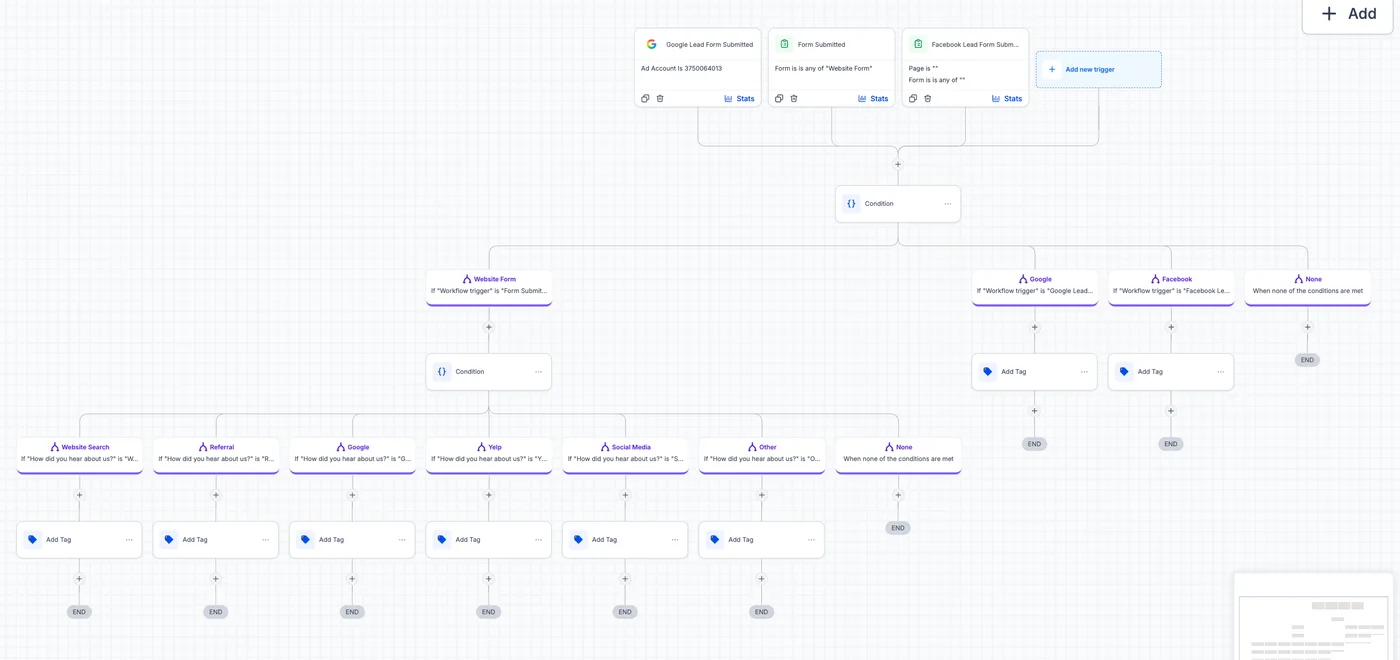
GoHighLevel setup services: what is included
A done-for-you GoHighLevel setup covers these areas. Each row links to the page with the detail, and the project itself is described on the hire a GoHighLevel CRM setup expert page.
| Area | What it includes | Page with the detail |
|---|---|---|
| Technical configuration | White-label domain, SSL, sending domain and authentication, phone and A2P registration | A2P registration |
| CRM architecture and pipelines | Pipeline stages with entry rules, custom fields, tag conventions, smart lists, calendars, permissions | CRM implementation |
| Workflow design | Lead response, missed-call text back, reminders, no-show recovery, nurture, review requests, internal notifications, all tested | GoHighLevel automation |
| Funnels and booking | Landing page, forms, calendar booking, Stripe, thank-you page | CRM implementation |
| Reporting | Dashboards for lead source, pipeline stage, conversion and team activity | CRM implementation |
| SaaS configuration | SaaS mode, snapshot, pricing tiers, recurring billing, onboarding | SaaS mode setup |
| Migration | Data map, import with validation counts, rebuilt automations, scheduled cutover | Migration |
| AI | Voice AI and Conversation AI with scope and handoff rules | GoHighLevel AI |
| Training and documentation | Recorded training per role, written account map, post-launch support | Process |
GoHighLevel setup cost: what a setup agency charges
With us, a GoHighLevel setup costs $500 to $4,000 for a basic or single-location build and $3,500 to $5,000 for white label and SaaS. Multi-location setups are a custom quote by number of locations. HighLevel's own subscription is billed separately by HighLevel.
| Setup option | Cost with us | Best for |
|---|---|---|
| Do it yourself with the setup guide | $0 plus your time | One simple offer and weeks to learn |
| Basic or single-location setup | $500 to $4,000, one-time | A business where a missed lead costs real money |
| White label and SaaS setup | $3,500 to $5,000, one-time | An agency launching a branded offer |
| Multi-location setup | Custom quote by number of locations | Franchises and groups |
See GoHighLevel setup cost for what moves a quote up or down, and the pricing page for what each band includes. The 30-minute call and the audit on it are free.
How long a GoHighLevel setup takes, stage by stage
A scoped single-location build usually takes three to five weeks including testing and training. Migrations and multi-location builds take six to ten weeks. The seven steps fall into the project in this order.
| Project | Typical time | What takes the time |
|---|---|---|
| One location, one sales process | Three to five weeks | Architecture sign-off, A2P approval, testing |
| Migration from another CRM | Six to ten weeks | Field mapping, import validation, parallel run |
| Multi-location | Six to ten weeks | Routing, roles, a shared snapshot |
| Stage of the project | What happens |
|---|---|
| Before the start | Free 30-minute call and audit, then a written quote |
| Early | Discovery, audit of any existing account and the architecture document, which you approve before the build |
| Middle | The build: account structure, phone and email setup, A2P registration, forms and workflows |
| Late | Testing every path with the execution log open, then recorded training and the account map |
| After launch | 30 days of support, then a monthly plan if you want one |
Setup agency, freelancer or offshore team?
Three kinds of provider sell GoHighLevel setup. The prices below are what the freelancer and offshore options publish themselves; ours are the bands above.
| Option | Good for | Watch for | Published price |
|---|---|---|---|
| Freelancer on Upwork or Fiverr | A funnel, a landing page, a few workflows, a quick fix you can describe exactly | You are the project manager. Nobody owns the account map, the A2P registration or what happens when the freelancer moves on | Hourly or per gig, set by each freelancer |
| Offshore team advertising hourly rates | Volume work on a known spec, such as repetitive sub-account setup for agencies | "Certified" on the page does not mean the person on your account is. Ask who does the work and ask to see an account they built | $10 to $19 an hour on the first page of Google for this search |
| Setup agency (us) | An account that has to work end to end: structure, workflows, texting registration, deliverability, integrations, testing, training, support | Costs more than a freelancer. Ask for the architecture document and the test log, in writing, before you pay | $500 to $4,000 for a single location |
The full comparison of the first and third options is on freelancer vs agency.
Who runs your GoHighLevel setup
HighLevel Automation Team was founded by Yash Patel, who leads system design standards, implementation quality and automation reliability across every project. The team works across CRM architecture, automation engineering, QA and optimization. Read his profile on the About page or find him on LinkedIn.
DIY setup vs a GoHighLevel setup agency
| DIY setup | Setup agency | |
|---|---|---|
| Starting point | A template that looks right in the demo, adjusted as problems appear | Your customer journey mapped first, then the account designed from it |
| Testing | Live leads find the bugs | Test contacts through every path before launch |
| When something breaks | No one knows which of several workflow versions is active | The workflow list and the account map say what runs and why |
| Documentation | Usually none | Written map and recorded training |
| Ownership | Whoever built it last | Named owner per workflow |
DIY is realistic for a simple sales process and a team with time to learn. It becomes expensive when you are paying for leads that follow-up does not catch.
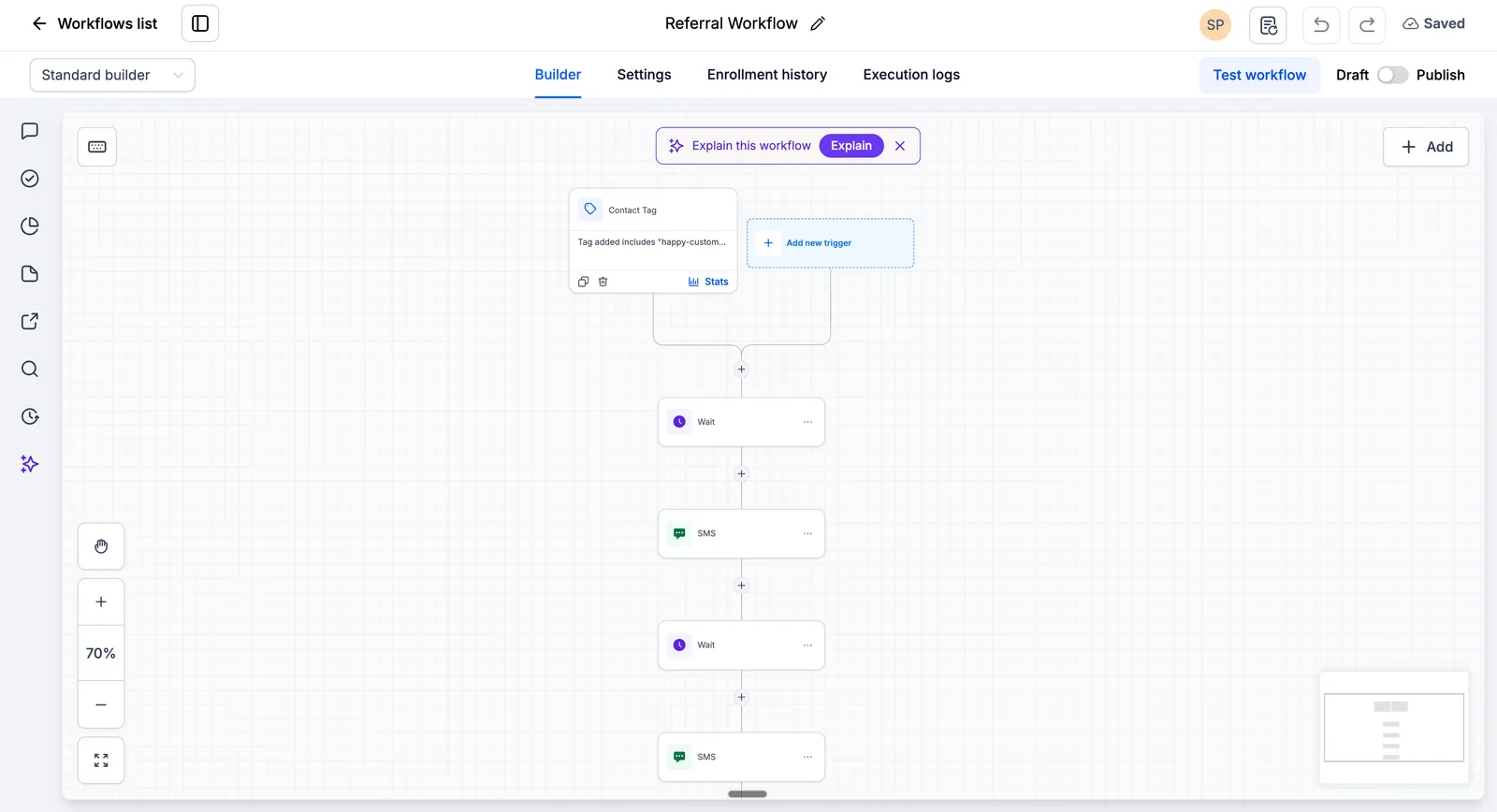
Common GoHighLevel setup mistakes we prevent
| Mistake | What it causes | What we do instead |
|---|---|---|
| Building workflows before mapping the customer journey | Automation that does not match how customers move | Map the journey, then list the workflows |
| Testing with one perfect contact | Breaks on a lead with no phone number, a midnight form or a duplicate | Test contacts for the awkward cases too |
| No documentation | The team is afraid to touch the account | Account map and recorded training |
The setup guide has the longer table of common setup mistakes with the usual cause and fix for each.
Why choose us as your GoHighLevel setup agency
HighLevel Automation Team has built GoHighLevel systems since 2021 and works on nothing else. Every project follows a documented process: audit, written architecture, build, test, training, support.
We are a poor fit if you want the cheapest option or a snapshot copied into your account. We are a good fit if you want a system built to last and a team you can reach when it needs changing. Pricing is in writing after the call, and the pricing page lists what each band includes.
What to expect after the build
- Faster first response. Workflows answer new leads in the first minute, and the owner is notified.
- A pipeline you can read. Each deal is in a stage that means something, and stalled deals are visible.
- Less manual follow-up. Reminders, no-show recovery and review requests run themselves.
- Cleaner data. Source and stage are recorded at entry, so reports have something to use.
- Changes you can make safely. The account map shows how things connect.
These follow from the structure; exact numbers depend on your lead volume and process, and we do not promise a figure in advance.
Who this page is for
It is for businesses that need a stable GoHighLevel system built correctly and have tried, or decided not to try, doing it in-house. It is not for people looking for tutorials or free templates; the setup guide and HighLevel's own Template Library are the right places for that.
Book a 30-minute strategy call. We review your current system, name the gaps and outline an implementation plan. Come with your current setup, your goals and the specific problems you are trying to solve, and we will say honestly whether we can help.
Book your free 30-minute strategy call
Sources and further reading
Checked at the time of writing; prices, features and policies change. Checked 2026-10-19.
- HighLevel: How to Use Webhooks in HighLevel (Zapier) (help article, modified December 15, 2023)
- HighLevel: Template Library (help article, modified September 19, 2026)
Frequently asked questions about hiring a GoHighLevel setup agency
How much does GoHighLevel setup cost?
Doing it yourself costs $0 plus your time, and HighLevel bills its own subscription and usage separately. Done for you with us, a basic or single-location setup is $500 to $4,000, white label and SaaS $3,500 to $5,000, and multi-location is a custom quote. See GoHighLevel setup cost for what moves the price.
How much does a GoHighLevel setup agency cost?
With us, a GoHighLevel setup costs $500 to $4,000 for basic and single-location builds and $3,500 to $5,000 for white label; multi-location is a custom quote that depends on how many locations and how different they are. We confirm the figure in writing after a free 30-minute call, with the deliverables listed. The pricing page shows the bands.
What is included in a GoHighLevel setup service?
A written architecture, the account build (pipelines, fields, calendars, forms, phone and email, A2P registration, workflows), testing with test contacts, recorded training, an account map and 30 days of support. The table above lists each area and links to the detail.
Is there a Go High Level setup company that lets me own the account?
Yes, we build inside your account, with you as the owner, and your phone numbers, contacts and workflows stay yours if you stop working with us. Whichever Go High Level setup company you pick, ask for that in writing.
Can I set up GoHighLevel myself?
Yes, if your sales process is simple and you have the time to learn. The GoHighLevel setup guide gives the order of operations step by step, and you can hand over only the parts you do not want to do.
Do I need a setup agency if I already have a CRM set up?
Not if leads are being followed up, your team uses the system consistently and you get the data you need. If leads fall through gaps, automations break or staff do manual work a workflow could do, an audit will show what to change, and it may be a fix rather than a rebuild.
How long does a GoHighLevel implementation take?
A scoped single-location build usually takes three to five weeks including testing and training. A basic account with one pipeline and a few workflows can be faster; multi-location, migration or SaaS builds take longer. You get a specific timeline after the discovery call, based on your scope.
Setup agency, consultant or freelancer: which do I need?
A setup agency builds the whole account and hands it over tested. A GoHighLevel consultant diagnoses and plans, which suits an account that exists but misbehaves. A GoHighLevel expert suits building or fixing specific parts of an account you already have. A freelancer suits a defined task when you already own the design. A GoHighLevel-only team knows the platform's workflow logic, limits, usage billing and registration rules in advance; a general CRM agency learns them on your project.
Can you migrate my existing data to GoHighLevel?
Yes, we can migrate your existing data to GoHighLevel from most CRMs and spreadsheets. We audit the old system, map old fields to new ones in a document you sign off, clean duplicates, import with validation counts and rebuild the automations for GoHighLevel. Migration is quoted with the implementation; see the migration page.
Do you provide training for my team?
Yes, training for your team is part of every GoHighLevel build we do. Each role gets recorded walkthroughs of what they need for their job, plus the written account map to refer back to. Refresher sessions are available if the team changes.
What happens after the setup is complete?
You get 30 days of post-launch support included. We watch the workflows, fix issues and adjust based on real activity. After that you can move to a monthly support plan or run the account yourself using the documentation.
Can you integrate GoHighLevel with my existing tools?
Usually yes, GoHighLevel connects natively to many tools, and webhooks or Zapier cover others. Common ones are calendars, payment processors, phone systems and ad platforms. We confirm each integration on the call and test it before launch. See integrations.
Do I keep ownership of the account and data?
Yes, we build inside your account, with you as the owner, and your phone numbers, contacts and workflows stay yours if you stop working with us. The account map makes handing it to another team straightforward.