
GoHighLevel for Chiropractors: Patient Retention, No-Show Recovery & Practice Automation (2026)
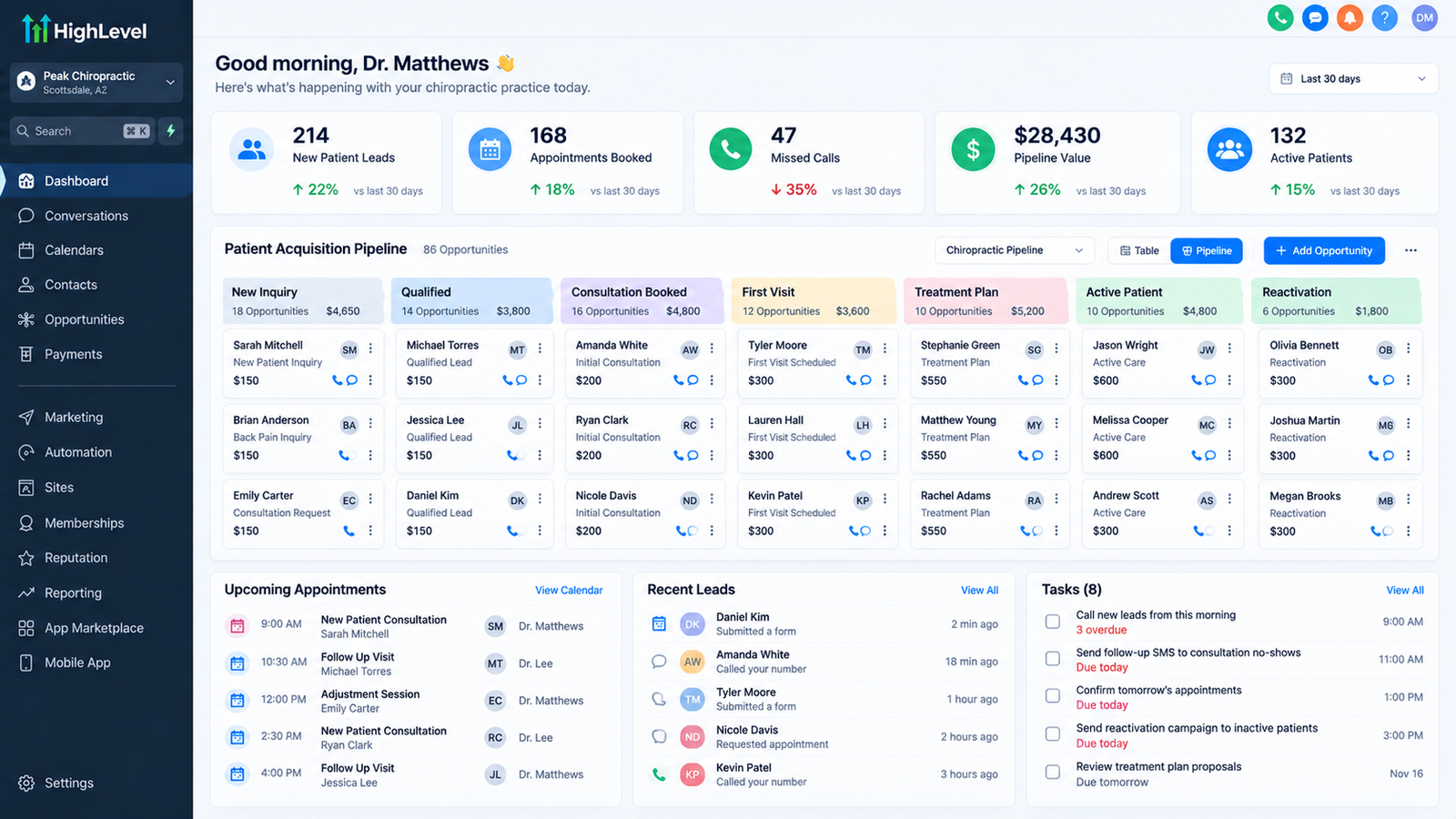
A GoHighLevel pipeline built for chiropractic care — patients move automatically from Inquiry through Consult, Active Care, Maintenance, and Reactivation.
Yes. GoHighLevel automates the patient-communication and retention layer of a chiropractic practice — appointment reminders, no-show recovery, care-plan follow-up, recall, reactivation, missed-call recovery, and lead response — while consolidating tools most practices currently pay for separately.
Short answer: GoHighLevel works as a patient-retention CRM for chiropractic clinics — automated reminders, no-show recovery, care-plan adherence follow-up, and reactivation campaigns. It is a communication and CRM layer that sits alongside your chiropractic EHR — it does not replace clinical documentation or charting. See what GoHighLevel does and doesn’t replace below.
Whether it produces positive ROI depends on your appointment volume, baseline no-show rate, care-plan adherence, and implementation quality. This guide covers the no-show math, the care-plan drop-off problem, the reactivation economics, chiropractic CRM setup, the core automation workflows to build, how to stay HIPAA-eligible, what it actually costs, and the exact 90-day rollout — based on systems we have configured for chiropractic and healthcare clinics across North America. If you’re deciding whether to DIY or hand it to an expert, our done-for-you GoHighLevel setup service covers the implementation at the end.
What’s in This Guide
- Who This Guide Is For
- The Chiropractic Patient Lifecycle & Where GHL Fits
- GoHighLevel Chiropractic CRM Setup
- The Revenue Problem: No-Shows, Care-Plan Drop-Off & Dormant Patients
- Inside the Dashboard
- Core Chiropractic Workflows (9 Automations Every Practice Needs)
- HIPAA-Eligible vs. HIPAA-Certified & Communication Compliance
- What GoHighLevel Does & Doesn’t Replace
- What Automation Actually Changes: Results Data
- GoHighLevel vs. Chiropractic EHR & Practice Management Software
- Cost, ROI & Break-Even Math
- Implementation Roadmap & 90-Day Launch
- FAQ
- When GHL Is & Isn’t a Good Fit
Key Takeaways
- [Industry benchmark] A planning range of 10–15% of scheduled appointments is commonly used in chiropractic industry estimates for no-shows and last-minute cancellations — at $50–$75 per adjustment over a 22-day operating month, a 30-patient-a-day practice has roughly $3,300–$7,400/month of appointment revenue at risk. Practices should calculate their own baseline rather than assume this number.
- [Published research] A BMJ Open systematic review and meta-analysis across healthcare settings (Robotham et al., 2016) found electronic reminders were associated with a 25% lower no-show risk, and multiple reminders outperformed a single one — the evidence was not chiropractic-specific.
- [Industry data] A single missed appointment is a leading churn signal, and medical practices lose an estimated 10–30% of patients to attrition per year (Dialog Health patient-retention data).
- [HAT implementation observation] A clinic bringing 20 lapsed patients back into a ~10-visit care plan at the ~$67 average chiropractic visit value could generate approximately $13,500 in modeled appointment revenue if the assumptions hold — see the full ROI model.
- [Verified, Sept 2026] GHL is HIPAA-eligible, not HIPAA-certified — you need the $297/month HIPAA add-on plus a signed BAA before PHI flows through it; marketing-only workflows (inquiry follow-up, review requests) typically don’t require it. See the full HIPAA breakdown.
Who This Guide Is For
This guide is designed for:
- Solo chiropractors managing their own front-desk and follow-up
- Multi-doctor practices with an office manager coordinating patient communication
- Chiropractic franchises/networks wanting a consistent system across locations — see our multi-location governance model for the account structure
- Practices currently using their EHR’s built-in reminders but seeing high no-show rates anyway
This guide assumes an active-care chiropractic model with recurring visits. If your practice is single-visit/injury-only, the care-plan and recall sections are less relevant, but the lead-response and no-show sections still apply. If chiropractic isn’t your industry, see our full GoHighLevel setup guide for a general-purpose walkthrough.
The Chiropractic Patient Lifecycle & Where GHL Fits
A chiropractic practice runs one patient through the same lifecycle again and again — and the entire GHL build is a set of automations attached to stages of that lifecycle.
The Five-Stage Lifecycle:
Stage 1: Inquiry → New Lead
- Trigger: Website form, phone call, or referral inquiry
- GHL Role: Auto-respond, qualify, and book the first consult
- Automation: Speed-to-lead text/call within minutes, new-patient intake form sent automatically
Stage 2: Consult → Care Plan Start
- Trigger: First visit completed, care plan proposed
- GHL Role: Confirm the recommended visit cadence and start the reminder sequence
- Automation: Care-plan overview sent, first follow-up appointment auto-scheduled
Stage 3: Active Care → Adherence
- Trigger: Ongoing scheduled visits per the care plan
- GHL Role: Reduce no-shows, catch drop-off early
- Automation: Multi-touch appointment reminders, auto-flag missed visits for staff follow-up
Stage 4: Maintenance → Recall
- Trigger: Active care plan completed, patient moves to periodic maintenance
- GHL Role: Keep maintenance patients on a recall cadence instead of losing them silently
- Automation: Recall reminders at the recommended interval (monthly/quarterly)
Stage 5: Lapsed → Reactivation
- Trigger: No visit within the defined inactivity window (typically 60–90 days)
- GHL Role: Win the patient back before they forget the practice entirely
- Automation: Reactivation sequence with a specific, time-bound offer to return
The result: Every patient moves predictably through five stages, and the highest-leverage moment — the missed visit — triggers an immediate, automatic response instead of silently becoming a lost patient.
GoHighLevel Chiropractic CRM Setup
Before building automations, the CRM needs to be structured around how a chiropractic practice actually runs — not GHL’s generic default setup. A proper setup covers:
- Pipeline configuration — Custom stages matching your lifecycle: New Inquiry, Consult Booked, Active Care, Maintenance, Lapsed/Reactivation
- Patient source tracking — Tagging every contact by origin (referral, web form, insurance directory, walk-in) to see which channels actually convert
- Custom fields — Care-plan type, visit frequency, last-visit date, insurance vs. cash-pay status — the data that drives which reminder/recall sequence a patient enters
- Calendar setup — Separate booking types for new-patient consults vs. recurring adjustments, each with its own confirmation and reminder cadence
- HIPAA configuration — BAA signed and HIPAA add-on enabled before any PHI-bearing workflow goes live (see HIPAA section)
- Conversation settings — Shared inbox so front-desk staff can see a patient’s full text/call/email history in one thread
- Reporting dashboard — No-show rate, care-plan adherence rate, and recall/reactivation conversion tracked by stage
This setup layer is what most DIY builds skip — they turn on appointment reminders and stop there, without structuring the pipeline and HIPAA configuration correctly first.
The Revenue Problem: No-Shows, Care-Plan Drop-Off & Dormant Patients
Leak #1: No-Shows & Last-Minute Cancellations (The Biggest Leak)
The math: At a 10–15% no-show rate, $50–$75 per adjustment, and 22 operating days/month, a 30-patient-a-day practice has roughly $3,300–$7,400/month of appointment revenue at risk. Calculate your own baseline rather than assuming this range applies to your practice.
GHL fixes this: Multi-touch reminder sequences (confirmation, 24-hour, and same-day) are associated with meaningfully lower no-show risk in published reminder research — see the no-show recovery workflow below.
Leak #2: Care-Plan Drop-Off
The math: A single missed appointment is a leading predictor of a patient stopping care entirely — practices lose an estimated 10–30% of patients to attrition per year (Dialog Health). A patient who misses one visit and isn’t followed up with rarely self-corrects back onto the care plan.
GHL fixes this: A missed visit auto-flags the patient for same-day staff follow-up instead of silently falling off the schedule.
Leak #3: Dormant/Lapsed Patients
The math: A clinic bringing 20 lapsed patients back into a ~10-visit care plan at the ~$67 average chiropractic visit value could generate approximately $13,500 in modeled appointment revenue if the assumptions hold (illustrative model — actual reactivation rates vary by practice and offer).
GHL fixes this: Automated reactivation sequences trigger at the 60–90 day inactivity mark with a specific offer to return, rather than relying on the patient to call back on their own.
Inside the Dashboard
A chiropractic GHL setup isn’t just “a CRM” — it’s three connected systems:
Core Chiropractic Workflows: 9 Automations Every Practice Needs
Workflow 1: New Patient Speed-to-Lead
Trigger: New inquiry from web form, call, or referral
Sequence:
- Auto-text/call within minutes of the inquiry coming in
- Auto-send new-patient intake form
- Auto-offer available consult times
Reduces lead loss from slow front-desk response
Workflow 2: Multi-Touch Appointment Reminders
Trigger: Appointment booked
Sequence:
- Instant booking confirmation
- 24-hour reminder
- Same-day reminder
Multiple reminders outperform a single reminder (Robotham et al., 2016)
Workflow 3: No-Show & Empty-Chair Recovery
Trigger: Patient marked as no-show
Sequence:
- Auto-text same day: “We missed you today — let’s get you rescheduled”
- Auto-offer next available slot
- Auto-flag for staff callback if no response in 24 hours
Catches the single-highest churn-risk moment immediately
Workflow 4: Care-Plan Adherence Follow-Up
Trigger: Patient falls behind their recommended visit cadence
Sequence:
- Auto-flag patient in the dashboard
- Auto-send a check-in message from the practice
- Auto-create staff task for personal outreach if unresolved
Interrupts drop-off before it becomes permanent attrition
Workflow 5: Maintenance Recall
Trigger: Patient moves to maintenance-phase care
Sequence:
- Auto-schedule recall reminders at the recommended interval
- Auto-send booking link when the recall date approaches
- Auto-escalate to a call if the patient doesn’t self-book
Keeps maintenance patients from quietly disappearing
Workflow 6: Lapsed Patient Reactivation
Trigger: No visit within 60–90 days
Sequence:
- Auto-enroll in a reactivation sequence with a specific offer
- Multi-touch over several weeks (text, email, call task)
- Auto-remove from sequence once rebooked
Directly targets the dormant-patient revenue leak above
Workflow 7: Review Request
Trigger: Positive visit outcome / milestone in care plan
Sequence:
- Auto-send review request via text/email
- Auto-thank patients who leave a review
- Auto-flag low-satisfaction responses for staff follow-up instead of a public review ask
Builds local search visibility without manual staff effort
Workflow 8: Missed-Call Text-Back
Trigger: Inbound call goes unanswered
Sequence:
- Auto-text within seconds: “Sorry we missed your call — how can we help?”
- Auto-log as a new lead or existing-patient inquiry
Recovers inquiries that would otherwise go to voicemail
Workflow 9: Insurance/Benefits Expiration Reminder (If Applicable)
Trigger: Patient’s insurance benefit period approaching expiration
Sequence:
- Auto-remind patient of remaining visits/benefits before year-end
- Auto-offer to schedule remaining covered visits
Captures visits patients would otherwise forfeit
HIPAA-Eligible vs. HIPAA-Certified & Communication Compliance
GoHighLevel is HIPAA-eligible, not HIPAA-certified — there is no formal “HIPAA certification” program in the way some marketing implies. To route Protected Health Information (PHI) through GHL, a practice needs:
- The $297/month HIPAA add-on enabled on the account
- A signed Business Associate Agreement (BAA) with GoHighLevel
- A clear map of which workflows actually touch PHI vs. which are marketing-only
Not every message a chiropractic practice sends is automatically a HIPAA communication. General marketing (review requests unconnected to diagnosis, generic “we’re open” announcements) may not require it, while appointment reminders, care-plan details, and anything referencing a specific patient’s condition typically do. Whether a specific message counts as PHI is fact-specific — confirm your classification with a healthcare attorney before going live, and consult our dedicated HIPAA compliance guide for the full breakdown.
What GoHighLevel Does & Doesn’t Replace
GoHighLevel handles CRM, patient communication, automation, and booking — but it doesn’t replace every system in a chiropractic practice. Being clear about this upfront avoids the most common source of buyer confusion:
| System | Does GHL Replace It? |
|---|---|
| CRM / patient contact management | Yes |
| Appointment reminders & no-show recovery | Yes |
| Recall & reactivation campaigns | Yes |
| Review requests | Yes |
| Chiropractic EHR / clinical charting | No |
| SOAP notes & treatment documentation | No |
| Billing & insurance claims processing | No |
| X-ray / imaging systems | No |
| Payroll | No |
What Automation Actually Changes: Results Data
[HAT implementation observations] Aggregate patterns we see across chiropractic GoHighLevel implementations — illustrative ranges based on client configurations, not guaranteed results or published research. Every practice’s baseline differs:
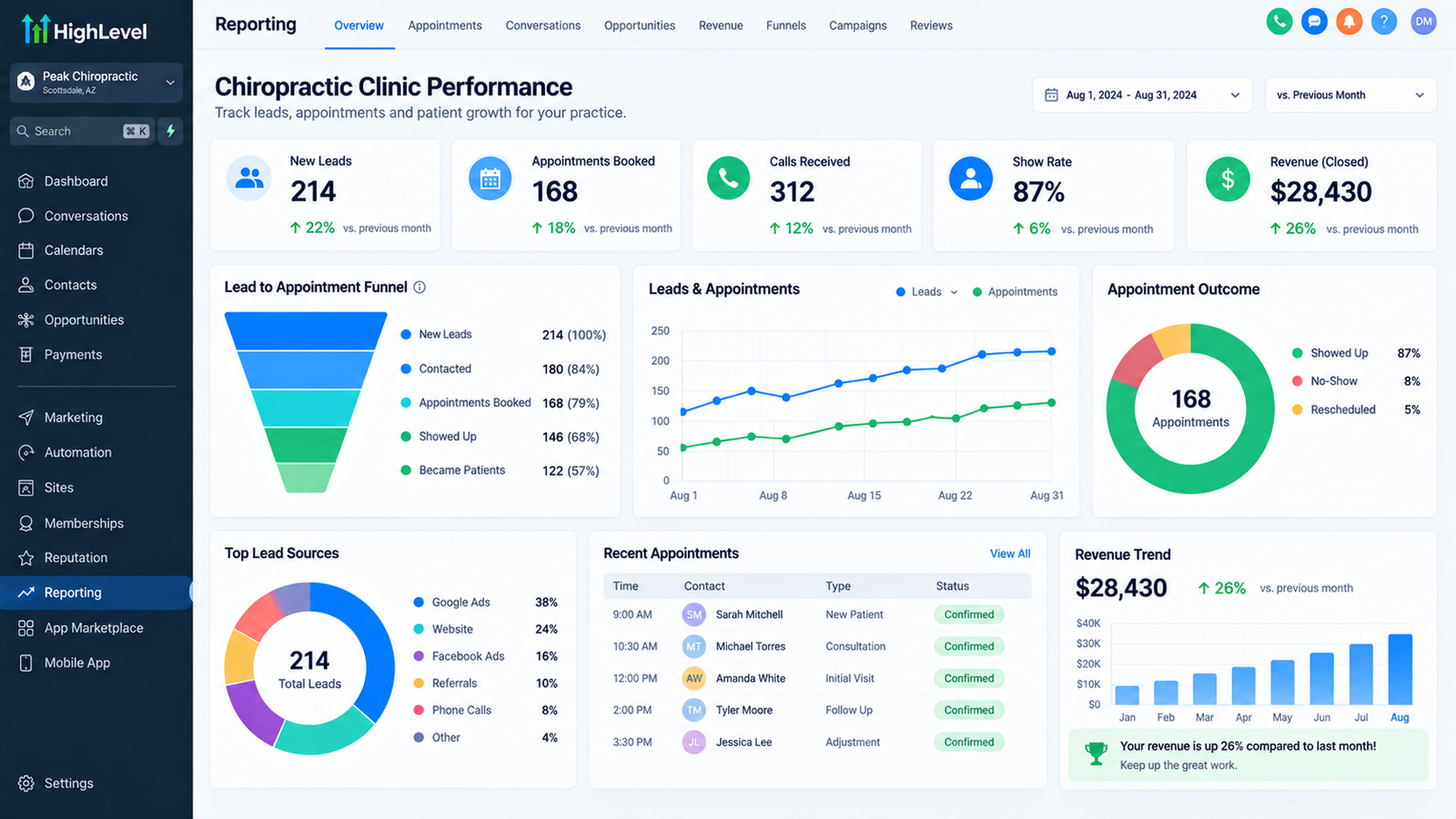
A results dashboard tracking no-show rate, care-plan adherence, and reactivation conversion after automation is live.
Real client result: Dr. Bryan’s chiropractic practice saw a 40% increase in patient growth within 2 months of implementing GoHighLevel automation, alongside a 45% reduction in no-shows and a jump in Google reviews from 58 to 90+ through automated review requests.
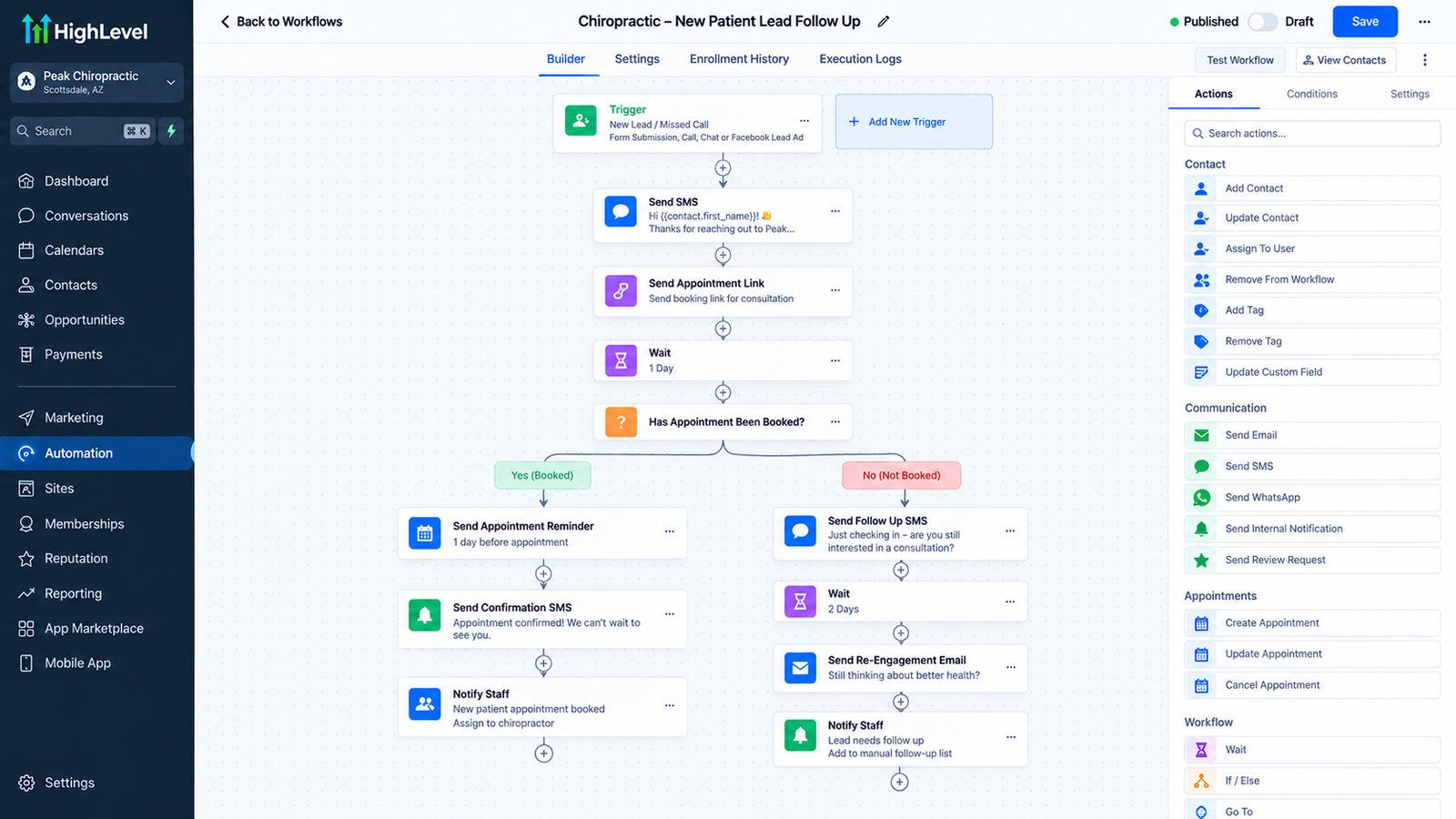
A no-show recovery workflow: a missed appointment triggers an immediate patient text, a rebooking offer, and a staff task if unresolved.
GoHighLevel vs. Chiropractic EHR & Practice Management Software
Monthly Cost Comparison — Single-Location Practice
Entry-tier monthly pricing shown; each platform’s plans vary by feature tier and patient volume. GHL does not include clinical charting — see the feature table below for what each platform actually covers.
| Feature | GoHighLevel | ChiroTouch | Jane App | Weave |
|---|---|---|---|---|
| Clinical charting / SOAP notes | No | Yes | Yes | No |
| Patient communication automation | Advanced (9+ workflows) | Basic | Basic | Good |
| SMS/Texting | Built-in (usage) | Add-on | Limited | Built-in |
| Landing pages / marketing | Built-in, unlimited | Not included | Not included | Not included |
| Reactivation/recall automation | Advanced | Basic | Basic | Basic |
| Billing / insurance claims | No | Yes | Yes | No |
| Best For | Patient communication & retention layer on top of your EHR | All-in-one clinical + billing (chiropractic-specific) | Multi-discipline clinics needing charting | Phone/communication for multi-location practices |
Verdict: GHL is not a competitor to your chiropractic EHR — it’s the patient-retention and communication layer most EHRs handle weakly or not at all. Practices typically run GHL alongside ChiroTouch, Jane, or similar for clinical/billing functions, using GHL specifically for reminders, recall, reactivation, and marketing. See full GoHighLevel pricing for platform cost details.
Cost, ROI & Break-Even Math
What You’ll Pay
- Platform: $97 (Starter) / $297 (Unlimited) / $497 (Agency Pro) per month — most single-location practices only need Starter or Unlimited. See full GoHighLevel pricing breakdown
- HIPAA add-on: $297/month, account-wide, required before PHI flows through the platform
- Communication (SMS/calls): Usage-based, typically $100-300/month for a single-location practice depending on patient volume
- Implementation: DIY $0 (20-40 hours) or done-for-you $2,000-6,000 (HIPAA configuration included)
Illustrative ROI Model: 30-Patient-a-Day Practice
This is a scenario model built on the stated assumptions — not a forecast or guaranteed result. Your actual numbers depend on your patient volume, baseline no-show rate, and care-plan structure.
Monthly Revenue Impact Breakdown
*Based on the $13,500 illustrative annual reactivation model above, averaged monthly.
Baseline no-show exposure: 10-15% no-show rate at $50-75/visit = $3,300-7,400/month at risk (calculate your own baseline)
Reactivation model: 20 lapsed patients returning to a ~10-visit plan at $67/visit = ~$13,500/year if assumptions hold
Platform + HIPAA cost: $297 (Unlimited) + $297 (HIPAA) + ~$150 (communication) = ~$744/month = $8,928/year
Even capturing a modest fraction of the no-show and reactivation opportunity typically clears the platform cost — the size of the return depends entirely on your practice’s actual no-show baseline and patient volume.
Implementation Roadmap & 90-Day Launch
Weeks 1-2: Setup & HIPAA Configuration
- Create GHL account, enable HIPAA add-on, sign BAA
- Import patient database, configure pipeline stages
- Set up calendars for new-patient consults vs. recurring visits
Weeks 3-4: Core Reminder & No-Show Workflows
- Build Workflow 1: New patient speed-to-lead
- Build Workflow 2: Multi-touch appointment reminders
- Build Workflow 3: No-show & empty-chair recovery
- Test with a subset of appointments before full rollout
Weeks 5-8: Care-Plan & Recall Automation
- Build Workflow 4: Care-plan adherence follow-up
- Build Workflow 5: Maintenance recall
- Build Workflow 6: Lapsed patient reactivation
- Launch to full active patient base
Weeks 9-12: Reviews, Missed Calls & Optimization
- Build Workflow 7: Review requests
- Build Workflow 8: Missed-call text-back
- Review 60-day no-show and reactivation data, refine messaging
- Train front-desk staff on exception handling
FAQ
Q: Is GoHighLevel good for chiropractic practices?
A: Yes, for practices that want automated appointment reminders, no-show recovery, care-plan follow-up, and recall/reactivation in one system. It’s a weaker fit for single-visit/injury-only practices with no recurring care-plan structure.
Q: Is GoHighLevel HIPAA compliant?
A: GHL is HIPAA-eligible, not HIPAA-certified — you need the $297/month HIPAA add-on and a signed BAA before PHI flows through it. See the full HIPAA breakdown above.
Q: Will this replace my chiropractic EHR?
A: No. GHL is the patient-communication and retention layer on top of your EHR — it doesn’t do clinical charting, SOAP notes, or billing. See what it does and doesn’t replace above.
Q: How much does GoHighLevel cost for a chiropractic practice?
A: $97-297/month for the platform, plus $297/month for the HIPAA add-on if you’re routing PHI through it, plus usage-based communication costs. See the full cost breakdown above.
Q: Can GoHighLevel reduce no-shows?
A: Multi-touch appointment reminders are associated with meaningfully lower no-show risk in published research (Robotham et al., BMJ Open, 2016), though the evidence wasn’t chiropractic-specific. Actual results depend on your patient population and current baseline.
Q: What if a patient’s messages contain PHI?
A: Any workflow referencing a specific patient’s condition, treatment, or diagnosis should be treated as PHI and routed through a HIPAA-configured account with a signed BAA — confirm classification with a healthcare attorney for your specific workflows.
Q: Do we need a separate texting/reminder tool if we get GoHighLevel?
A: Typically no — GHL consolidates appointment reminders, recall, reactivation, and review requests, replacing 2-3 separate point tools most practices already pay for.
When GHL Is & Isn’t a Good Fit
Great Fit If You:
- Run an active-care model with recurring visits and a defined care plan
- Have a no-show rate above 8-10% with no systematic reminder sequence
- Have a meaningful base of lapsed/maintenance patients with no recall system
- Currently pay for separate reminder, review, and marketing tools
Poor Fit If You:
- Run a single-visit, injury-only practice with minimal recurring care
- Need clinical charting/SOAP notes — GHL is not an EHR
- Aren’t prepared to handle HIPAA configuration properly before launch
Get Started
Your practice’s revenue depends on patients showing up and staying on their care plan. GHL automates both — so your front desk isn’t manually chasing every reminder and recall.