
How to hire a GoHighLevel expert comes down to three things: know what the work involves, see a live account they built, and get the scope and price in writing before you pay. A GoHighLevel expert is someone who sets up and runs the platform for you: the pipeline, the custom fields and tags, the calendars, the phone and email settings, and the workflows that answer leads and run appointments. With us, basic setup and single-location builds run $500 to $4,000 one-time, white label $3,500 to $5,000, and multi-location work is a custom quote; ongoing work is a monthly plan, depending on scope. This guide explains what the work involves, how a workflow actually runs, what separates an expert from someone who installs a snapshot, what it costs, and the questions to ask before you pay. If you already want one, see our GoHighLevel expert team. Prefer to compare first? See the best GoHighLevel experts in the USA.
The title covers a few roles. A GoHighLevel specialist or GHL expert usually builds inside the account. A GoHighLevel consultant scopes and advises as well as builds; our own GoHighLevel consultant service is that kind of engagement, and our GoHighLevel setup agency service is the done-for-you build. A GoHighLevel virtual assistant handles daily tasks in an account someone else designed. This page is about the first two. It is written by Yash Patel, founder of HighLevel Automation Team.
Short version
- What they do: pipelines, fields and tags, calendars, lead capture, phone and email setup, workflows, integrations, reporting and training.
- What they cost with us: $500 to $4,000 for basic setup, $3,500 to $5,000 for white label, a custom quote for multi-location; a few hundred to a few thousand a month for support; about $75 to $250 an hour for one-off fixes. The strategy call and the audit are free.
- How to check one: ask to see a live account they built, ask how they test, ask what you receive at handover. HighLevel certification can be checked in its directory.
- When to hire: you have leads and no follow-up system, you are moving from another CRM, or the account someone set up has stopped working.
What a GoHighLevel expert does
GoHighLevel puts a CRM, a calendar, texting and email, a funnel builder, a pipeline and a reporting dashboard in one account. None of those parts does anything useful until someone decides how they connect: which form creates which opportunity, which stage change sends which message, who gets notified, and what happens when nobody replies. That decision-making is the job. The clicking is the smaller part.
In practice an expert's work falls into six areas.
Account structure: pipeline, fields and tags
The expert maps how your business sells, then builds a pipeline whose stages match it, each with a clear rule for entering and leaving. Custom fields hold the facts you need to segment on, and a tag convention records where a contact came from and what they asked for. This is boring work and it decides whether reporting is usable a year later. Our guide to how we organise a GoHighLevel account shows the layout we use.
Lead capture and source tracking
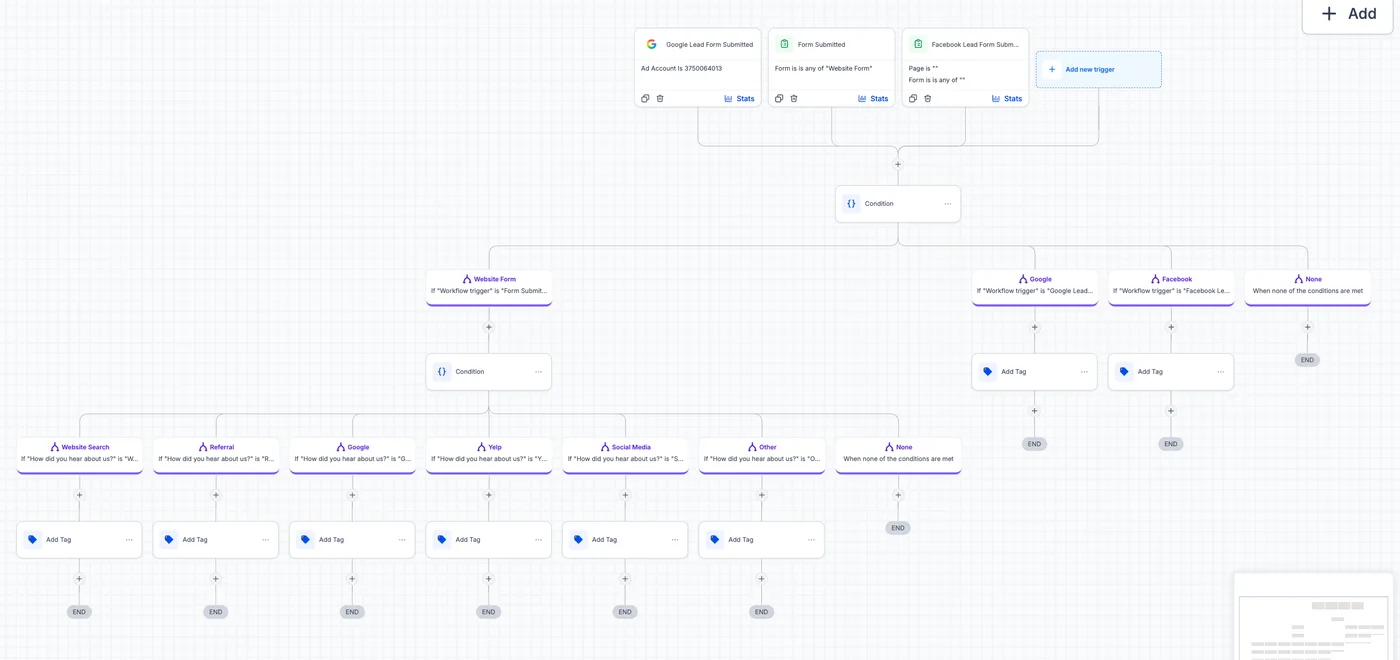
Forms, funnels, chat widgets, missed-call text-back and ad lead forms all land in the same place, tagged by source. A workflow that tags by source on entry is what lets you later ask which channel produced booked appointments rather than just leads.
Workflows: how the automation actually runs
A workflow is a trigger, optional conditions and a chain of actions. The trigger is an event such as a form submission, a tag being added, an appointment changing status or a contact replying. Actions then run in order: send a text, send an email, wait, branch on an if/else, create or move an opportunity, assign an owner, notify the team. Each time a contact meets the trigger they are enrolled, and the execution log records what happened to them step by step. That log is how a fix is verified and why "it seems to work" is not an acceptable test.
- TriggerA lead submits a Facebook lead form.
- Immediate actionsTag the source, create the opportunity in "New lead", assign an owner, send the first text and email.
- Wait and branchWait a set time, then check whether the contact replied or booked.
- Follow-up or exitIf no, send the next touch; if yes, stop the sequence and notify the owner.
- RecordEvery step lands in the execution log, so a failure shows up as a named step rather than a mystery.
Calendars and appointments
Booking pages, confirmations, reminders, reschedule links and no-show recovery run off the appointment status. Most "my reminders did not send" problems come back to a calendar that was never linked to the workflow's trigger.
Phone, email and compliance setup
US texting needs A2P 10DLC brand and campaign registration. Email needs a sending domain with SPF, DKIM and DMARC. Texting and calling also need consent and quiet-hours rules built into the workflows. An expert treats these as part of the build, because they decide whether messages arrive at all.
Integrations
Payments, calendars, ad platforms, e-commerce stores and internal tools connect through native integrations, webhooks or Zapier. The work is mapping fields in both directions and testing each path, since a broken integration usually fails silently.
Source: seller and guide pages read October 18, 2026 (see our agency market study); our figures from our pricing page; owner price ladder of October 16, 2026. Multi-location is a custom quote
Why GoHighLevel setups fail
These are the failure patterns we find when we audit accounts that someone else built. They explain what an expert is actually paid to avoid.
| What you see | Usual cause | What an expert does |
|---|---|---|
| Leads sit untouched after the first text | One-step follow-up; no wait-and-branch logic | Builds a sequence with waits, a reply check and an owner task |
| Contacts stuck in a loop or receiving duplicates | Overbuilt workflow with no exit condition; re-entry left on | Splits it into small workflows, one job each, with exit rules |
| Reports cannot say which channel works | No source tag or UTM capture at entry | Tags every lead by source at capture |
| Every contact gets the same message | No segmentation by tag, field or pipeline stage | Uses smart lists and conditions so the message matches the stage |
| Texts and calls stop going out | A2P registration missing or rejected, or a sending domain not authenticated | Registers the brand and campaign, sets up the domain, tests delivery |
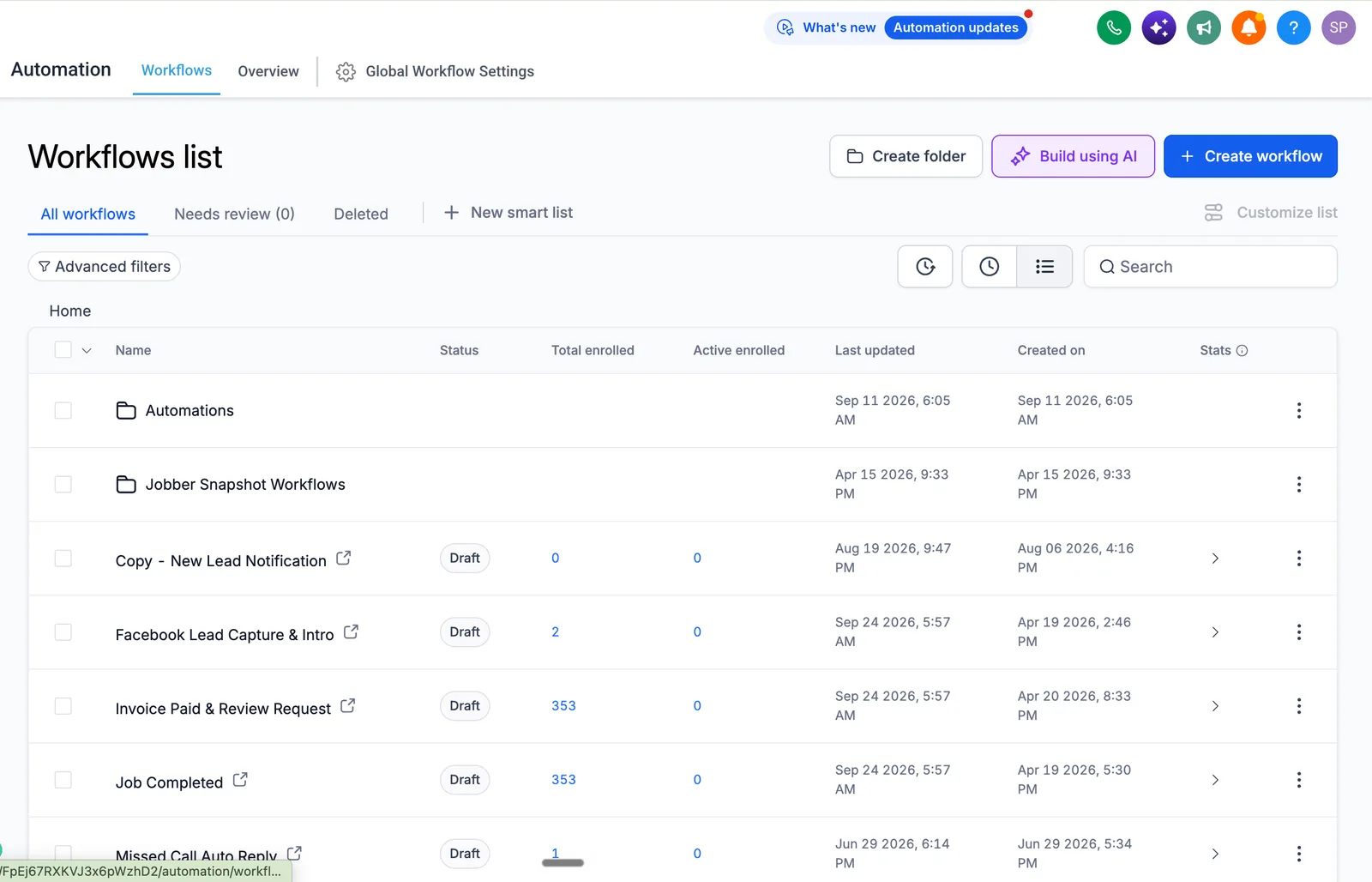
| Workflows "look fine" but nothing runs | Workflows left in Draft; an integration trigger never fires | Checks status and enrolment history first, then the execution log |
The quickest self-check is the workflow list: if several workflows are in Draft with past enrolments and zero active, the sequences you think are running are not.
GoHighLevel expert vs DIY setup
Doing it yourself is possible. The question is what the learning period costs. While you learn, follow-up on incoming leads is either manual or broken, and that cost is yours to estimate: take the number of leads you receive in a month, the share that would have booked with prompt follow-up, and what a booking is worth to you. The comparison below shows what changes, not a promise of results.
| Factor | DIY | With an expert |
|---|---|---|
| Time to a working system | Weeks to months, depending on how much time you can give it | Typically a few weeks for a scoped single-location build |
| Workflow logic | Learned by trial and error on live leads | Tested with test contacts through each path before launch |
| Account structure | Often a template that does not fit your sales process | Pipeline, fields and tags designed around your process |
| Integrations | Silent failures are common and hard to see | Each path tested and the log reviewed |
| Records | Usually none | Written account map and recorded training |
| Cost | Your time plus mistakes made on live leads | A scoped fee, quoted in writing |
How an expert builds the system, in order
The order matters because each step depends on the one before it.
- Discovery and architectureHow leads reach you, who owns them, what a win looks like. Written down and approved before building.
- CaptureEvery form, page, chat widget and ad lead form connected and tagged by source.
- Pipeline and fieldsStages with entry rules; fields and tags for segmentation.
- Phone, email and complianceNumber and sending domain, A2P registration, consent and quiet hours.
- WorkflowsLead response, appointment reminders, no-show recovery, nurture, review request.
- TestingTest contacts through every path while watching the execution log.
- Training and handoverA written account map and recorded walkthroughs per role.
A realistic first-version lead-response workflow for a home-services business looks like the example below. It is an illustration of structure, not a client result.
Trigger:  Facebook lead form submitted
Actions:  Tag "source-facebook", create the opportunity, assign an owner, send an SMS and an email
Wait:     1 day, then a second SMS; 2 more days, then a task for a manual call
Exit when: contact replies, books, or opts out
Freelancer, offshore team or specialist team: which to hire
Three kinds of provider sell GoHighLevel expert work, and each is right for a different job. The prices in the last column are what those providers publish themselves; ours are in the next section.
| Option | Good for | Watch for | Published price |
|---|---|---|---|
| Freelancer on Upwork or Fiverr | A funnel, a landing page, a few workflows, a quick fix when you can describe exactly what you want | You are the project manager. Nobody owns the account map, the A2P registration or what happens when the freelancer moves on | Hourly or per gig, set by each freelancer |
| Offshore team advertising hourly rates | Volume work on a known spec, such as repetitive sub-account setup for agencies | "Certified" on the page does not mean the person on your account is. Ask who does the work and ask to see an account they built | $10 to $19 an hour on the first page of Google for this search |
| A specialist team, such as ours | An account that has to work end to end: structure, workflows, texting registration, deliverability, integrations, testing, training, support | Costs more than a freelancer. Ask for the architecture document and the test log, in writing, before you pay | Project pricing; ours is $500 to $4,000 for a single location |
What a GoHighLevel expert costs in 2026
Price depends on scope far more than on who you hire. These are our own ranges; the exact figure is confirmed in writing after a free 30-minute call.
| Engagement | Typical US range, 2026 | Billing |
|---|---|---|
| Basic setup and single-location implementation | $500 to $4,000 | One-time, in stages |
| White label or SaaS launch | $3,500 to $5,000 | One-time, in stages |
| Multi-location or multi-pipeline build | Custom quote, by number of locations | One-time, in stages |
| Ongoing support and optimization | A few hundred to a few thousand a month | Monthly |
| One-off fix or consulting | About $75 to $250 an hour | Hourly |
What pushes the number up: more pipelines and workflows, custom integrations, large contact databases that need cleaning, several locations or user roles, and ongoing testing. A "complete setup" priced far below what its scope list implies is usually a snapshot install with no testing or documentation; ask what is excluded. HighLevel's own subscription ($97, $297 or $497 a month at the time of writing) is billed separately; the GoHighLevel pricing guide covers usage charges, and our pricing page lists what is inside each band.
Want to hire ours? Our GoHighLevel expert team page has the scope, the process and the prices, and you can book the free 30-minute call to have your account audited first.
When to hire a GoHighLevel consultant
- You are launching automation for the first time and do not want weeks of learning before leads are handled.
- You run paid ads and follow-up cannot keep up with the leads coming in.
- You are moving from another CRM. The data map and rebuild are where migrations go wrong (see HubSpot to GoHighLevel migration).
- You are building an agency or SaaS offer and need a repeatable client setup (see SaaS mode setup).
- You tried DIY and the account is half-built, or a previous builder left it behind.
- Your team does manual follow-up that a workflow could do.
The common thread is needing a working system rather than a software subscription. When to skip hiring: you have time, the sales process is simple, and you are willing to iterate slowly. The setup guide covers the DIY order of operations.
How to hire a GoHighLevel expert: the checks before you pay
- Ask for a screen-share of an account they built, with client details hidden. Read the workflow names.
- Ask how they test. The right answer involves test contacts and the execution log.
- Ask for the execution log from a past test, with a contact pushed through form, booking, no-show and reply.
- Ask what is in the scope in writing: pipelines, workflow count, integrations, training, support.
- Ask what you keep if you leave: account ownership, numbers, documentation.
- Ask for one client you can message, or a written result the client reported.
- Check HighLevel certification in the official directory, including the expiry date. What the badge does and does not prove is covered in how to verify a certified GoHighLevel expert.
The evaluation method for GoHighLevel experts expands each point with the exact questions to ask, and applies to us too.
What the contract should say
Most "how to hire" guides stop at vetting. The expensive disputes happen after, so check these seven points in writing before you pay a deposit.
| Point | What to ask for | Why it matters |
|---|---|---|
| Account ownership | The account, phone numbers, sending domains and data stay in your name. The expert works as a user you can remove. | Some providers build inside their own agency account and keep it. Moving later means rebuilding. |
| Deliverables | A list: pipelines, workflow count, integrations, tests, training, documentation. | "Full setup" with no list cannot be checked at handover. |
| Snapshots and templates | Who owns the snapshot built for you, and whether you may reuse it. | A snapshot you cannot take with you is a lock-in. |
| Change rule | What counts as a fix (free) and what counts as a change (priced). | It ends the "that was not in the scope" argument. |
| Handover | Account map, recorded training per role, a change log. | It lets you switch partners without starting over. |
| Stopping | How either side ends the work, what is refunded and what you keep. | Fixed-price work needs an exit that is fair to both sides. |
| Sensitive data | For health data, a decision on the HIPAA add-on and a business associate agreement before any patient data goes in. | It is hard to undo once data is in. See whether GoHighLevel is HIPAA compliant. |
This is a checklist, not legal advice. Have a lawyer read the contract if the project is large or involves health, financial or children's data.
How to check a GoHighLevel expert in ten minutes
- CredentialSearch HighLevel's certified admin directory and read the status and expiry date, not the badge on their site.
- Live accountAsk them to screen-share an account they built and open Automation, then Workflows. Read the names and the enrolment counts.
- Test logAsk for the execution log from a past test: a contact pushed through form, booking, no-show and reply.
- ReferenceAsk for one client you can message. A written result the client reported also counts.
- ScopeAsk for the deliverables list and what the price excludes.
If they decline the first three, you have your answer. Our scorecard guide turns these checks into a 100-point score, and the red flags page lists what should cut it. More hiring and troubleshooting reading sits in the GoHighLevel guide library.
What others publish for GoHighLevel expert prices
Three guides that print numbers are below. All three are written by companies that sell GoHighLevel services or content, and none cites a survey, so treat them as sellers' views.
| Source | Simple build or funnel | Full CRM or system build | Ongoing support |
|---|---|---|---|
| Ad Snipper, updated June 30, 2026 | $500 to $3,000 for one funnel; freelancers $25 to $100 an hour | Not given | Agencies $1,500 to $5,000 or more a month |
| AutoGenCRM, updated October 7, 2026 | $500 to $1,500 for a complete sub-account build | Custom snapshot $1,500 to $5,000 | $500 to $2,000 a month |
| AZ Big Media, published June 7, 2025 | $500 to $1,000 | $2,000 to $5,000 or more | $500 to $1,500 a month |
| Us, written quotes | $500 to $4,000 basic or single-location | White label $3,500 to $5,000; multi-location custom | A few hundred to a few thousand a month |
The pattern is steady: a scoped build is a few thousand dollars at most, support is hundreds to low thousands a month, and a very low price buys a snapshot install. The platform fee is separate; see the GoHighLevel cost guide.
Why businesses work with HighLevel Automation Team
HighLevel Automation Team only works on GoHighLevel, so the time goes into the platform rather than a spread of tools. If you want to hire one of our team, the GoHighLevel expert service page has the scope, process and prices. What an engagement includes:
- CRM implementation: pipelines, fields, calendars, forms
- Workflow automation for lead response, reminders, no-shows and nurture
- Phone, email and A2P setup
- Integrations
- Ongoing support after launch
Every project starts with a written scope and ends with documentation and training. The process page shows how a project runs.
Related: GoHighLevel specialist, freelancer vs agency, setup cost and the GoHighLevel setup agency page for a done-for-you build.
Sources and further reading
Checked October 19, 2026. Prices and policies change.
- HighLevel certified admin directory and certification program
- HighLevel pricing page
- HighLevel A2P campaign registration guide
- HighLevel help center
Frequently asked questions about hiring a GoHighLevel expert
What is a GHL specialist?
A GHL or Go High Level specialist is the same thing as a GoHighLevel expert: someone who configures the platform (pipelines, fields, calendars, phone and email, workflows, integrations) for a business. "Specialist" is the common word on freelance marketplaces; "expert" and "consultant" are more common for agencies. Ask what they have built, not what they call themselves.
What is the difference between a GoHighLevel expert and a GoHighLevel consultant?
In practice there is little difference between a GoHighLevel expert and a consultant: an expert or specialist usually builds inside the account. A consultant also scopes the work, writes the architecture before building and advises on what not to build. Our consultant page describes an engagement that includes both.
What does a GoHighLevel expert do?
They design and build the structure of the account: the pipeline, fields and tags, calendars, lead capture, phone and email settings, and the workflows that respond to leads, book appointments and move contacts through the pipeline. They also test each path, document the account and train your team.
How much does it cost to hire a GoHighLevel expert?
Basic setup and single-location builds run $500 to $4,000 one-time, white label runs $3,500 to $5,000, multi-location is a custom quote, support runs a few hundred to a few thousand dollars a month, and one-off fixes run about $75 to $250 an hour. The strategy call and audit are free. HighLevel's own subscription is separate. Ask what the quote excludes.
How long does GoHighLevel setup take with an expert?
A scoped single-location build typically takes three to five weeks from kickoff to launch, including testing and training. A basic account with one pipeline and a few workflows can be faster. Multi-location, migration or SaaS builds take longer, and delays usually come from slow approvals or data access on the client side.
How do I hire a GoHighLevel expert?
Start with HighLevel's certified directory, referrals from similar businesses and specialist agencies. Shortlist by experience in your business model, ask to see a live account they built, ask how they test, and get the scope and exclusions in writing before paying. The evaluation method lists the questions.
Is GoHighLevel hard to learn on your own?
It is learnable, but it combines many tools, so the time goes into connecting them correctly: segmentation, trigger logic, deliverability and integrations. The platform is quick to start and slow to get right. If your process is simple and you have the time, DIY is realistic; if you run paid ads or take calls all day, the learning period is expensive.
Do I need a GoHighLevel consultant to use the platform?
No, you need one if the cost of a half-built system is higher than the cost of a scoped build, for example when you are paying for leads that follow-up is not catching. If you have time to learn and your process is straightforward, you can build it yourself and bring in an expert later for an audit.
Can GoHighLevel automate my entire sales process?
It can automate the repetitive parts: lead capture, first response, reminders, follow-up sequences, pipeline movement, review requests and onboarding steps. It cannot replace the conversation itself. A good build hands off to a person at the point where judgment is needed and tells that person what has already happened.
What is the difference between a GoHighLevel expert and a general CRM consultant?
A GoHighLevel expert knows this platform's workflow logic, limits, native integrations and billing for usage. A general CRM consultant may work across several tools. For a GoHighLevel build, platform-specific knowledge saves time because the quirks, such as workflow re-entry and A2P registration, are known in advance.
Where to look next. To compare providers, read best GoHighLevel experts in the USA. For platform cost before hiring anyone, read the GoHighLevel pricing guide. To hire one of ours, see the GoHighLevel expert service; for advice before a build, the GoHighLevel consultant page.