Contacts, fields and tags
Duplicates, inconsistent sources, tags nobody uses. Can the data answer a basic question such as "which source booked the most appointments last month"?
A GoHighLevel audit is a read-only review of an existing account: contacts and fields, pipelines, every workflow, routing, calendars, forms, integrations, deliverability, reporting and the gaps. It is free, and we do it with you on a free 30-minute call.
Free, 30 minutes, nothing in the account is changed.
Duplicates, inconsistent sources, tags nobody uses. Can the data answer a basic question such as "which source booked the most appointments last month"?
Do stages match real decisions? Are opportunities created, moved and closed, or do they sit in New Lead forever?
Every workflow listed with its trigger, what it does, where it overlaps another, and what the Execution Logs show.
How a lead from each source reaches a person, and how long that takes.
Calendar types, availability, sync status, reminders, how no-shows are recorded.
Forms, surveys, chat widget and missed-call text back, and which fields and workflows they feed.
Every connection in and out, whether it still works, whether anyone documented it.
Sending domain authentication, A2P 10DLC status, consent capture, quiet hours.
What the dashboards show, whether the numbers can be trusted, what is missing.
The follow-up moments with no automation at all.
The usual findings: duplicate workflows, a pipeline nobody updates, a sending domain that was never authenticated, A2P registration half done. An audit finds those in minutes once someone is looking at the account. Fixing them first makes every later improvement measurable.
| Area | What we check | What you get |
|---|---|---|
| Contacts and fields | Duplicates, empty fields, tags that mean the same thing | A clean-up list |
| Pipelines and routing | Stage names, owners, lost reasons, who gets which lead | Fixes ranked by impact |
| Workflows | Status, enrolment history, exits, Execution Logs | Which to keep, fix or delete |
| Calendars and forms | Availability, buffers, sync, booking flow | Booking problems found |
| Integrations and deliverability | Connections, texting registration, email authentication | What may be failing silently |
| Reporting | Whether the dashboard answers real questions | The reports to build |
The audit follows the same order every time, because the early screens explain what we find on the later ones. Here is what we open, what we are looking for, and what we usually find.
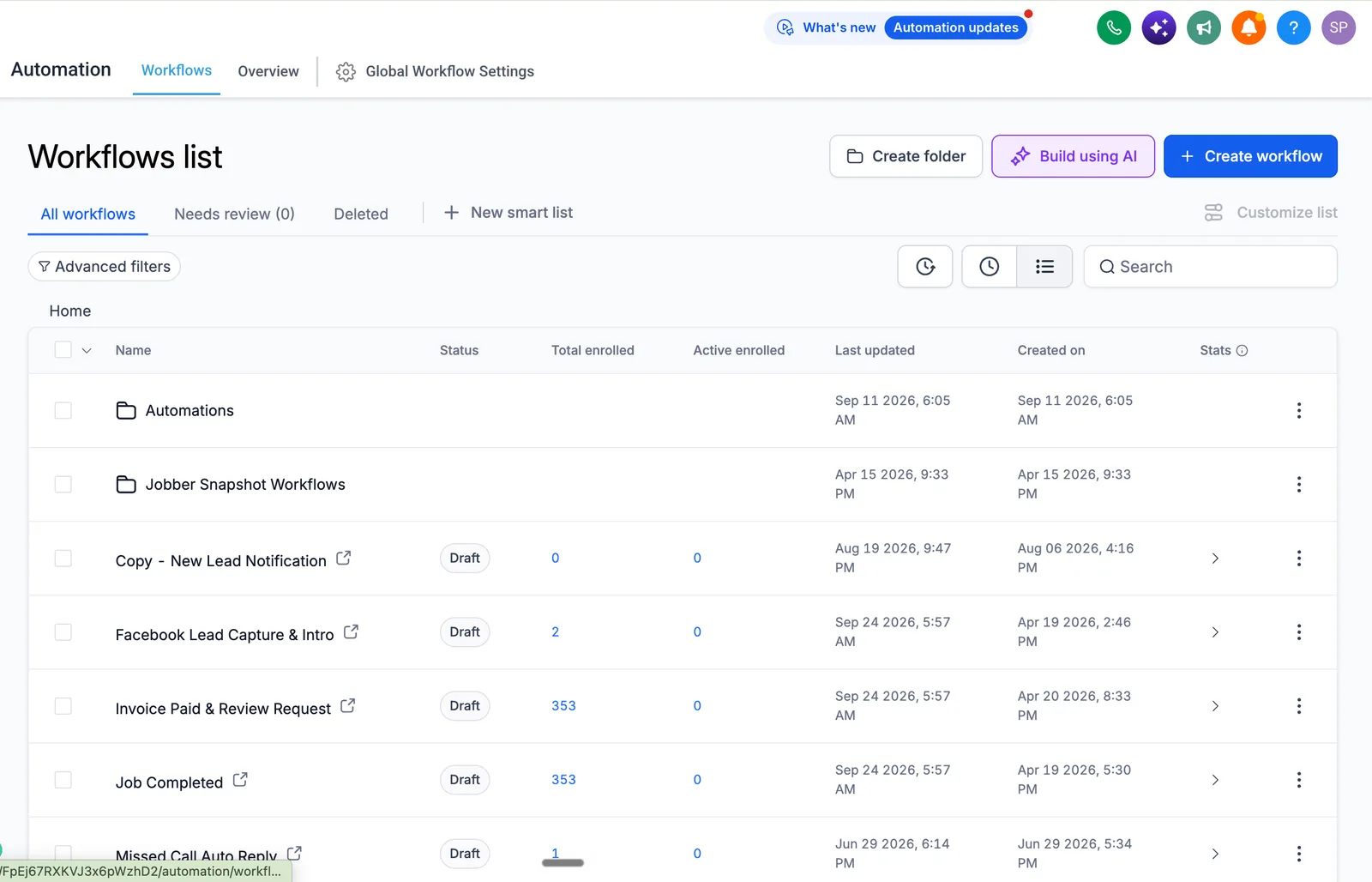
1. Automation > Workflows. The list view first: status, total enrolments, active enrolments. A workflow in Draft with hundreds of past enrolments means a sequence someone thinks is running is not. Then each workflow's trigger and its exit. Two workflows with the same trigger and no exit is the most common cause of a lead being texted twice.
2. Execution Logs and Enrollment History. For the workflows that matter most, speed to lead and reminders, we read the last few runs step by step: which step ran, which was skipped, and why. This is where "the automation does not work" turns into a specific step with a specific cause.
3. Settings > Pipelines and the Opportunities board. Stage names against real decisions, how many opportunities sit in the first stage, whether lost reasons exist. A board where everything is in New Lead tells us the team stopped using it, and usually why.
4. Contacts and Custom Fields. Duplicate rate on phone and email, whether a source field exists and is filled, tags that mean the same thing under three names. Reporting is only as good as these fields.
5. Settings > Phone Numbers and the Trust Center. A2P 10DLC brand and campaign status, which number each workflow sends from, whether missed call text back is on. A pending or rejected registration explains a lot of "texts not arriving" tickets on its own.
6. Settings > Email Services. Whether a dedicated sending domain exists and whether SPF, DKIM and DMARC are verified. Sending from the shared domain is the usual reason email lands in spam.
7. Settings > Calendars. Calendar type, availability, buffers, time zone, sync status per user, which reminder workflow is attached, how no-shows are recorded.
8. Sites > Forms and the chat widget. Which contact field each form field writes to, whether consent language is captured, which workflow the form starts.
9. Integrations and webhooks. Every connection in and out, whether it still fires, and whether anyone wrote it down.
10. Reporting. Whether the dashboard can answer "which source booked the most appointments last month" without someone exporting a spreadsheet.
You leave the call with the findings ranked by impact and a view on whether the account needs fixes or a rebuild. If you want us to do the work, it is quoted in writing as a scoped project or a monthly support plan. If you want to fix it yourself or with someone else, the ranked list is yours to use. Nothing in the account is changed during the audit.
Platform facts are checked against the HighLevel help center.
Source: the rollout plan described in this guide
A walk through your account on the call, covering the ten areas above, with what we find and what to fix first and why. You can act on it with us, with your own team, or with someone else.
The simplest way is to share your screen on the call so we look at the account together. If you prefer, give us user access, ideally admin so we can read workflow logs and settings. We change nothing during the audit.
The audit is part of the 30-minute call. A typical sub-account fits in that time. An agency account with many sub-accounts may need a second call, and we say so on the first one.
Yes, the audit is free and happens on the free 30-minute strategy call. There is no fee and no obligation to hire us afterwards.
No, the audit is read-only: we read workflows, enrolment history, fields, tags, calendars and settings, and report. Any fixes are a separate, scoped piece of work that you approve.
The areas listed above: structure, pipelines, workflows and their status, phone and email setup, registrations, integrations, data hygiene and reporting. We rank the findings by impact so you know what to fix first.
Book the free 30-minute call and we will go through your account together.
Free 30-minute call with a free account audit. Every price is a custom quote in writing. No obligation.

Free GoHighLevel strategy call
Pick a day
You are booked.
With the HighLevel Automation Team
Before the call
Need a different time? Reschedule or cancel.
Free 30-minute call with a free account audit. Every price is a custom quote in writing.