
GoHighLevel emails usually land in spam because of missing or misconfigured SPF, DKIM, and DMARC records, a duplicate SPF record breaking authentication, or a sending domain with no dedicated reputation of its own. Fixing deliverability means correcting your DNS authentication first, then addressing list hygiene and template content that trigger spam filters even after authentication passes.
Quick Verdict: Start by checking whether your emails show "via" a sending-service domain in Gmail, that's a visible authentication failure signal. Fix your SPF, DKIM, and DMARC records in DNS (one record each, correctly aligned to your From-domain), set up a dedicated sending domain and branded tracking link instead of GHL's shared default, and ramp your DMARC policy gradually. Since April 2024, Gmail and Yahoo require this authentication for any bulk sender, so unauthenticated GHL campaigns risk outright rejection as well as spam-folder placement.
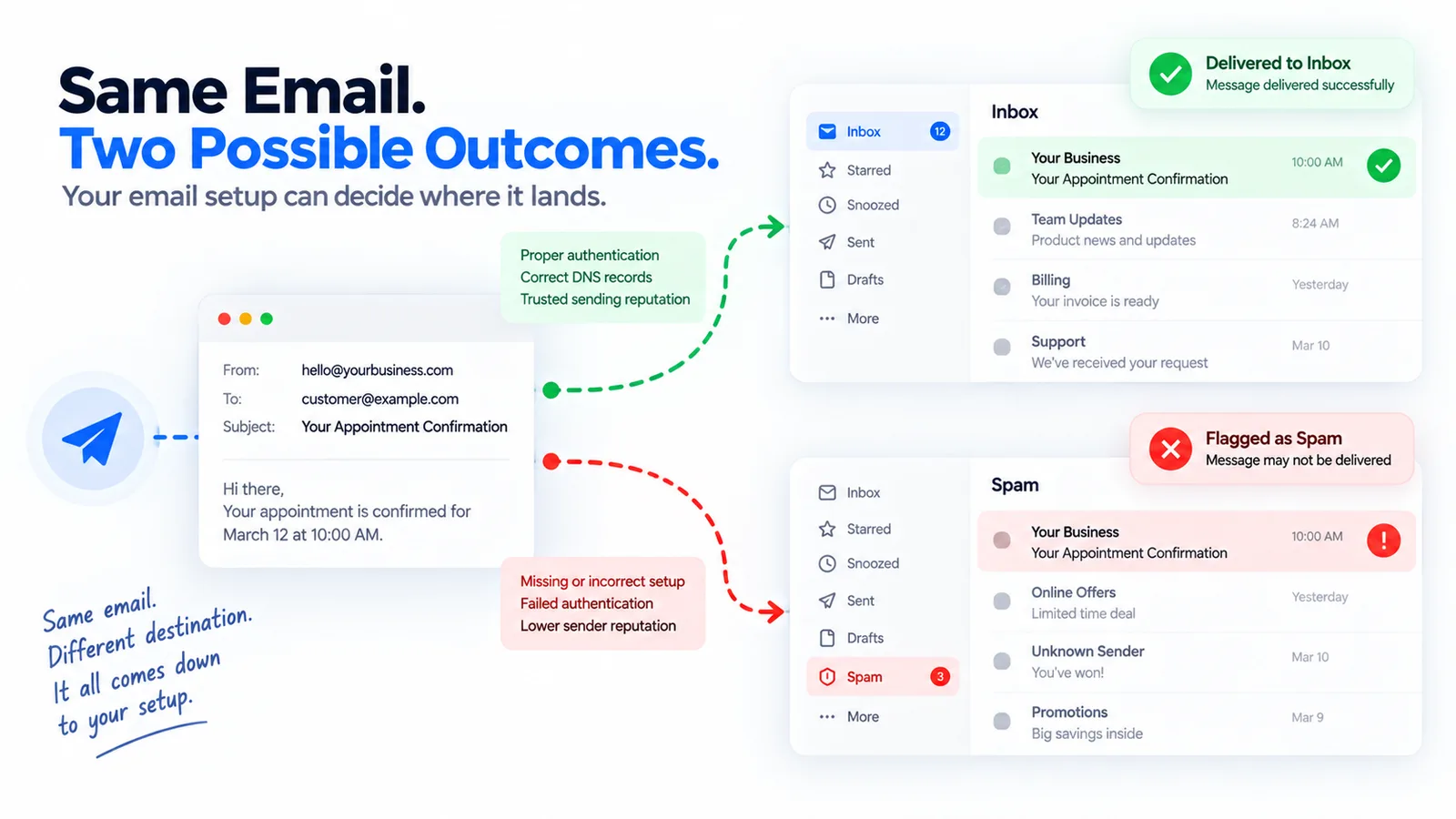
Why GoHighLevel Emails Go to Spam
Most deliverability problems in GoHighLevel trace back to one of a handful of root causes, and they compound. Authentication failures get you flagged by mailbox providers before a single word of your subject line matters. List hygiene and content issues then determine whether you stay flagged even after authentication is fixed.
The regulatory backdrop matters here. Google's email sender guidelines require SPF, DKIM and DMARC (a policy of none is accepted) from anyone sending more than 5,000 messages a day to Gmail accounts, require the From domain to align with the SPF or DKIM domain, and require one-click unsubscribe on marketing mail. Yahoo's sender best practices ask bulk senders for SPF, DKIM, a DMARC policy of at least p=none and a working one-click unsubscribe. Both providers want complaint rates kept low: Google names 0.10% as the target and 0.30% as the limit, Yahoo says below 0.3%. For agencies sending GoHighLevel campaigns on behalf of clients this is the most important deliverability fact: unauthenticated bulk mail risks more than the spam folder. Checked 2026-10-19; the providers change these rules.
Even correctly authenticated senders do not get every message into the inbox, and placement differs by mailbox provider and by your own sending reputation. Google's sender guidelines point senders to Postmaster Tools to watch their domain's spam rate, which is the number to track instead of a general industry average.
- Reach the inbox83
- Do not17
Source: EmailToolTester 2026 study, as cited on this page. A general benchmark, not a GoHighLevel figure
SPF, DKIM, and DMARC: The DNS Records That Control Inbox Placement
Authentication is the foundation. Without correctly configured SPF, DKIM, and DMARC records, mailbox providers have no reliable way to confirm your GoHighLevel emails actually come from you, and they'll route accordingly.
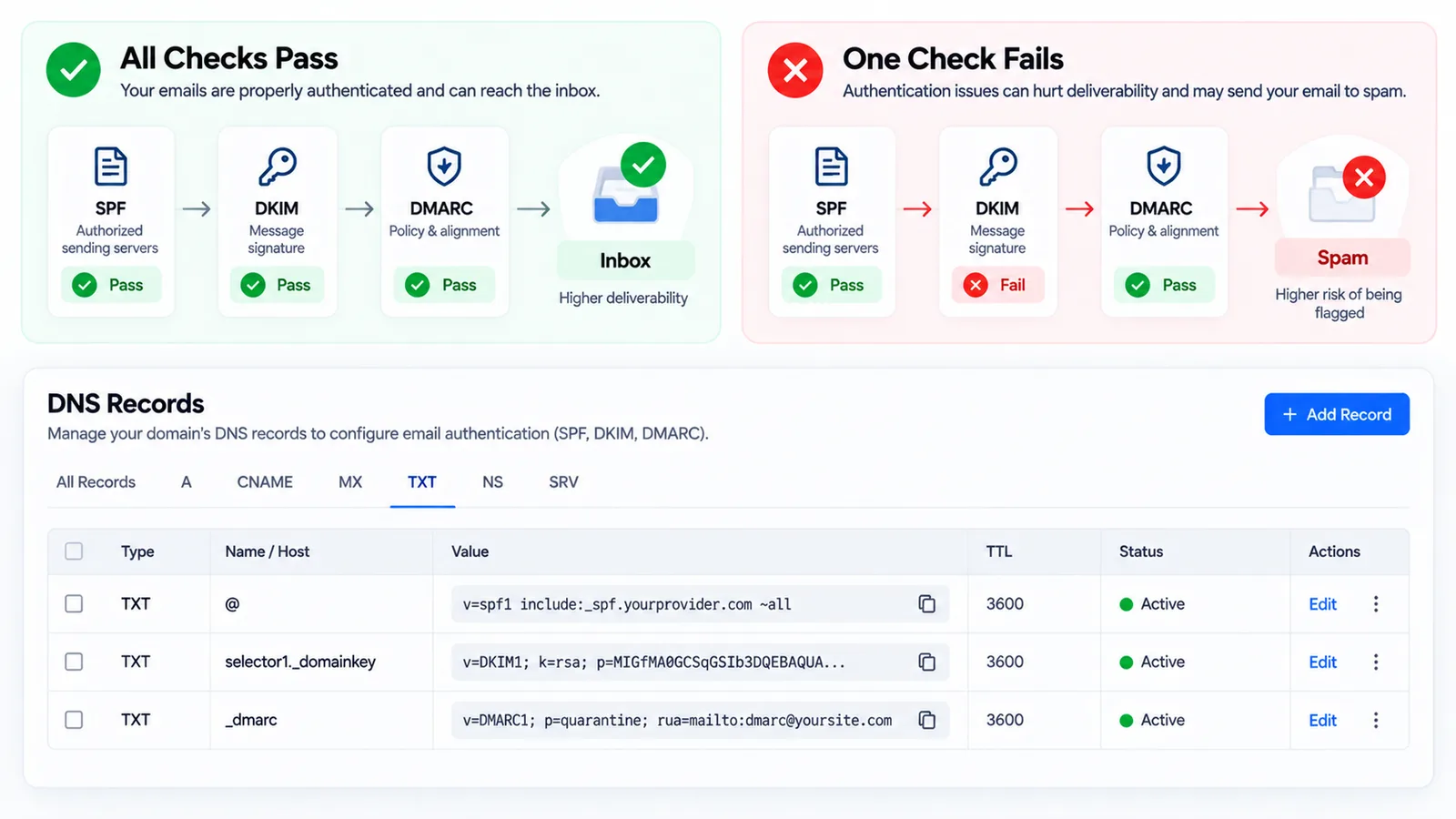
HighLevel maintains an official support article titled "Email Authentication - DMARC", which confirms that DMARC isn't technically required to send email through the platform, but it is required by Gmail and Yahoo policy for any bulk sender. In practice, that makes it required for nearly every agency running GoHighLevel campaigns at scale.
DNS Record Checklist for GoHighLevel Senders
Use this as a copy-paste reference when working with your domain registrar or DNS host. You don't need to be a developer to add these records, most registrars have a simple TXT record interface.
| Record Type | Purpose | Example Value |
|---|---|---|
| SPF (TXT) | Lists which servers are allowed to send email on behalf of your domain | v=spf1 include:_spf.google.com include:sendgrid.net ~all |
| DKIM (TXT) | Attaches a cryptographic signature proving the email wasn't altered in transit and came from an authorized sender | selector._domainkey.yourdomain.com with a public key value provided by GoHighLevel |
| DMARC (TXT) | Tells mailbox providers what to do when SPF or DKIM checks fail, and where to send reports | _dmarc.yourdomain.com → v=DMARC1; p=none; rua=mailto:reports@yourdomain.com |
Two details matter more than the syntax itself. First, you should have exactly one SPF record per domain. Second, your visible From-domain and your DKIM-signing domain need to match, or align through DMARC's relaxed alignment rules, or DMARC checks fail even when SPF and DKIM individually pass.
Duplicate SPF Records: A Common Silent Failure
A duplicate SPF record is one of the most common DNS mistakes agencies make when adding a new sending tool. If your domain already has an SPF TXT record and you add a second one instead of editing the existing one, you create an SPF PermError, a permanent error state that breaks authentication for every sender on that domain, including existing ones.
The fix is straightforward once you know to look for it: open your DNS host, search for TXT records starting with "v=spf1," and confirm there is only one. If you find two, combine every "include:" mechanism from both into a single record and delete the duplicate. Adding GoHighLevel's sending servers to an existing SPF record, rather than creating a new one, is the correct approach for agencies that already send email from other tools on the same domain.
The "Via" Tag: What It Means and How to Fix It
If your GoHighLevel emails show up in Gmail with a "via mail.yourprovider.org" or similar tag next to the sender name, that's a visible signal to recipients that authentication didn't fully pass. A missing or misaligned DKIM signature is a common cause of this tag; Google's sender guidelines require the From domain to align with the SPF or DKIM domain, so check that first. The exact cause can vary by sending configuration.
To confirm whether this is happening to you, send a test email to a Gmail address you control, open the message, click the three-dot menu, and select "Show original." In the raw headers, look for three lines: SPF, DKIM, and DMARC, each should read "PASS." If any of them read "FAIL" or "NEUTRAL," that's your starting point for troubleshooting, and it usually points back to either a missing DKIM record or a From-domain and signing-domain mismatch.
Set Up a Dedicated Sending Domain
Many GoHighLevel accounts start on a shared subdomain or a default tracking link inherited from the platform's out-of-the-box setup. That configuration ties your sender reputation to the sending behavior of every other agency or account sharing that infrastructure. If another sender on the same shared domain gets flagged for spam complaints, your emails can suffer the fallout even though you did nothing wrong.
The standard fix is to configure a dedicated sending domain and a branded tracking CNAME under your own domain, rather than a generic one. This isolates your sender reputation so it reflects only your own sending history, and it also looks more trustworthy to recipients who see links pointing to your actual domain instead of a third-party tracking service.
For the full account setup this fits into, see our GoHighLevel for digital agencies guide. For deliverability guidance on the SMS side, see our guide to fixing A2P 10DLC rejections.
Rolling Out DMARC Without Breaking Delivery
A common mistake agencies make once they understand DMARC is moving too fast to enforcement. Jumping straight to p=reject before confirming every legitimate sending source passes DMARC checks can cause mail to bounce entirely instead of merely landing in spam, which is a worse outcome for your clients.
The safer sequence is to ramp the policy over time:
- p=none, Publish the record and monitor DMARC reports without affecting delivery. This is the minimum required by Gmail and Yahoo's 2024 bulk sender policy.
- p=quarantine, Once reports confirm your legitimate senders (GoHighLevel, any other marketing tools, your own mail server) all pass, move failing mail to spam rather than the inbox as a middle step.
- p=reject, Only after weeks of clean reports showing no legitimate mail failing, move to full rejection of unauthenticated mail claiming your domain.
Skipping straight to reject is the single most common way well-intentioned DMARC setups cause client-facing outages.
List Hygiene and Sender Reputation
Authentication gets your foot in the door. Engagement and list quality determine whether mailbox providers keep letting you through. Sending to unvalidated or non-opted-in contacts, ignoring domain warmup limits when a sending domain is brand new, and continuing to email unengaged contacts all degrade sender reputation over time, even on a fully authenticated domain.
For agencies managing multiple GoHighLevel sub-accounts, this is worth auditing client by client. A single client importing a purchased or scraped list can damage the shared reputation of the sending infrastructure used across your other accounts, depending on how sending domains are isolated.
Workflows that automatically tag and suppress unengaged contacts help here too, if your automations aren't running reliably, check our guide on GoHighLevel workflows not triggering.
Spam Trigger Words to Avoid in GoHighLevel Templates
Even a perfectly authenticated domain can lose inbox placement if engagement drops, and content is one of the biggest levers on engagement-based reputation signals. Certain patterns in subject lines and body copy reliably suppress open rates and trigger spam filter scrutiny, even when SPF, DKIM, and DMARC all pass cleanly.
Common patterns to avoid in GoHighLevel email and SMS templates include:
- Excessive urgency language stacked in a single subject line, such as combining "last chance," "expires today," and "don't miss out"
- ALL CAPS subject lines, which filters and recipients both read as aggressive or spam-like
- Excessive exclamation points, especially more than one per subject line
- Stacked promotional trigger words like "free," "guarantee," and "act now" appearing together in the same message
- Misleading subject lines that don't match the body content, which increase spam complaints even when opened
None of these guarantee spam placement on their own. The risk comes from stacking several of them in the same message, which degrades engagement (opens, clicks, replies) over time. Mailbox providers weigh engagement heavily, so a template that technically passes authentication but consistently gets ignored or reported will still lose inbox placement over repeated sends.
Step-by-Step: Diagnosing Your GoHighLevel Deliverability Issue
- Send a test email to a Gmail address from your GoHighLevel account and open "Show original" to check the raw headers.
- Confirm SPF, DKIM, and DMARC all read PASS. If any fail, that's your priority fix before touching anything else.
- Check your DNS for duplicate SPF records. Search all TXT records for "v=spf1" and confirm there's only one.
- Verify your From-domain and DKIM-signing domain align. Mismatches break DMARC even when SPF and DKIM individually pass.
- Check whether you're on a shared or dedicated sending domain. If it's shared, migrate to a dedicated domain and branded tracking link.
- Review your DMARC policy stage. Confirm you're not sitting at p=reject without weeks of clean p=none/p=quarantine reporting behind it.
- Audit your list for unvalidated or non-opted-in contacts and remove or re-permission them before your next send.
- Review recent templates for stacked spam trigger language in subject lines and body copy.
If you'd rather have this audited for you, contact us for a deliverability review.
Sources and further reading
Checked 2026-10-19 at the time of writing; providers change these rules.
- Gmail Help: Email sender guidelines (5,000-a-day threshold, SPF, DKIM, DMARC, alignment, one-click unsubscribe, spam rate)
- Yahoo Sender Hub: Sender best practices (bulk sender authentication, DMARC minimum, unsubscribe, complaint rate)
- HighLevel: email authentication and DMARC
Frequently Asked Questions
Why are my GoHighLevel emails going to spam even after setting up SPF and DKIM?
GoHighLevel emails can still go to spam because SPF and DKIM passing individually doesn't guarantee DMARC alignment. Your visible From-domain and the domain actually signing DKIM need to align, or DMARC checks fail regardless of SPF and DKIM results. It's also worth checking for a duplicate SPF record, which causes a PermError that breaks authentication entirely even if the record looks correct on its own.
What does "via" mean next to my sender name in Gmail?
It's a visible signal that Gmail couldn't fully verify your message came from your domain. A missing or misaligned DKIM signature is a common cause, and Google requires the From domain to align with the SPF or DKIM domain, though the exact cause depends on your sending configuration.
Do I really need DMARC to send from GoHighLevel?
HighLevel's official support documentation on "Email Authentication - DMARC" confirms DMARC isn't technically required to send through the platform. However, Gmail and Yahoo have required it since April 2024 for any sender emailing roughly 5,000+ messages per day to personal accounts, which covers most agencies running client campaigns.
How many SPF records should my domain have?
Your domain should have exactly one SPF record. If you find more than one SPF TXT record on your domain, you have a duplicate that's causing a PermError. Combine all sending sources into a single record rather than adding a second one.
Should I move straight to a DMARC p=reject policy?
No, start at p=none to monitor without affecting delivery, confirm every legitimate sending source passes, move to p=quarantine, and only shift to p=reject after weeks of clean reports. Jumping straight to reject can cause legitimate mail to bounce entirely.
Does using GoHighLevel's default sending domain hurt deliverability?
Using GoHighLevel's default sending domain can hurt deliverability. A shared subdomain or default tracking link ties your sender reputation to other accounts' sending behavior on the same shared infrastructure. Setting up a dedicated sending domain and branded tracking CNAME isolates your reputation to your own sending history.
Can spam trigger words alone cause my emails to go to spam?
Rarely on their own, but stacking multiple trigger patterns, such as ALL CAPS subject lines combined with excessive urgency language and multiple exclamation points, degrades engagement over time. Since mailbox providers weigh engagement heavily, low open and click rates can push otherwise authenticated mail into spam.
How do I check if my GoHighLevel emails are actually authenticated?
Send a test email to a Gmail address, open the message, click "Show original," and review the raw headers for SPF, DKIM, and DMARC results. All three should read PASS.
Get Your GoHighLevel Email Deliverability Fixed
If your open rates have dropped, your emails show a "via" tag, or you're not sure whether your SPF, DKIM, and DMARC records are configured correctly, a DNS audit is the fastest way to find out. Contact us for a review of your current authentication setup and a prioritized list of fixes.