
This GoHighLevel case study shows how our team set up the CRM for Silicon Valley Nutrition and Performance (SVNP), a personal training and nutrition gym in Santa Clara, California: five lead sources tagged at the door, an owner on every lead, and a pipeline built around the free consultation. On 13 October 2026 the account held 2,088 contacts and 65 opportunities from the previous 30 days, worth about $17,000, with 4 closed won worth $3,480. This page is written as a build log. For each part of the account it records the decision we made, why, and the GoHighLevel setting that carries it, so another gym or consult-led business can copy the reasoning, not only the screenshots.
The build at a glance
- Client: SVNP, personal training and nutrition coaching on El Camino Real, Santa Clara, serving Sunnyvale, Cupertino and San Jose.
- Sources wired in: Facebook lead ads, Google lead form ads, Yelp, the website form and existing members from Mindbody.
- Built in GoHighLevel: one capture and tagging workflow, a Facebook lead workflow, an 11-stage pipeline, and two follow-up sequences split by coach.
- Numbers: read from SVNP's own account on 13 October 2026. They describe the account on that date. There is no before-and-after comparison and no projection on this page.
What problem was the GoHighLevel build solving?
SVNP sells programs through a free consultation, and its enquiries arrived in five different places, so the risk was simple: a lead that nobody owned and nobody answered. The build had to put every enquiry in one list, give it an owner and a stage, and keep following up after a first "not now".
A consult-led gym loses money in three predictable spots, and we designed against each one:
| Where leads leak | What it looks like in a gym | What the account does about it |
|---|---|---|
| Between apps | A Yelp message, a Facebook form and a Mindbody member each live in a different inbox | Every source lands in one contact list with a source tag |
| Between people | Two coaches each assume the other replied | Each lead is assigned to one coach as soon as it arrives |
| After the first reply | Someone says "maybe next month" and is never contacted again | A Cold stage with its own follow-up, split by coach |
The two coaches who own leads are named on SVNP's public site: Del Adzimah (personal training) and Kevin Rogers (registered dietitian). Their names appear in the workflow branches, so we name them here too.
Design decision 1: tag the source before anything else runs
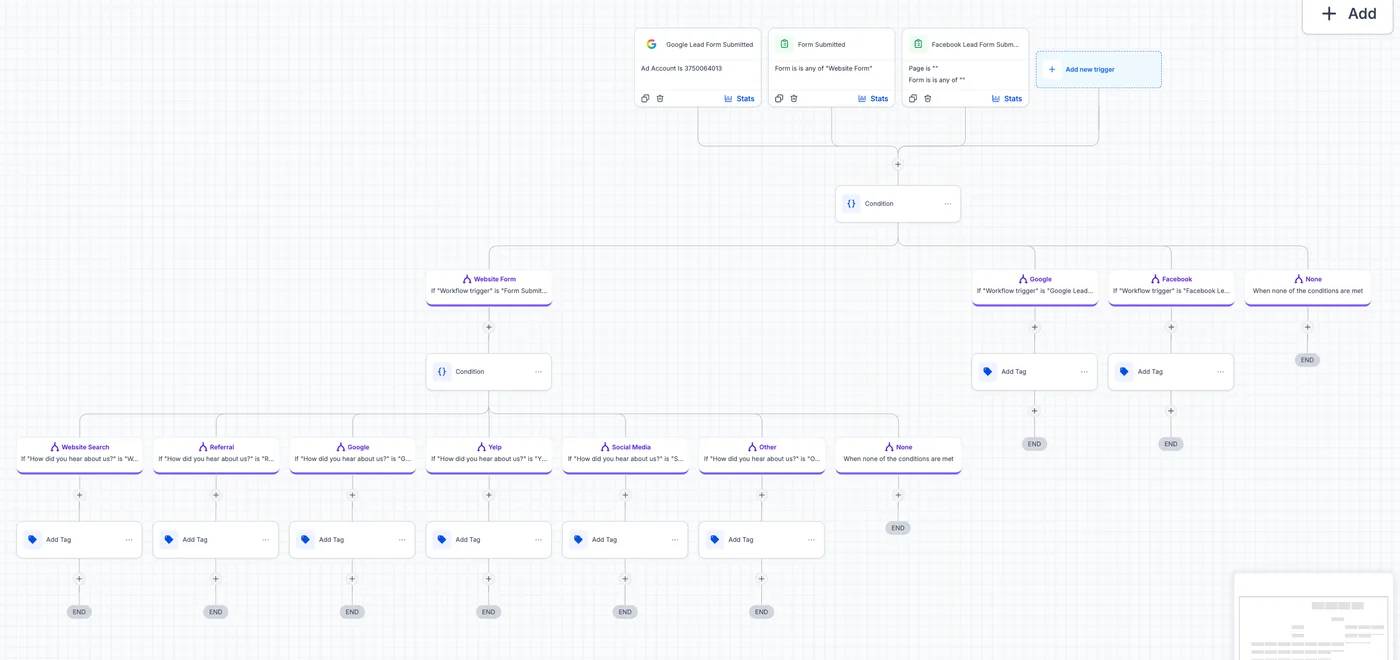
The first step for every new contact is a source tag, before any message, opportunity or owner, so every later report can split results by where the lead came from. If tagging happens later in the chain, a failed step leaves leads with no source and the ad report quietly goes wrong.
One capture workflow listens to three triggers at once (Google lead form, website form and Facebook lead form), and a condition splits them. Facebook and Google leads get their tag straight away. Website leads pass through a second condition that reads the form's "How did you hear about us?" answer.
| Source | Trigger or route into the account | Tag written |
|---|---|---|
| Facebook lead ads | Facebook lead form trigger | source-facebook |
| Google lead form ads | Google lead form trigger | Google source tag |
| Yelp | Yelp leads arrive as contacts | source-yelp |
| Website form | Form trigger, then the "How did you hear about us?" answer | website search, referral, Google, Yelp, social media or other |
| Existing members | Mindbody sync | sync-mindbody |
The same pattern is on our CRM implementation page as a default for every build: one entry workflow per account, tag first, act second.
Design decision 2: create the opportunity before assigning the coach
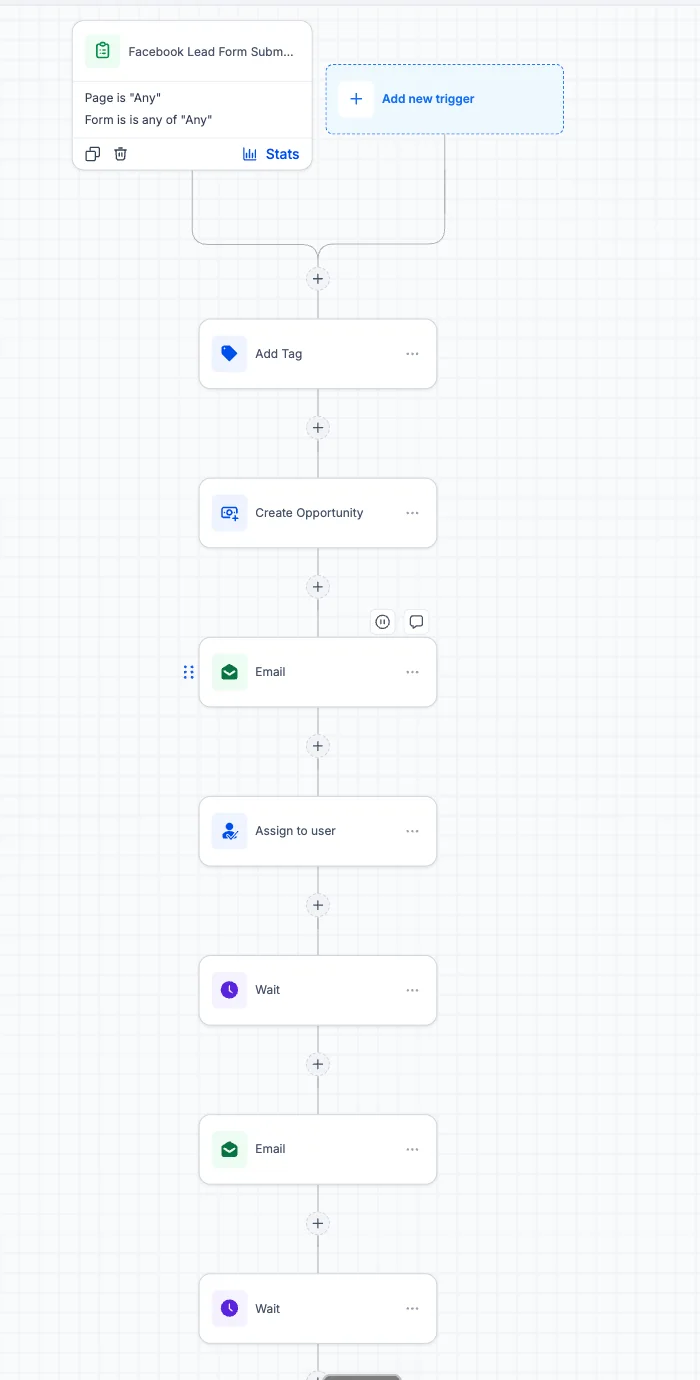
In the Facebook lead workflow the order is tag, create opportunity, first email, assign owner, wait, follow up. Creating the opportunity first means a new lead appears in the pipeline even when no coach is free to pick it up, and the first email goes out with no wait step, while the person still remembers filling in the form.
The reverse order is a common failure: assign first, then create the opportunity in a later step. When the assignment fails (a user removed, a round robin with nobody available), the opportunity is never created and the lead is invisible. Putting the pipeline record first removes that failure mode. Replies then land in GoHighLevel's team inbox next to the contact's tags, owner and stage, so either coach can pick up the thread with the full history.
Design decision 3: name pipeline stages after what the lead has done
The "SVNP Master Pipeline" stages describe the lead's state, not a task for staff: new lead, attempted contact, consult booked, consult completed, warm, cold, closed won, closed lost. A stage named as a state can be moved by an event (a booking, a reply, a payment), so the board stays true without anyone dragging cards. Our guide to GoHighLevel pipeline mistakes explains why task-named stages drift.
| Stage | Meaning | Opportunities, 30 days to 13 Oct 2026 |
|---|---|---|
| New Lead | Arrived, not contacted yet | 5 |
| Attempted Contact | First message sent, no answer | 14 |
| Consult Booked | Free consultation on the calendar | 3 |
| Consult Completed | Met a coach, deciding | 1 |
| Warm | Interested, likely to buy | 4 |
| Cold | Went quiet or said "not now" | 27 |
| Closed Won | Bought a program | 4 ($3,480) |
| Closed Lost | Said no | 7 |
The pipeline also has B2B, Won and Lost/abandoned stages that held nothing in this window, so they are left out. The 65 opportunities add up to about $17,000 of pipeline value as shown on SVNP's dashboard.
Source: SVNP's GoHighLevel dashboard, read 13 October 2026; 65 opportunities in total
Design decision 4: give the Cold stage its own workflow
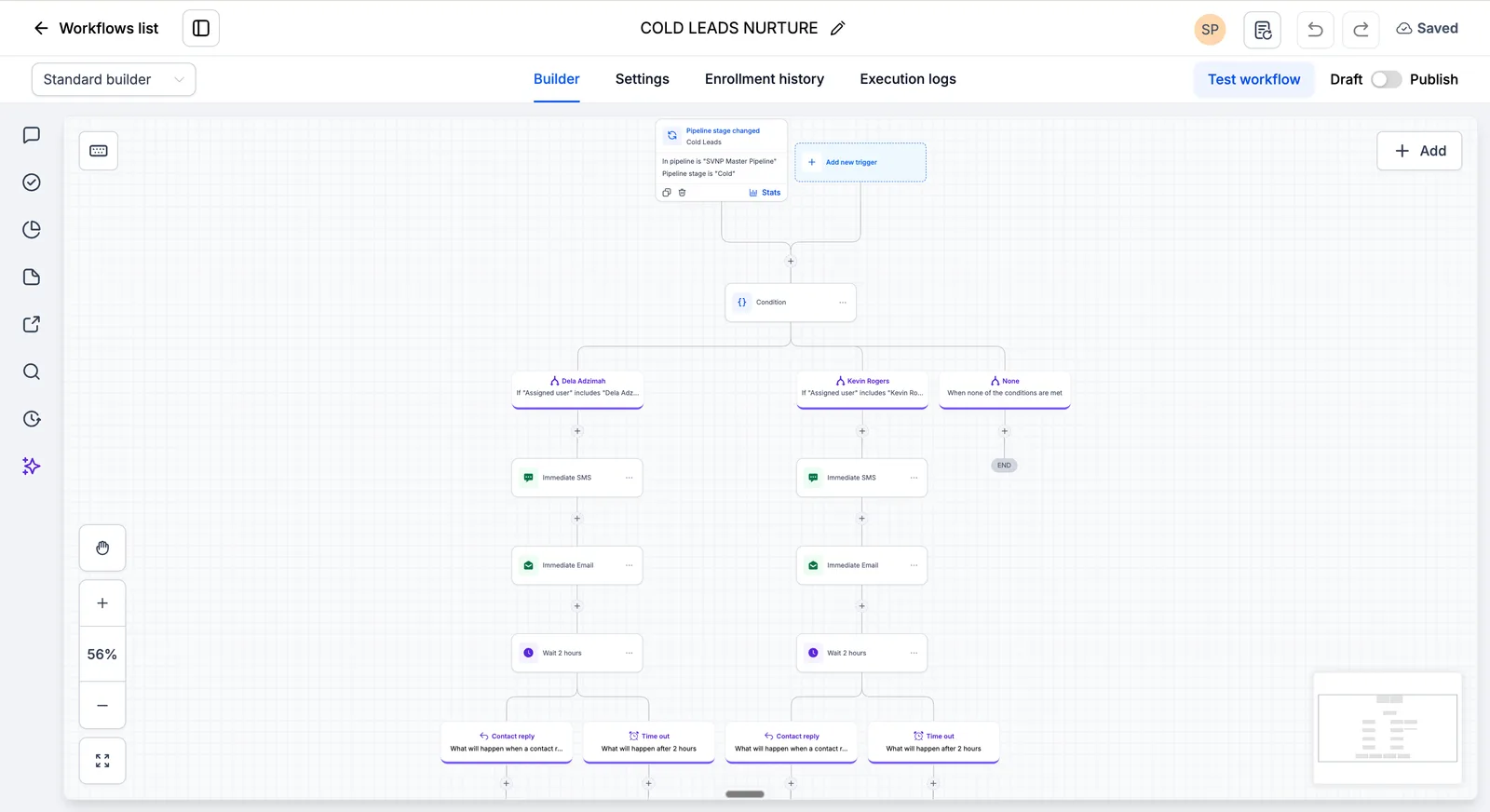
Cold was the largest stage, 27 of 65 opportunities or 42% of the 30-day pipeline, so it got its own workflow instead of a generic nurture. These are people who already raised a hand once; a system that stops at the first "not now" throws away the most expensive leads the ads bought.
- Trigger: the pipeline stage changes to Cold in the SVNP Master Pipeline.
- Branch by owner: one path for Del's leads, one for Kevin's, and an end step for anything unassigned, so a message never arrives from the wrong coach.
- Send: an SMS and an email on the owning coach's path.
- Wait for a reply: two hours, using the Wait action's reply condition, which holds a contact until they reply or a timeout passes (HighLevel help: Wait action).
- Stop on reply: if the person answers, the automation ends and the coach takes the conversation.
- Otherwise: a second SMS, then a 24-hour wait before the next step.
A slower long-term nurture uses the same split by coach: an SMS, seven days, an email, seven days, another SMS. When the screenshots were taken on 13 October 2026, both follow-up sequences were built but still in Draft, not switched on. We show them as part of the build, not as a source of results.
What do the SVNP numbers prove, and what don't they?
They prove the account works as one source of truth: 2,088 contacts, 65 opportunities and about $17,000 of pipeline in one 30-day window, each lead tagged by source and owned by a coach. They do not prove a lift in sales, because SVNP has no published before-and-after baseline, and the two follow-up sequences were not yet live.
| Measured on 13 Oct 2026 | Not measured |
|---|---|
| Contacts in the account (2,088) | Sales before the build |
| Opportunities by stage, last 30 days (65) | Reply time before and after |
| Pipeline value (about $17,000) and closed won (4, $3,480) | Results from the Cold and nurture sequences, which were in Draft |
If you are comparing providers, ask every one of them, us included, which of their numbers are snapshots and which are before-and-after results. Our case study library labels each figure the same way.
What would we build next in this account?
The next three steps are switching on the two follow-up sequences, adding consult reminders and no-show recovery on the booking calendar, and a monthly report of Cold-stage replies by coach. Each one acts on a stage that already exists, so none needs a rebuild.
- Publish the Cold and long-term sequences after a test run with test contacts on each coach's path, reading the Execution Logs line by line.
- Consult reminders and no-show recovery: a confirmation on booking, a reminder the day before and a reschedule link if the consult is missed, the pattern on our GoHighLevel for fitness studios page.
- A Cold-stage reply report so the gym can see whether the follow-up earns its place.
How to copy this GoHighLevel setup for your gym
Copy the order, not the template: list every place leads arrive, tag each at entry, create the opportunity before the owner, name stages as states, and give the biggest stuck stage its own workflow. That order works for any consult-led business, from gyms to clinics.
- List every lead source, including review sites and the booking or membership system.
- Build one capture workflow that writes a source tag first.
- Create the opportunity, send the first reply, then assign an owner.
- Name pipeline stages after what the lead has done.
- After 30 days, find the largest stage that is not Closed and give it its own follow-up.
- Test each path with test contacts before publishing, and keep the test log.
Want this built and tested in your account? Our GoHighLevel setup agency service covers the whole build from $500, and the first call and audit are free.
Sources
Account figures were read from SVNP's GoHighLevel account on 13 October 2026. Platform behaviour was checked on 31 October 2026.
- Silicon Valley Nutrition and Performance: services and coaches
- HighLevel help center: Wait action, including wait for reply with a timeout
- HighLevel pricing: the subscription is billed by HighLevel, separate from our build fee
Frequently asked questions about this GoHighLevel gym case study
Can GoHighLevel work as a CRM for a gym?
Yes. In this build GoHighLevel is the gym's CRM: it collects leads from Facebook, Google, Yelp, the website and Mindbody, tags each by source, assigns a coach, runs the pipeline and sends follow-up by text and email. Class booking and memberships stayed in Mindbody, which syncs members into the account.
Does GoHighLevel connect to Mindbody?
In SVNP's account, existing Mindbody members arrive as contacts with a sync-mindbody tag, so the coaches see members and new leads in one list. How the sync is set up depends on the Mindbody plan and the connector used, so we confirm it on the audit call before quoting.
Why is the Cold stage the biggest part of the pipeline?
Because fitness decisions get postponed. In the 30 days to 13 October 2026, 27 of SVNP's 65 opportunities were in Cold, 42% of the pipeline. That is normal for a consult business, and it is why the Cold stage has its own follow-up workflow split by coach.
Are these results or a snapshot?
A snapshot. Every figure on this page was read from SVNP's GoHighLevel account on 13 October 2026 and describes the account on that date. There is no before-and-after comparison, and the two follow-up sequences were built but still in Draft when the figures were read.
How long does a gym CRM build like this take?
A single-location build with one sales process usually takes three to five weeks with us, including testing and training. Connecting a membership system such as Mindbody, or moving data from another CRM, can add time, and we put the timeline in the written quote.
What does a GoHighLevel build like SVNP's cost?
Basic setup and single-location builds with us run $500 to $4,000, depending on the number of sources, workflows and integrations. The HighLevel subscription is billed by HighLevel separately. The call and account audit are free, and the price is fixed in writing before work starts.