
This case study shows a GoHighLevel Jobber integration our team built for Noma Home Pros, a handyman and property maintenance company in Champaign, Illinois. Jobber kept the jobs, quotes and invoices; GoHighLevel took over the customer side: a review request after every paid job, a text back on every missed call, Facebook lead capture and a fully registered phone line. By 13 October 2026 the review request workflow had run 353 times since April 2026. The page is organised by the questions a trades business asks before connecting the two tools: which system does what, which Jobber event should trigger follow-up, what the phone line needs, and what the run counter does and does not mean.
The build at a glance
- Client: Noma Home Pros, handyman and property maintenance for homeowners, landlords and property managers in Champaign, Urbana, Savoy, Mahomet, Homer and nearby towns.
- Tools kept: Jobber for quotes, scheduling, visits and invoices.
- Built in GoHighLevel: the Jobber connection, Job Completed and Invoice Paid & Review Request workflows, Missed Call Auto Reply, Facebook Lead Capture & Intro, source tags, the social planner and the phone registrations.
- Numbers: read from Noma's own account on 13 October 2026: 353 review workflow runs, 93 contacts, all four phone registrations approved. No before-and-after comparison is published.
Which jobs stay in Jobber and which move to GoHighLevel?
In this GoHighLevel Jobber integration, Jobber runs the work and GoHighLevel runs the conversation. Nothing that already worked in Jobber was rebuilt: the crew kept quoting, scheduling and invoicing where they were used to it, and GoHighLevel picked up the events that need a message to a customer.
| Job | Where it lives | Why |
|---|---|---|
| Quotes, scheduling, visits, invoices | Jobber | Field service software built for crews; switching would retrain the team for no gain |
| Review requests after a job | GoHighLevel | Triggered by a Jobber event, sent by text and email, logged on the contact |
| Missed calls and new enquiries | GoHighLevel | Phone system, text back and lead capture in one inbox |
| Facebook and Instagram posts | GoHighLevel social planner | One login for posts, leads and replies |
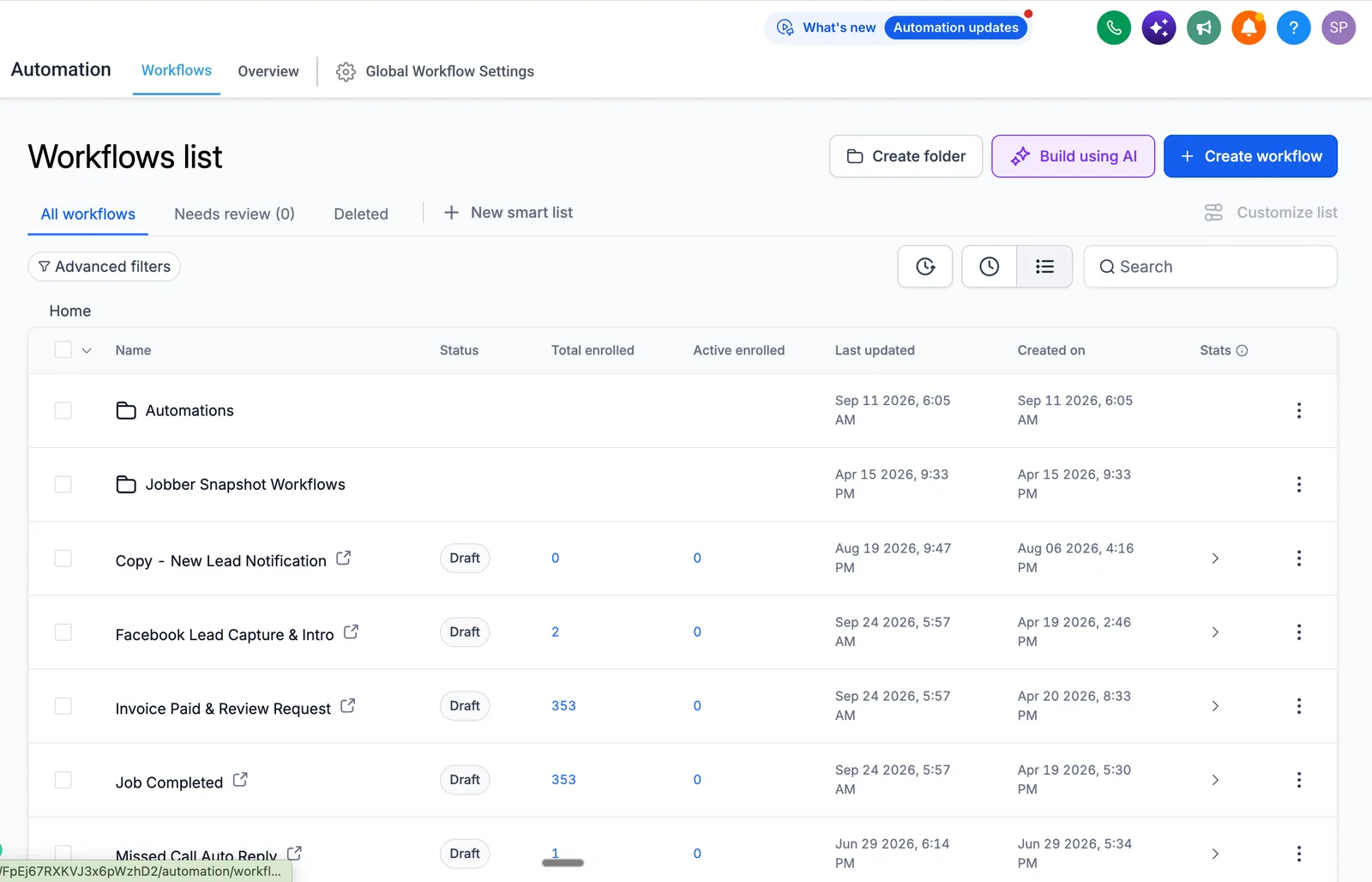
Jobber and HighLevel have an official integration. HighLevel's help article describes the client and contact sync and a snapshot of prebuilt workflows and message templates (HighLevel help: integrate Jobber), and Jobber's September 2025 product update describes job information flowing between the two (Jobber product update). The "Jobber Snapshot Workflows" folder in Noma's account is that snapshot, installed on 15 April 2026. We built Noma's own workflows on top of it.
- 15 Apr 2026Jobber snapshot installed
- 19-20 AprJob, review and Facebook lead workflows
- 29 JunMissed Call Auto Reply
- 11 SepAutomations folder added
- 13 Oct 2026Snapshot: 353 review workflow runs
Should a review request trigger on job completed or invoice paid?
Trigger it on the event that means the customer is happy and the work is done. For a business that bills after the visit, that is invoice paid; for one that takes payment up front, it is job completed. Noma's account has both workflows, so the rule follows how the job is billed instead of a fixed date.
- Job Completed (created 19 April 2026) runs when a job is marked complete in Jobber.
- Invoice Paid & Review Request (created 20 April 2026) waits for the payment, then sends the review request.
Jobber's own community shows why the choice matters: when Jobber's built-in requests went out only on invoice paid, customers who prepaid could get a review link before the work was done, and users asked for a job-completed trigger (Jobber community thread). Building the trigger in GoHighLevel lets you pick per job type. Our page on GoHighLevel workflow automation covers event-based triggers in general.
What does "353 runs" actually measure?
It counts how many times each review workflow ran between April and September 2026, as shown in the workflow list on 13 October 2026. It is not the number of reviews posted and not the number of customers: the account held 93 contacts that day, and one customer with several jobs enrols once per job.
| Figure on 13 Oct 2026 | What it is | What it is not |
|---|---|---|
| 353 runs, Job Completed | Times the workflow started from a completed job | Unique customers |
| 353 runs, Invoice Paid & Review Request | Review requests triggered by a paid invoice | Reviews received |
| 93 contacts | Contacts in the CRM that day | All customers ever served |
These first versions of the workflows were switched to Draft on 24 September 2026, after an Automations folder was added to the account on 11 September, so 353 is the record of what they ran from April to September. If you hire anyone for a build like this, ask them to label every number this way. Ours are labelled the same way across the case study library.
How are missed calls and new leads handled?
A missed call gets an automatic text back, a Facebook lead gets an intro message the moment it arrives, and every contact is tagged by where it came from. For a handyman business the phone is the main channel, so a caller with a leak hears back before ringing the next name on the list.
- Missed Call Auto Reply (created 29 June 2026) texts the caller when nobody picks up. How we set it up is on our missed call text back page.
- Facebook Lead Capture & Intro (created 19 April 2026) brings lead form contacts in and sends the first message.
- Source tags mark Google Business Profile leads (source-gbp) and website leads (source-website), and a contacted tag shows who has already had a reply.
What does the phone line need before texts and calls go out?
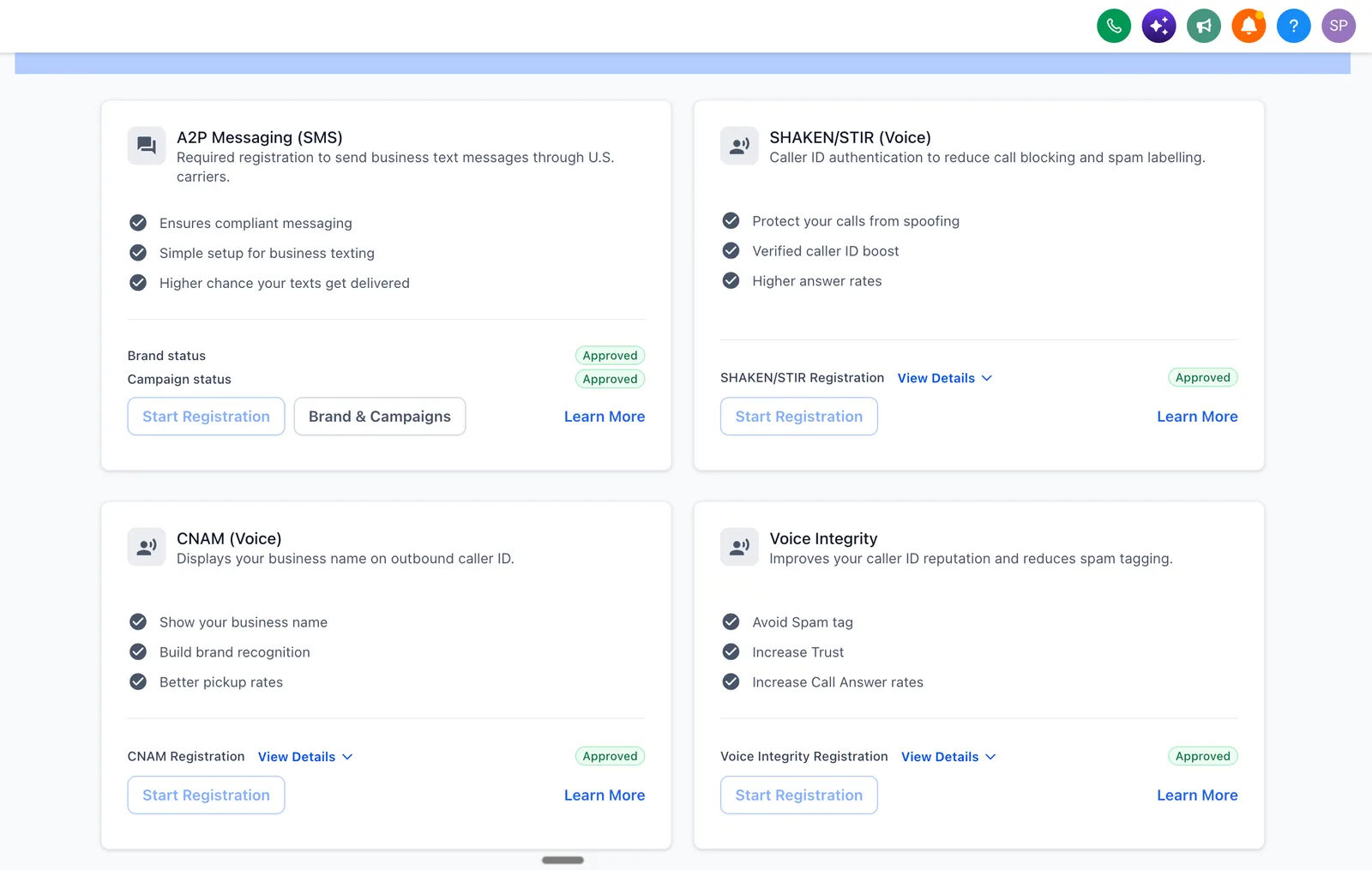
In the US, business texts from a local number need A2P 10DLC registration or carriers can filter them, and caller ID registrations make outgoing calls more likely to be answered. Noma's account had all four approved on 13 October 2026, which is the launch checklist we use for any trades account.
| Registration | What it does | Status, 13 Oct 2026 |
|---|---|---|
| A2P messaging, brand and campaign | Registers the business and its texting use case with US carriers | Approved |
| SHAKEN/STIR | Authenticates caller ID against spoofing | Approved |
| CNAM | Shows the business name on outgoing calls | Approved |
| Voice Integrity | Improves caller ID reputation and reduces spam labels | Approved |
Without the A2P approval, the missed-call text and the review request are the messages most likely to be filtered. If a registration comes back rejected, our guide to A2P 10DLC rejections lists the usual reasons and fixes.
In what order was the Noma build done?
The review workflows went first, in April 2026, because they work on jobs that are already happening and need no new lead flow. Missed-call handling followed in June, social posting ran through the summer, and an Automations folder was added in September.
| Date | Step |
|---|---|
| 15 Apr 2026 | Jobber snapshot installed: integration and prebuilt workflows |
| 19 to 20 Apr 2026 | Job Completed, Invoice Paid & Review Request and Facebook Lead Capture workflows built |
| 29 Jun 2026 | Missed Call Auto Reply added |
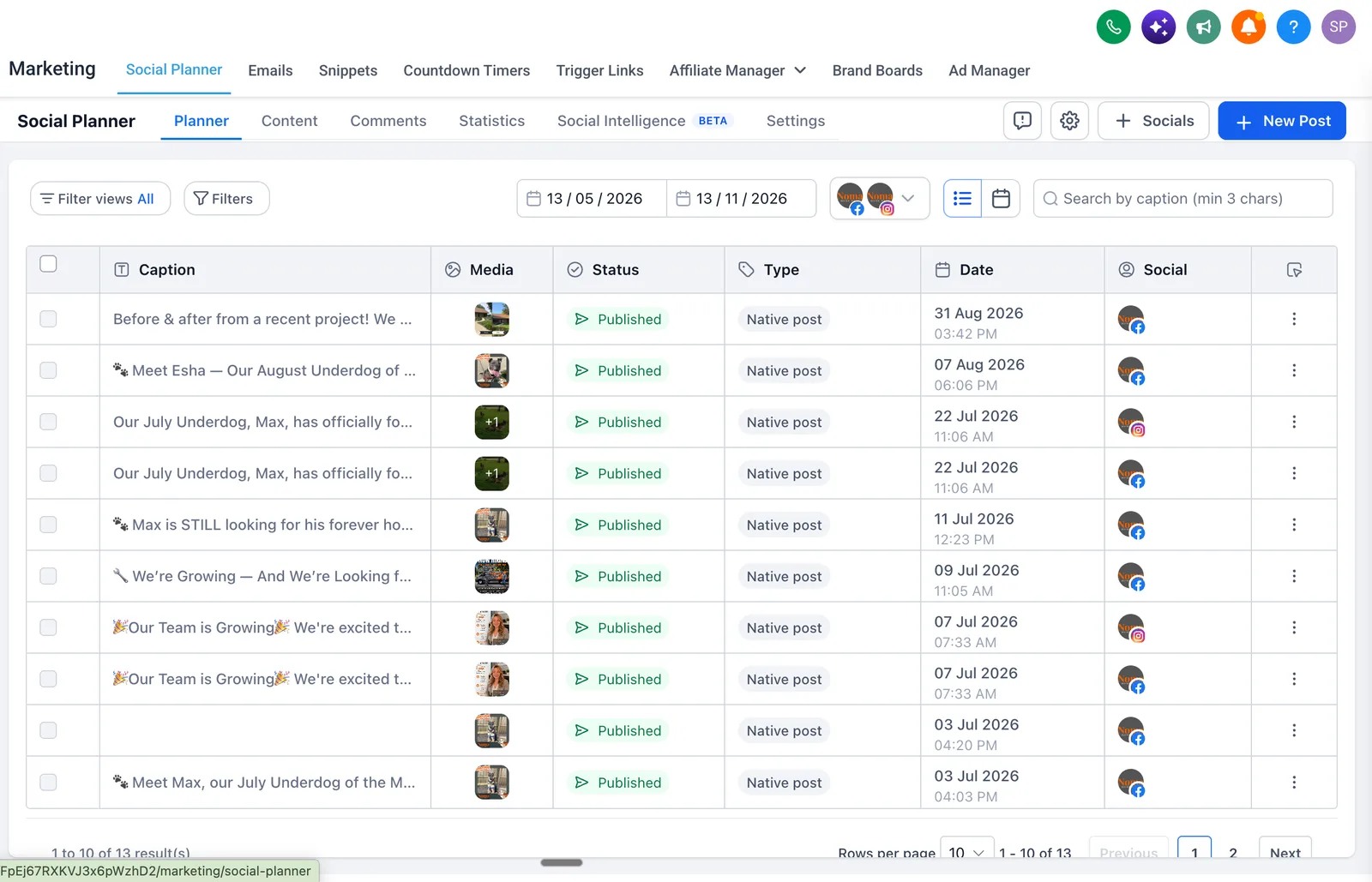
| 31 Aug 2026 | 13 posts published on Facebook and Instagram from the social planner |
| 11 Sep 2026 | Automations folder added; first workflow versions moved to Draft on 24 September |
| 13 Oct 2026 | Account snapshot read for this page |
The dates come from the created and updated columns in Noma's GoHighLevel workflow list. The 13 posts in the planner by 31 August were mostly before-and-after project photos, hiring posts and a monthly "Underdog" post about a dog looking for a home.
How to connect Jobber to GoHighLevel for your trades business
Keep Jobber for the work, install the official integration, build your own follow-up workflows beside the snapshot, register the phone line before sending, and label every number you report. Those five steps cover most handyman, cleaning, HVAC and plumbing businesses that already run on Jobber.
- Connect Jobber in GoHighLevel's integrations and check that clients sync as contacts.
- Install the Jobber snapshot, then build your own workflows in a separate folder.
- Choose the review trigger by how you bill: invoice paid or job completed.
- Add missed call text back and lead capture for every source, each with a source tag.
- Register A2P, SHAKEN/STIR, CNAM and Voice Integrity before the first text goes out.
- Test each workflow with a test job and a test contact, and read the Execution Logs.
Want it set up and tested for you? Our GoHighLevel setup agency service builds and hands over the whole account, with the price agreed in writing first. More home-service patterns are on our industries page.
Sources
Account figures were read from Noma Home Pros' GoHighLevel account on 13 October 2026. Integration documentation was checked on 31 October 2026.
- Noma Home Pros: services and service area
- HighLevel help center: how to integrate Jobber with HighLevel
- Jobber product updates: sync jobs and marketing with the HighLevel integration (September 2025)
- Jobber community: review requests triggered when the job is complete
Frequently asked questions about the GoHighLevel Jobber integration
Does GoHighLevel integrate with Jobber?
Yes. HighLevel and Jobber have an official integration that syncs Jobber clients into GoHighLevel as contacts and comes with a snapshot of prebuilt workflows and message templates. Jobber's product update from September 2025 also describes job information flowing between the two tools.
Do I have to stop using Jobber if I use GoHighLevel?
No. In Noma's build, Jobber still runs quotes, scheduling, visits and invoices. GoHighLevel handles the customer messages around the job: review requests, missed call text back, lead capture and social posts. The two tools share client records through the integration.
How do I send a review request after a Jobber job is done?
Build a GoHighLevel workflow triggered by a Jobber event and end it with the review request. Use invoice paid if you bill after the visit, or job completed if customers pay up front, so the link never arrives before the work is finished. Test it with a test job first.
Is 353 the number of reviews Noma received?
No. 353 is the number of times the review request workflow ran between April and September 2026. GoHighLevel's counter counts workflow runs, not reviews posted and not unique customers. The account held 93 contacts on 13 October 2026.
Why do texts from a GoHighLevel number need A2P registration?
US carriers require business texts sent from local 10-digit numbers to be registered under A2P 10DLC. Unregistered traffic can be filtered or blocked, which would stop missed-call texts and review requests from arriving. Noma's brand and campaign were approved, along with SHAKEN/STIR, CNAM and Voice Integrity.
How much does a GoHighLevel Jobber build cost?
A single-location build like this falls in our basic setup range of $500 to $4,000, depending on the number of workflows, lead sources and phone registrations. HighLevel and Jobber subscriptions are billed by those companies separately. The first call and account audit are free.