Who is the CEO of GoHighLevel?
Shaun Clark is the CEO of GoHighLevel and a co-founder of HighLevel. Who the other founders are, where the company is based and what we could not verify.
Read the answer →GoHighLevel implementation done properly: we build the pipelines, calendars and workflows that answer every lead and book the appointment, test each one, train your team and keep the account running after launch.
We fix the system.
GoHighLevel is one account that holds the contact record, the pipeline, the calendars, the phone number, the email sending domain and the workflows that connect them. Here is what happens to one lead when the account is built properly, and where each piece is configured.
A Facebook lead form, a website form, a Google Business Profile call or the chat widget creates or updates one contact. The source is written to a field, so later you can ask which channel actually books appointments. Duplicates are merged on phone and email, not left as three records of the same person.
Where it lives: Contacts, Sites > Forms, Settings > Integrations (Facebook, Google), Settings > Phone Numbers.
The workflow creates an opportunity in New Lead with the source and the location saved on it. The pipeline stages match real decisions in your business (contacted, qualified, booked, showed, won), so the board tells the truth without anyone cleaning it up on Friday.
Where it lives: Settings > Pipelines; the Create/Update Opportunity action inside Automation > Workflows.
The lead gets a short text and an email within a minute, from your own number and your own sending domain. That only works if the A2P 10DLC brand and campaign were registered and SPF, DKIM and DMARC were set on the domain. Skip that and the messages are filtered or never leave.
Where it lives: Settings > Phone Numbers > Trust Center (A2P), Settings > Email Services (dedicated domain); Send SMS and Send Email actions.
A second touch after two hours, a call task for a person the next morning, another text on day two. Each message checks whether the lead already replied or booked and stops if so. Missed calls get a text back automatically, so a ring-out after hours is still a conversation by morning.
Where it lives: Wait, If/Else and Customer Replied steps in the workflow; Missed Call Text Back under Settings > Phone Numbers.
Replies land in Conversations against the contact, whatever channel they came from. If you use Conversation AI or a Voice AI agent, it answers from your own knowledge base, books from the real calendar and writes what it learned back to the contact fields. It does not run in a separate chat tool nobody checks.
Where it lives: Conversations; AI Agents and Voice AI under the AI menu; the Appointment Booking action.
Each person or room has a calendar with its own availability, buffers and time zone. A booking changes the opportunity stage, sends a confirmation, then reminders at 24 hours and 1 hour. A reschedule moves the reminders with it. A no-show starts its own short recovery sequence.
Where it lives: Settings > Calendars; Appointment Status trigger; a separate Appointment No-Show workflow.
When the opportunity is marked won or the appointment is marked showed, a review request is sent the same evening with your Google review link. The contact is tagged as a customer so marketing to prospects stops and customer messages start.
Where it lives: Reputation > Reviews (review request settings); Opportunity Status trigger; Add Tag action.
Smart lists find customers who have not booked in 60 or 90 days, or members whose plan lapsed, and a reactivation sequence invites them back. For a med spa that is the Botox rebooking reminder; for an HVAC company it is the autumn service campaign. The owner sees reply rates and bookings on the dashboard, by campaign.
Where it lives: Contacts > Smart Lists; Marketing > Campaigns; Reporting.
Every step above writes to the same contact record, so the owner can open one person and see the ad they clicked, every text and call, the appointment, the no-show, the review and the reactivation message. That is the difference between a CRM and a pile of tools.
Most broken accounts are not missing features. One of these rows was skipped or half done, usually because the account was set up in an afternoon.
| Part of the system | Where it is in GoHighLevel | What we configure | What happens when it is skipped |
|---|---|---|---|
| Contact record and fields | Contacts; Settings > Custom Fields | The fields the business actually uses, duplicate rules, the source field on every lead | Three records per person, no way to see which channel brings bookings |
| Pipeline and stages | Settings > Pipelines; Opportunities | Stages that match real decisions, lost reasons, one pipeline per sales process | Everything sits in New Lead; the board is ignored within a month |
| Workflows | Automation > Workflows | One job per workflow, named for the job, an exit when the stage changes, tested with Execution Logs open | Overlapping sequences text the same lead twice, or nothing fires and nobody notices |
| Phone and texting | Settings > Phone Numbers; Trust Center | Number ported or bought, A2P 10DLC brand and campaign registered, missed call text back, call recording where allowed | Texts filtered by carriers, registration rejected for a name mismatch, weeks lost |
| Email sending | Settings > Email Services | Dedicated sending domain with SPF, DKIM and DMARC, warm-up, unsubscribe handling | Mail lands in spam from the first campaign and the domain reputation is damaged |
| Calendars | Settings > Calendars | One calendar per person or service, availability, buffers, time zone, Google or Outlook sync, reminder workflow | Double bookings, reminders for the wrong time, no-shows with no follow-up |
| Forms, surveys and chat | Sites > Forms, Surveys, Chat Widget | Every field mapped to a contact field, consent language captured, each form starting the right workflow | Form data lands in notes nobody reads; no consent record for texting |
| Integrations | Settings > Integrations; Webhooks; the API | Native connectors first, webhooks second, API when volume or a custom system needs it, each one documented | Payments and bookings live in other tools; the CRM is always out of date |
| Reviews | Reputation > Reviews | Review request timing, the Google link, who gets a reminder, replies routed to a person | Reviews only arrive when a customer is angry |
| Reporting | Reporting; Dashboard widgets | Response time, stage conversion, bookings by source, failed workflow steps | Decisions made on feelings; nobody knows which ad pays |
These are the phrases people type into Google about the parts above. Each answer links to the page that goes deeper.
It is one account that stores every contact and runs your pipelines, calendars, phone, email and automations against that record. You configure the parts above; workflows connect them. Setup guide, step by step →
The events that start a workflow: a form submitted, a Facebook lead, a missed call, a reply, an appointment status change, an opportunity moving stage, a tag added, a payment received. Why a workflow does not trigger →
Turn it on under Settings > Phone Numbers for the number, write the message, and make sure the number has A2P registration so the text is delivered. We also add a workflow so the missed call becomes a task for a person. Missed call text back, done properly →
Usually the user connected the wrong Google account, chose one-way sync, or the calendar is assigned to a different user. Each team member has to connect their own Google account. Calendar sync fixes →
It is the carrier registration every US business number needs before texting. Rejections come from a legal name that does not match the IRS letter, a brand new EIN, or a website that does not show the opt-in. Fix a rejected A2P registration →
Conversation AI answers texts and chats, Voice AI answers calls, and both can book from your calendar and update the contact. It costs extra per sub-account and needs a written knowledge base to be any good. AI inside GoHighLevel →
Yes, reminders come from a calendar workflow, no-show recovery from the appointment status, and reactivation from a smart list of clients who have not rebooked. We build those three together for every med spa. GoHighLevel for med spas →
The platform is $97 to $497 a month plus usage. A proper implementation from us runs $500 to $4,000 one time for a single location, with white label and multi-location quoted separately. Full cost breakdown →
Pipelines, fields, calendars, phone and email built around how you sell, written down before anything is built.
See how it works →Workflows with one job each, an exit condition, and test contacts run through every path before launch.
See how it works →Fields mapped before import, automations rebuilt for HighLevel, cutover scheduled so no lead goes unanswered.
See how it works →Voice AI, Conversation AI and workflow AI that work inside the CRM instead of beside it.
See how it works →Plans, rebilling, a tested snapshot and your own branding on your own domain.
See how it works →A monthly look at response times, stage conversion and failed workflow steps, then fixes.
See how it works →We build inside your GoHighLevel account, test with real scenarios, train your team and keep it working. No ads, no SEO, no general marketing. Pick the line that sounds like you.
Pipelines, fields, calendars, phone, email and the first workflows, planned on paper and approved before anything is built.
CRM implementation →Set up fast, workflows misfire, nobody trusts the numbers. We audit it with you, keep what works and rebuild the rest.
Get the free audit →HubSpot, Keap, ActiveCampaign, Zoho, Pipedrive or spreadsheets. Fields mapped, automations rebuilt, cutover scheduled so no lead goes unanswered.
Migration →SaaS mode, white label, snapshots that install cleanly and rebilling on the Agency Pro plan, with onboarding your staff can run.
SaaS and white label →Also: AI agents · integrations · monthly support · white label only
Ultra Cryo & Recovery in Auburndale, Florida had hundreds of Facebook leads a month and a front desk that could not keep up. We rebuilt the pipeline, lead response, booking, no-show recovery and reporting.
Conversion and capacity figures are client-reported, from GoHighLevel pipeline reports, 90 days after launch compared with before.
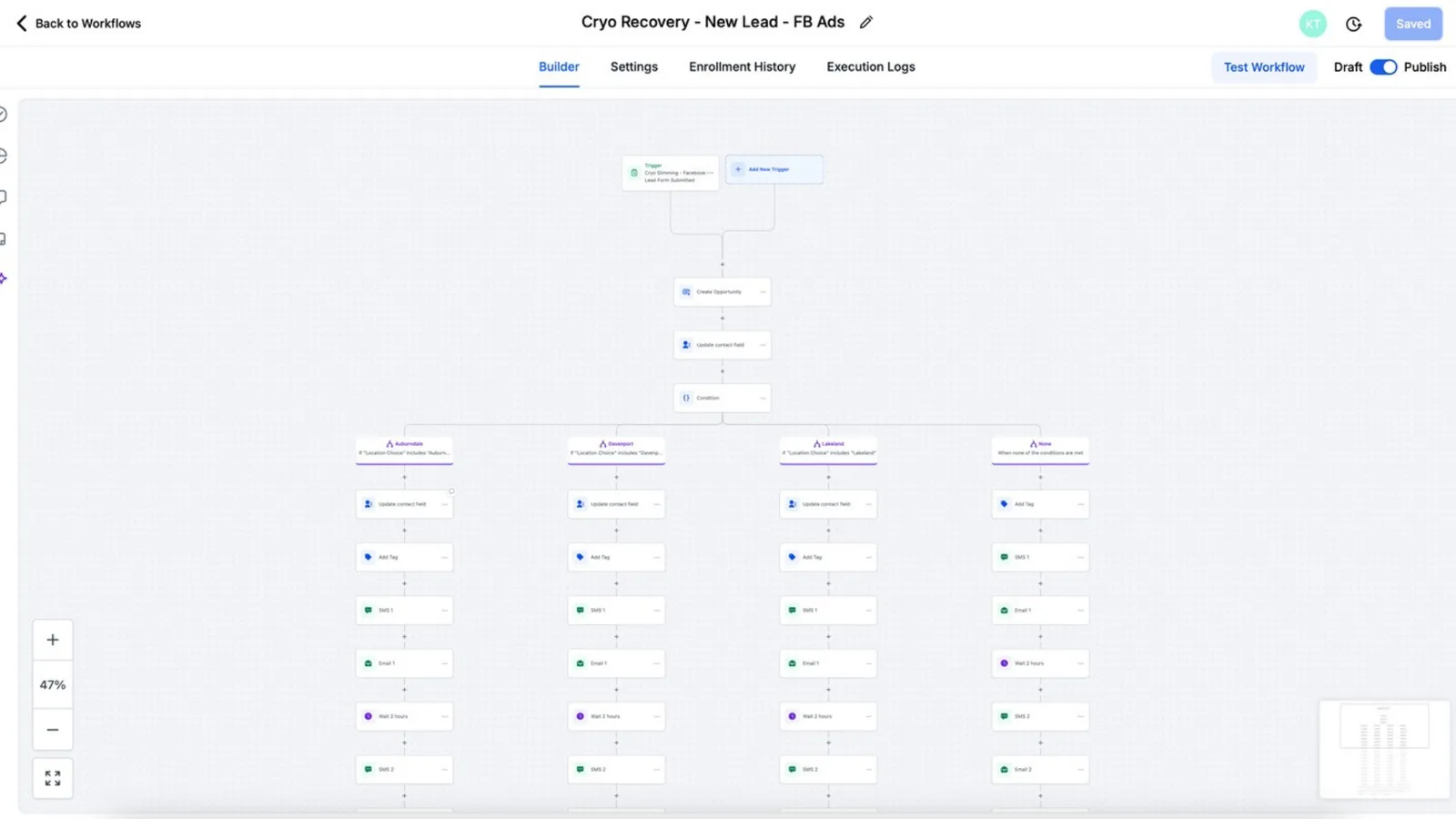
Every workflow we build follows the same rules: one job each, named after that job, an exit when the pipeline stage changes, and a run with test contacts before it is published.
Nothing is built on a verbal brief. Every step ends with a document, a log or a recording you see before the next step starts. One location takes three to five weeks; migrations and multi-location builds take six to ten.
Where leads come from, who answers them, what a sale looks like.
Discovery notesPipelines, fields, calendars and the workflow list, written down first.
Architecture docPipelines, calendars, forms, phone and email settings, workflows.
Change logPayments, calendars, lead forms, your website, other software.
Integration mapTest contacts through each path with Execution Logs open.
Test logWorkflows published in stages, team trained from recordings.
Training videosMonthly look at response times, stage conversion and failed steps.
Monthly noteSame platform, a different build for each business. Pick yours to see the journey we automate.
Facebook leads answered by text and email, consultations booked on the right location calendar, no-show recovery and membership follow-up.
How we build it for a med spa →Intake, reminders, recall and reviews next to the EHR. HIPAA add-on and BAA decided before the first contact goes in.
How we build it for a healthcare clinic →Treatment-plan follow-up and hygiene recall, which practice-management software usually leaves to the front desk.
How we build it for a dental →Fast first reply, buyer and seller nurture, a transaction pipeline and past-client follow-up.
How we build it for a real estate →Missed-call text back, estimate follow-up, technician calendars and seasonal campaigns for HVAC, roofing and similar trades.
How we build it for a home services →Intake and consultation booking in front of the practice-management software, with texting consent handled in the workflows.
How we build it for a law firm →Quote requests answered fast, follow-up that continues until the quote is accepted or declined, and renewal reminders on the same record.
How we build it for a insurance →Sub-account structure, snapshots that install cleanly, onboarding your staff can run, and the agency-or-SaaS decision.
How we build it for a agency →A reply that never reaches the record is a chat, not a system. Each step below writes back to the account.
 HubSpot
 Zoho
Zoho Stripe
 Google
 Meta
Meta Google Calendar
 Gmail
Gmail WordPress
 Shopify
 Zapier
An architecture document you approve before anything is built: pipelines, fields, calendars, the workflow list.
Sending domain, A2P 10DLC registration and consent capture done as part of the build, so texts and email arrive.
Every workflow tested with Execution Logs open, a test log you can see, recorded training per role, and a written map of the account.
Every project is a custom quote in writing. As a guide:
Monthly support plans after launch. The strategy call and the account audit are free. HighLevel's own subscription is separate. Pricing details →
Questions people ask about GoHighLevel, answered from primary sources, plus the product updates that change how an account should be built.
Shaun Clark is the CEO of GoHighLevel and a co-founder of HighLevel. Who the other founders are, where the company is based and what we could not verify.
Read the answer →What users like and struggle with, counted from 226 community posts, with the method and the limits shown.
Read the study →Every update from October 14 to 17, 2026 and what an agency should check in its own accounts.
Read the digest →Looking for a team to build it? See our GoHighLevel agency service, or browse all answers, research and news.
What GHL experts do, what they cost in 2026 and seven checks before you pay.
Read the guide →The $97, $297 and $497 plans, usage rates and a monthly budget by business type.
See the pricing →The order that works, from the agency account to the first four workflows.
Start the setup →Clinics, doctors, TRT and weight loss, with the HIPAA add-on explained.
Read more →Pricing, features and who should pick which, for agencies and small businesses.
Compare them →The $297 add-on, the BAA and what stays your responsibility.
Read the answer →Source: our pricing page; owner price ladder of October 16, 2026. Multi-location is a custom quote
Source: our process page
| Snapshot install | Hourly freelancer | Us | |
|---|---|---|---|
| Written plan you approve | ✕ | ◐ | ✓ |
| Texting and email set up properly | ✕ | ◐ | ✓ |
| Workflows tested and logged | ✕ | ◐ | ✓ |
| Documentation and training | ✕ | ◐ | ✓ |
| Support after launch | ✕ | ◐ | ✓ |
Source: our view of typical deliverables, not a survey
We implement GoHighLevel for businesses and agencies: the account structure, the workflows that answer leads and run appointments, migration from another CRM, SaaS mode and white label, AI features, and monthly support. GoHighLevel is the only platform we work on.
You tell us how leads reach you and what is not working. If you already have a GoHighLevel account, we open it with you and audit it on the call for free. You leave with what we would build first, how long it takes, and a custom quote in writing afterwards. No obligation.
Three to five weeks for one location with one sales process, including testing and training. Migrations and multi-location builds take six to ten weeks. Most of the extra time goes into discovery and testing, not configuration.
Yes, HubSpot, Keap, ActiveCampaign, Zoho, Pipedrive and spreadsheets are the usual sources. We map every field before importing, rebuild the automations for GoHighLevel instead of copying them, and switch forms, numbers and domains on a schedule so follow-up never stops.
Yes, we design the plans, configure SaaS mode and rebilling on the Agency Pro plan, build and test the snapshot, set up signup and provisioning, and brand the app on your domain.
Yes, and most projects start that way. We audit the account first, keep what works, rebuild what does not, and document the result. The account, numbers and data stay yours.
Basic setup and single-location implementation run $500 to $4,000 one-time, white label runs $3,500 to $5,000, and multi-location is a custom quote; support is a monthly plan. The strategy call and the audit are free. Every engagement is quoted in writing after a 30-minute call. HighLevel's own subscription is separate.
We open it with you, point out what is working and what is leaking, and tell you what we would build first and what it would cost.
Free 30-minute call with a free account audit. Every price is a custom quote in writing. No obligation.

Free GoHighLevel strategy call
Pick a day
You are booked.
With the HighLevel Automation Team
Before the call
Need a different time? Reschedule or cancel.
Free 30-minute call with a free account audit. Every price is a custom quote in writing.