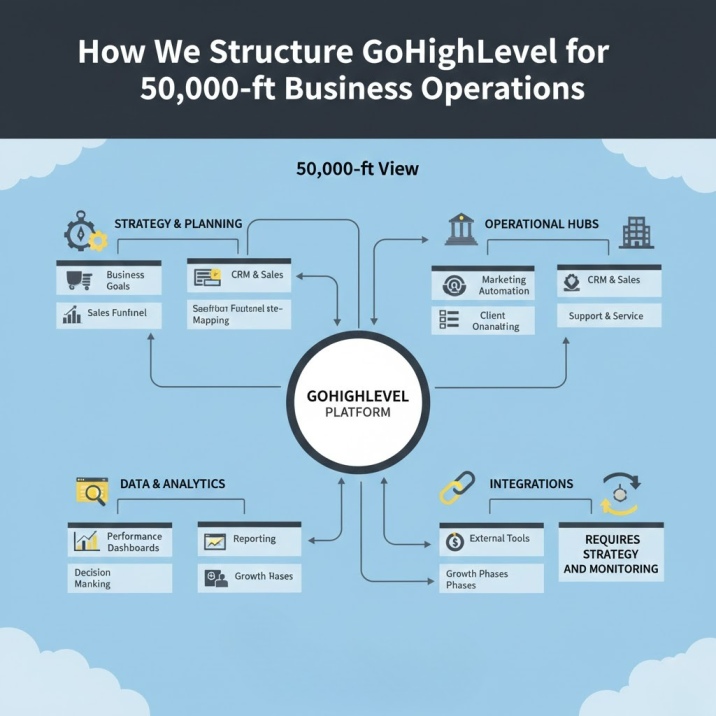
GoHighLevel Pipeline Mistakes That Are Killing Your Sales (And How Experts Fix Them)
Jump to a section:
- Why Most GoHighLevel Pipelines Fail at the Design Stage
- Mistake #1: Building Stages Around Software Instead of Sales Reality
- Mistake #2: Missing Automation Triggers Between Every Stage Transition
- Mistake #3: No Lead Routing or Assignment Rules
- Mistake #4: Ignoring Pipeline Metrics That Actually Matter
- Mistake #5: Building for Today, Not for Six Months from Now
- How a GoHighLevel Expert Fixes These Pipeline Problems
- The Cost of a Broken Pipeline
- What a Working Pipeline Actually Delivers
- Ready to Fix Your Pipeline?
Most businesses building their first GoHighLevel pipeline hit the same wall: the demo looked incredible. Actual results? Radio silence.
The problem isn’t GoHighLevel. The platform is powerful. The problem is how pipelines get structured, what stages get created, and how automation triggers connect to real-world sales processes.
After completing over 450 GoHighLevel implementations across industries from healthcare clinics to SaaS companies, we’ve identified the exact pipeline mistakes that cost businesses the most leads, the most revenue, and the most sanity.
This guide walks through every critical mistake we see repeatedly—and how a GoHighLevel expert fixes each one.
Why Most GoHighLevel Pipelines Fail at the Design Stage
Every failed GoHighLevel pipeline starts the same way: someone opens the dashboard, clicks “Add Pipeline,” and creates stages that sound reasonable. New, Contacted, Qualified, Proposal, Won, Lost.
Sound familiar? It should. That’s the default template GoHighLevel provides.
The problem isn’t that these stage names are wrong. The problem is that they’re generic. They don’t reflect any actual sales process. They don’t account for how your leads actually move through your business. They don’t trigger the right actions at the right moments.
A GoHighLevel expert doesn’t start by opening the platform. They start by mapping your actual customer journey—every touchpoint, every decision point, every moment where a lead either advances or disappears.
Only after that mapping do they touch the software.
The design stage determines whether your pipeline will support your sales process or fight against it. Get this wrong, and you’re fighting a losing battle with automation that triggers at the wrong times, leads that fall through gaps between stages, and a team that eventually stops trusting the system.
Let’s walk through each mistake in detail.
Mistake #1: Building Stages Around Software Instead of Sales Reality
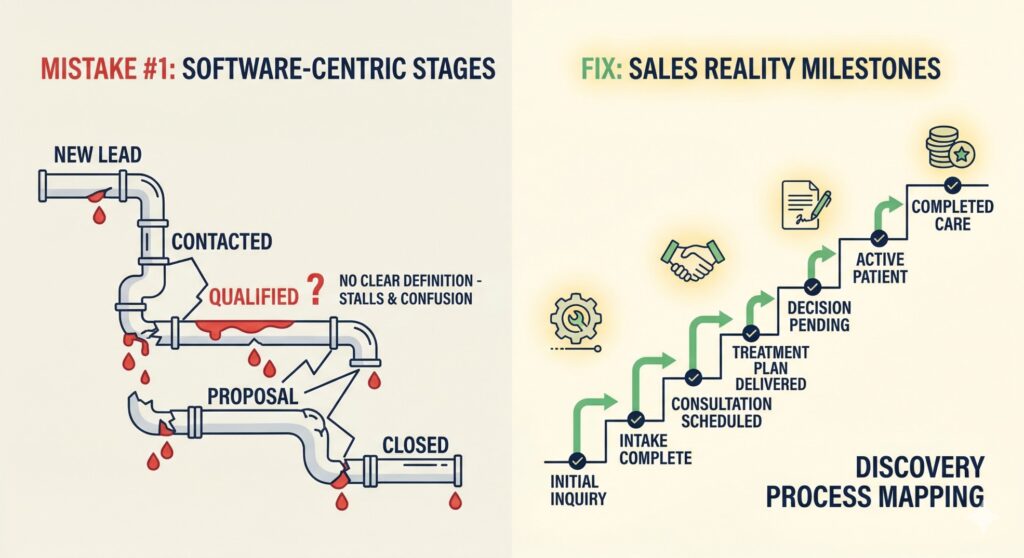
The most common pipeline mistake is using GoHighLevel’s default stages or creating stages that sound logical but don’t match how your business actually operates.
What We See Constantly
- “New Lead” → “Contacted” → “Qualified” → without any definition of what “qualified” actually means
- Stages named after internal team roles instead of customer milestones
- Pipeline stages that assume all deals follow the same path (they never do)
- Stages that represent activities instead of outcomes
Why It Kills Sales
When your pipeline stages don’t reflect reality, your team doesn’t know what to do with deals. Do I move this lead to “Qualified” after one email or three? What qualifies them—budget, timeline, authority, need?
Without clear definitions, deals stall. Leads sit in ambiguous stages while your competition closes them.
How a GoHighLevel Expert Fixes This
We start every pipeline design with a discovery process. We map your actual sales process:
- Where do leads come from? (Website form, referral, cold outreach, advertising)
- What’s the first meaningful action? (Booking a call, requesting a quote, downloading a resource)
- What qualification criteria matter for your business? (Budget range, timeline, service type, decision-maker status)
- What touchpoints must happen before a deal closes? (Discovery call, proposal delivery, negotiation, contract signing)
- What are the real exit paths? (Won with specific reasons, Lost with specific reasons, Referrals)
Then we build stages that reflect these actual milestones—not software defaults.
For example, a healthcare clinic we worked with initially had stages like “Lead,” “Appointment,” “Consultation,” “Treatment Plan,” “Closed.” After discovery, we rebuilt it to reflect their actual patient journey: “Initial Inquiry,” “Intake Complete,” “Consultation Scheduled,” “Treatment Plan Delivered,” “Decision Pending,” “Active Patient,” “Completed Care.”
The difference? Their team now knows exactly what stage a patient should be in and what actions should trigger stage changes.
Mistake #2: Missing Automation Triggers Between Every Stage Transition
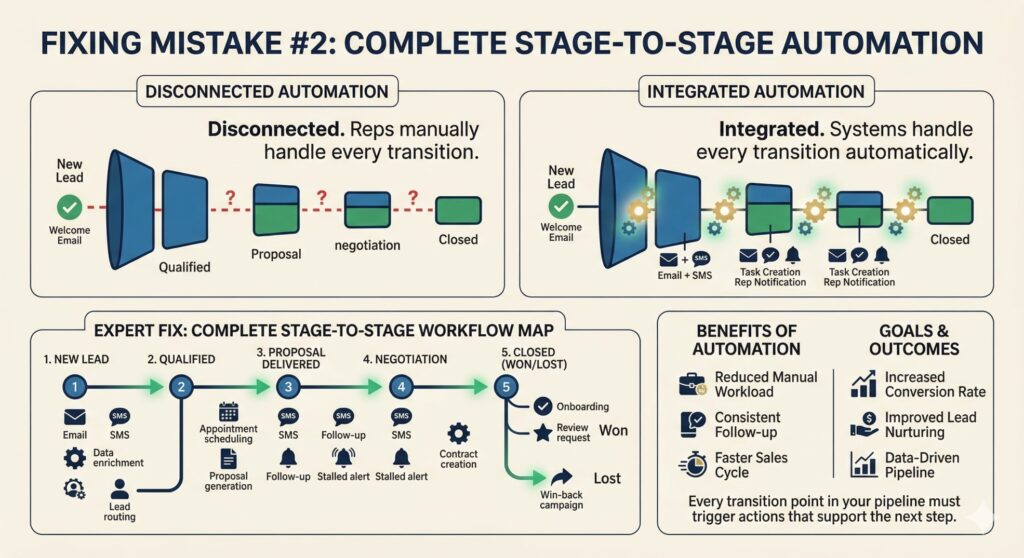
Most pipelines have automation… somewhere. Usually, someone set up a welcome email when a lead enters the system and maybe a task creation when a deal moves to a new stage.
That’s not a pipeline. That’s a series of disconnected automations.
What We See Constantly
- Automations that trigger only at the first stage (new lead entry)
- No automation when a deal moves from Stage 3 to Stage 4
- Follow-up sequences that stop after one email
- No SMS or voicemail drop sequences to support email follow-up
- Missing task creation for manual touchpoints that should happen between stages
- No notifications to sales reps when deals need attention
Why It Kills Sales
Your team can’t manually handle every touchpoint for every lead. That’s exactly why you’re investing in GoHighLevel. But if automation only triggers at entry, you’re still doing manual work for everything that happens afterward.
And manual follow-up fails consistently. Sales reps get busy. They forget. Leads go cold. Deals die.
How a GoHighLevel Expert Fixes This
We map every stage transition and identify what should happen automatically:
Entry automation triggers:
- Welcome sequence (email + SMS)
- Lead routing and assignment
- Initial task creation for manual follow-up
- CRM data enrichment triggers
- Notification to sales rep with lead details
Stage transition triggers:
- Automated follow-up sequences specific to each stage
- Task creation for required manual actions
- Notification alerts for deals that need attention
- Internal handoff communications when leads transfer
- Customer communication at milestone moments (appointment confirmed, proposal delivered, etc.)
Exit automation triggers:
- Post-win sequences (onboarding automation, review requests, upsell sequences)
- Post-loss nurture sequences (win-back campaigns, referral requests)
- Internal notifications and reporting updates
- CRM cleanup automation
Every transition point in your pipeline should trigger automated actions that support the next step in your sales process.
Discover how we build complete automation workflows →
Mistake #3: No Lead Routing or Assignment Rules
You have a pipeline. Leads are entering. They’re moving through stages (sometimes). But who’s responsible for each lead?
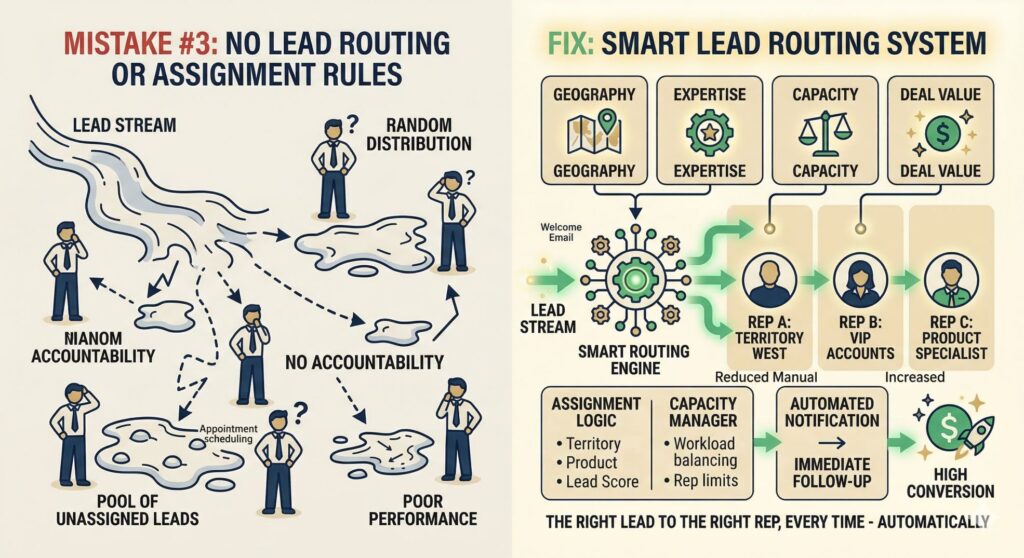
Without proper routing and assignment rules, you get one of two failures:
- Everyone’s leads, no one’s leads. Leads enter but no specific rep is assigned. They float in a pool until someone grabs one—usually whoever is paying attention at the right moment.
- Random distribution. Leads get assigned randomly or in rotation without accounting for territory, expertise, workload, or deal value. Your best rep handles low-value leads while your newest rep gets your biggest opportunity.
What We See Constantly
- No assignment rules configured
- Manual lead assignment by admin
- Round-robin distribution without exception handling
- No consideration for rep capacity or current workload
- No rules for high-value lead prioritization
Why It Kills Sales
First response time is the single biggest predictor of conversion. Leads assigned within 5 minutes convert at 4x the rate of leads assigned after 30 minutes. If your routing is broken, your first response times are broken.
Beyond speed, proper routing ensures the right rep handles the right lead. A real estate agent specializing in luxury homes shouldn’t be assigned starter-home leads, even if they’re next in the rotation.
How a GoHighLevel Expert Fixes This
We build routing logic that considers multiple factors:
Assignment factors:
- Territory or geographic region
- Product or service category
- Lead source (some reps handle referrals better, others handle cold leads)
- Current workload (capacity balancing)
- Historical performance with similar leads
- Deal value or lead score
Exception handling:
- VIP or high-value lead overrides to senior reps
- Time-based routing (after-hours leads to on-call team)
- Reassignment triggers for stalled deals
- Escalation rules for specific scenarios
Capacity management:
- Maximum active deals per rep
- Workload-based distribution
- Time-zone awareness for distributed teams
A properly configured routing system ensures every lead reaches the right person in the right time frame—automatically.
Explore our GoHighLevel setup services →
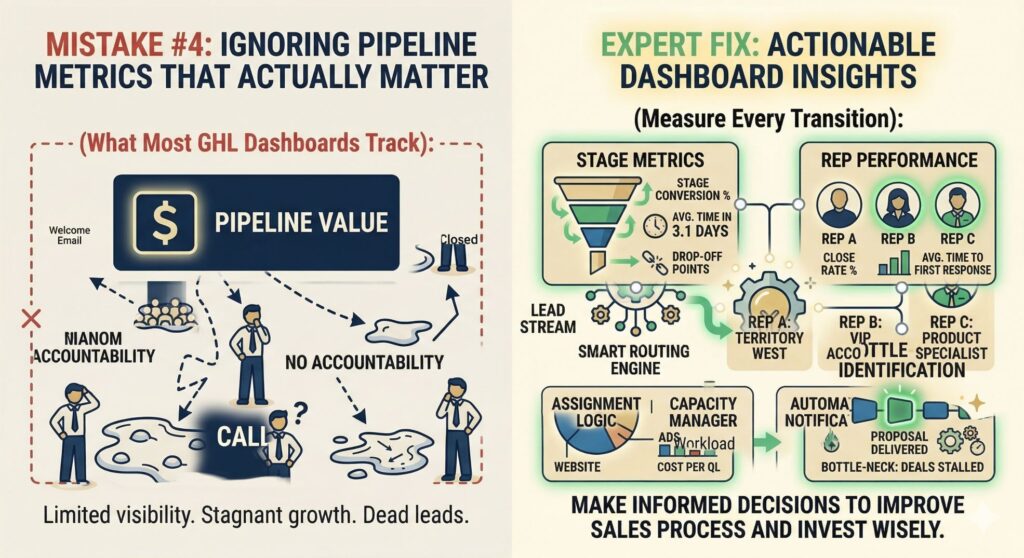
Mistake #4: Ignoring Pipeline Metrics That Actually Matter
You’ve built your pipeline. Automations are working. Leads are moving. But how do you know if it’s actually working?
Most businesses using GoHighLevel stare at a dashboard that shows pipeline value and call it a day. That’s like driving a car while only looking at the fuel gauge.
What We See Constantly
- No tracking of stage-specific conversion rates
- No measurement of average time in each stage
- No visibility into bottleneck stages (where deals get stuck)
- No rep performance comparison
- No lead source analysis by pipeline stage
Why It Kills Sales
You can’t improve what you don’t measure. If deals are stalling in a specific stage, you need to know which stage and why. If one rep consistently closes at higher rates, you need to know what they’re doing differently.
Without proper metrics, you’re flying blind. You might celebrate increased lead volume while ignoring that 80% of those leads die in your second stage.
How a GoHighLevel Expert Fixes This
We build dashboards and tracking that give you actionable insights:
Stage-level metrics:
- Conversion rate from each stage to the next
- Average time spent in each stage
- Drop-off points where leads exit the pipeline
- Volume trends over time by stage
Rep performance metrics:
- Deals handled per rep
- Close rate by rep
- Average time to first response
- Pipeline velocity (how fast deals move through)
- Stage-specific performance
Lead source analysis:
- Which sources generate the most leads
- Which sources generate the highest-converting leads
- Cost per qualified lead by source
- Attribution by pipeline stage
Bottleneck identification:
- Where deals get stuck
- Why deals stall (timeout, no response, competitor, budget)
- Comparison to historical performance
With these metrics, you can make data-driven decisions about where to invest: improving your sales process, adjusting follow-up sequences, or shifting budget to higher-performing lead sources.
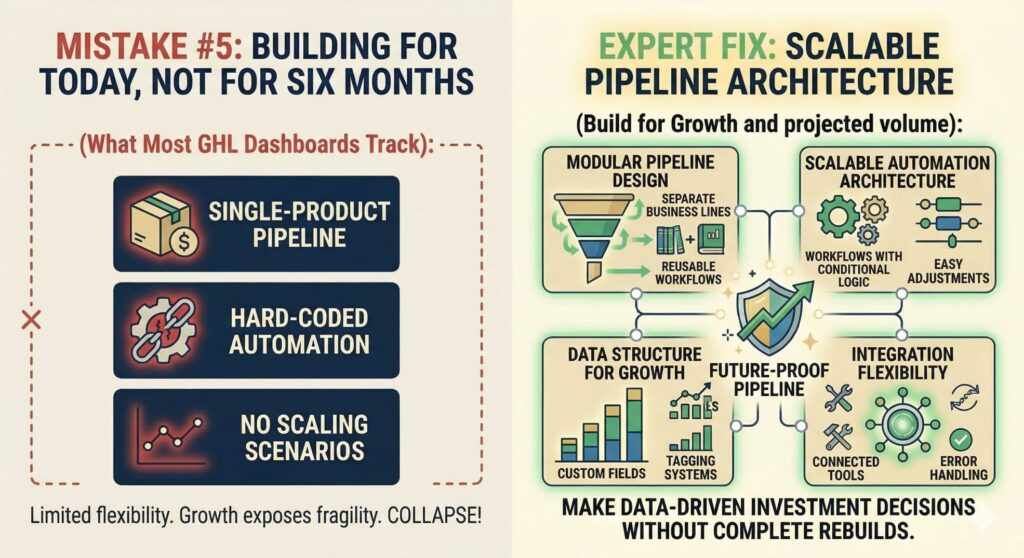
Mistake #5: Building for Today, Not for Six Months from Now
Your business is small. You have one product, one service, one team. Your current pipeline handles everything you need.
Then you launch a second product. Then you expand to a second location. Then you hire three more salespeople.
And your pipeline—the one that worked perfectly six months ago—starts breaking.
What We See Constantly
- Single-product pipelines that can’t handle new offerings
- Hard-coded automation that breaks when processes change
- No naming conventions or organization systems
- Stage structures that don’t account for growth scenarios
- Integrations built for current tools that will need replacing
Why It Kills Sales
Growth exposes pipeline fragility. What worked for 50 leads per month collapses at 500 leads per month. What handled one product line can’t accommodate five. What your two-person team managed becomes impossible for your ten-person team.
Every rebuild costs time, money, and data integrity. A properly designed pipeline from day one avoids this entirely.
How a GoHighLevel Expert Fixes This
We build with scalability principles:
Modular pipeline design:
- Separate pipelines for separate business lines (allows independent tracking and reporting)
- Reusable workflow components that can be copied and modified
- Consistent naming conventions across all automation elements
Scalable automation architecture:
- Workflows designed with conditional logic for multiple scenarios
- Easy-to-adjust timing and threshold settings
- Template libraries for new product launches or seasonal campaigns
Data structure for growth:
- Custom fields that accommodate future data needs
- Tagging systems that scale with complexity
- Pipeline views that stay clean as deal volume increases
Integration flexibility:
- Connected tools that can be swapped without rebuilding automation
- API-based integrations over point-to-point connections
- Error handling that prevents cascade failures
We design every pipeline to handle your current volume and your projected growth—without requiring a complete rebuild when your business evolves.
How a GoHighLevel Expert Fixes These Pipeline Problems
Now you know the five critical mistakes. But knowing isn’t fixing.
Here’s how we approach pipeline problems differently:
Step 1: Discovery Before Design
We don’t open GoHighLevel until we understand your business. We map your customer journey, identify your qualification criteria, document your touchpoints, and understand your team’s workflow. This discovery creates the blueprint for everything that follows.
Step 2: Architecture-First Design
We design your pipeline structure before touching the platform. We create stage definitions, transition logic, routing rules, and automation specifications. You review and approve this architecture before we build anything.
Step 3: Complete Implementation
We build everything to specification:
- All pipeline stages with clear definitions
- All automation triggers and sequences
- Lead routing and assignment logic
- Dashboard configuration and metric tracking
- All necessary integrations
Step 4: Rigorous Testing
Before launch, we test every workflow, every trigger, every integration point. We run test leads through the entire system. We verify data accuracy. We confirm notifications fire correctly. We catch problems in testing, not in production.
Step 5: Team Training
Your team gets hands-on training on the system we built. Not generic GoHighLevel training—specific training on your pipeline, your processes, your automation.
Step 6: Ongoing Optimization
Our relationship doesn’t end at launch. We monitor performance, identify bottlenecks, optimize workflows, and scale the system as your business grows.
The Cost of a Broken Pipeline
Let’s be direct about the financial impact.
Lost leads
Every deal stuck in a broken pipeline is a lead you paid for but didn’t close. At a $1,000 average deal value and a 20% pipeline failure rate, you’re losing significant revenue every quarter.
Wasted marketing spend
You’re driving traffic, running ads, generating leads—but those leads die in broken pipelines. Your marketing budget is generating expensive opportunities that your sales process fails to capture.
Team inefficiency
Your sales reps spend hours on manual follow-up that should be automated. They chase leads that have already gone cold. They manage spreadsheets because the CRM doesn’t give them what they need.
Competitive disadvantage
Your competitors with working pipelines respond faster, follow up more consistently, and close more deals. Every day your pipeline is broken, you fall further behind.
A working pipeline doesn’t just improve operations—it directly impacts your revenue.
What a Working Pipeline Actually Delivers
When GoHighLevel is set up correctly, the results are measurable:
Faster response times
Automated routing ensures leads are assigned within minutes, not hours. Our clients see first response times drop from hours to minutes.
Higher conversion rates
Consistent follow-up sequences—email, SMS, voicemail—ensure no lead goes cold. Our implementations see close rates increase by 25-40% on average.
Scalable operations
A properly designed pipeline handles volume growth without breaking. You can 10x your lead volume without rebuilding your system.
Rep accountability
Clear stage definitions, automated tasks, and performance tracking help your team understand exactly what they need to do—and how they’re performing.
Data-driven decisions
Pipeline metrics reveal where your sales process needs improvement, where your team needs coaching, and where your marketing should invest more budget.
Ready to Fix Your Pipeline?
If you’re running GoHighLevel but your pipeline isn’t delivering results, you’re not alone. Most businesses need help—not just with setup, but with the strategic design, complete implementation, and ongoing optimization that makes a CRM actually work.
Our team has completed over 450 GoHighLevel implementations across healthcare, real estate, SaaS, professional services, and more. We don’t just set up pipelines. We build systems that your team will use, that generate measurable results, and that scale with your business.
What you get working with us:
- Complete pipeline design based on your actual sales process
- Every automation workflow configured and tested
- Lead routing and assignment configured for your team
- Dashboard setup for actionable metrics
- Integration with your existing tools
- Hands-on team training
- Post-launch support and optimization
If you’re ready to stop guessing and start closing more deals, let’s talk.
Case Studies
- Med Spa GoHighLevel Case Study – How we built a complete automation system for a Florida med spa
- Healthcare HIPAA-Compliant Automation Case Study – HIPAA-compliant automation for a Georgia healthcare provider
Frequently Asked Questions
How long does it take to fix a broken GoHighLevel pipeline?
It depends on complexity. A basic pipeline fix takes 1-2 weeks. A complete rebuild with proper automation triggers, routing rules, and dashboards typically takes 3-4 weeks. The key isn’t speed—it’s proper testing and validation. We won’t launch a pipeline that hasn’t been tested thoroughly, even if it takes a few extra days.
What’s the difference between a GoHighLevel pipeline and a funnel?
A pipeline manages your sales process after a lead is captured—tracking deals through stages, automating follow-ups, and measuring conversion. A funnel captures leads and guides them to a specific action (like booking a call or making a purchase). Pipelines and funnels work together: funnels bring leads in, pipelines manage what happens after. Most businesses need both, configured to connect seamlessly.
Can you fix an existing GoHighLevel pipeline without rebuilding everything?
Sometimes. If your current pipeline has good underlying data and reasonable structure, we can often optimize it—adding missing automation triggers, fixing routing rules, and improving stage definitions. However, if your pipeline was built completely wrong from the start, a partial fix won’t deliver results. We’ll audit your current setup first and give you an honest recommendation.
How much does GoHighLevel pipeline setup cost?
Pipeline setup costs vary based on complexity. Basic pipeline configuration with standard automation typically starts around $1,500-$3,000. Complete implementation with custom stages, full automation sequences, routing rules, dashboards, and testing usually ranges from $3,000-$8,000. Enterprise-level pipelines with complex integrations can exceed $15,000. We provide detailed quotes after understanding your specific requirements.
Do I need GoHighLevel if I’m already using another CRM?
Not necessarily. If your current CRM is working well and your team is using it consistently, switching costs time and money. However, if you’re paying for multiple tools (separate CRM, email marketing, SMS, scheduling, landing pages) that don’t integrate well, GoHighLevel’s all-in-one approach often saves money and reduces complexity. We help you evaluate whether a switch makes sense for your specific situation.
How do you test GoHighLevel pipelines before launching?
We run extensive testing before every launch. This includes: running test leads through every stage transition, verifying all automation triggers fire correctly, checking data accuracy in all fields, confirming notifications reach the right people, testing edge cases and error scenarios, and validating integrations sync data properly. We use our own test accounts and simulate real-world conditions. Your pipeline only goes live when everything passes our quality checklist.
What metrics should I track in my GoHighLevel pipeline?
The most important metrics are: stage conversion rates (where do deals drop off?), average time in each stage (where do deals stall?), lead response time (how fast do reps contact new leads?), pipeline velocity (how quickly do deals move through?), and close rate by source (which leads convert best?). Most businesses track none of these initially. We build dashboards that make all of these metrics visible from day one.
Can I manage my GoHighLevel pipeline myself after you build it?
Yes. We design pipelines that your team can manage independently. We provide comprehensive training on how to move deals through stages, adjust automation sequences, add new team members, and interpret dashboard data. However, complex technical changes—like modifying integration connections or rebuilding automation logic—typically still require our assistance. We also offer ongoing support plans if you prefer to have us handle updates and optimizations.