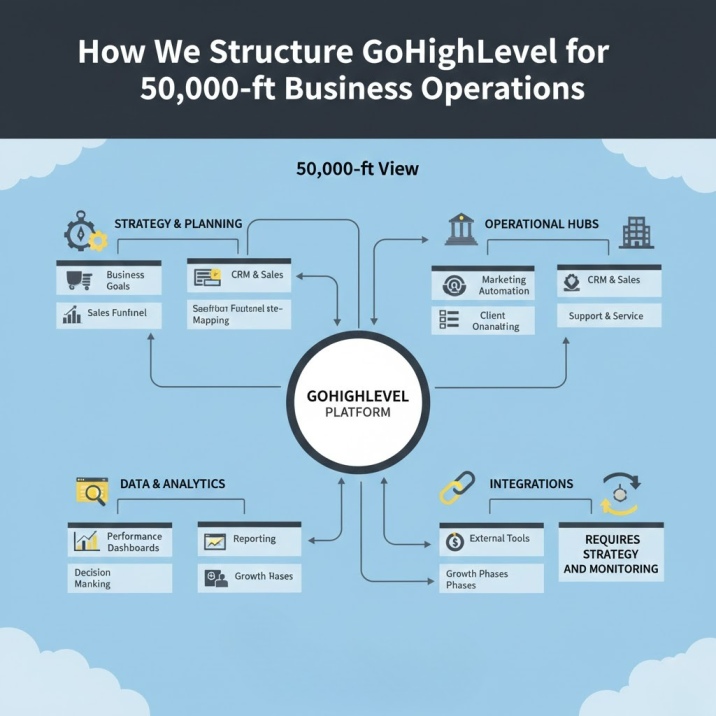
If you’ve been struggling to get your GoHighLevel setup for agencies right, you’re not alone. Thousands of agency owners invest in the platform, then watch leads slip through the cracks because the foundation was never built correctly.
A misconfigured CRM, broken automation, or missing DNS record can cost your business thousands in lost revenue and wasted hours. That’s why professional GoHighLevel setup services exist — to eliminate guesswork and get your system working from day one.
Whether you’re launching a new agency or rebuilding a broken system, this guide walks you through every critical step. You’ll also discover why many fast-growing agencies choose to hire a GoHighLevel expert rather than figuring it out alone.
Let’s build your agency the right way.
What is GoHighLevel & Why Agencies Use It
GoHighLevel is an all-in-one CRM and marketing automation platform built specifically for agencies. Instead of paying separately for HubSpot, ClickFunnels, Calendly, and Mailchimp — GoHighLevel replaces all of them.
Here’s why agency owners are moving to it:
- CRM & Pipeline Management — Track every lead, deal, and client relationship in a centralized dashboard with unlimited contacts
- Multi-Channel Automation — Run email, SMS, voicemail drops, and social DMs from a single workflow builder
- Funnel & Website Builder — Create high-converting landing pages and full websites without a developer
- White-Label SaaS Mode — Rebrand the entire platform, sell access to clients, and charge monthly recurring revenue
- Reputation Management — Automate Google review requests and monitor client reviews from one place
The bottom line? GoHighLevel lets agencies deliver more value, retain clients longer, and build scalable recurring revenue — but only when it’s set up correctly.
Step-by-Step GoHighLevel Setup for Agencies
Agency Account Configuration
Your agency account is the control center for everything. Get this wrong and every sub-account inherits the problems.
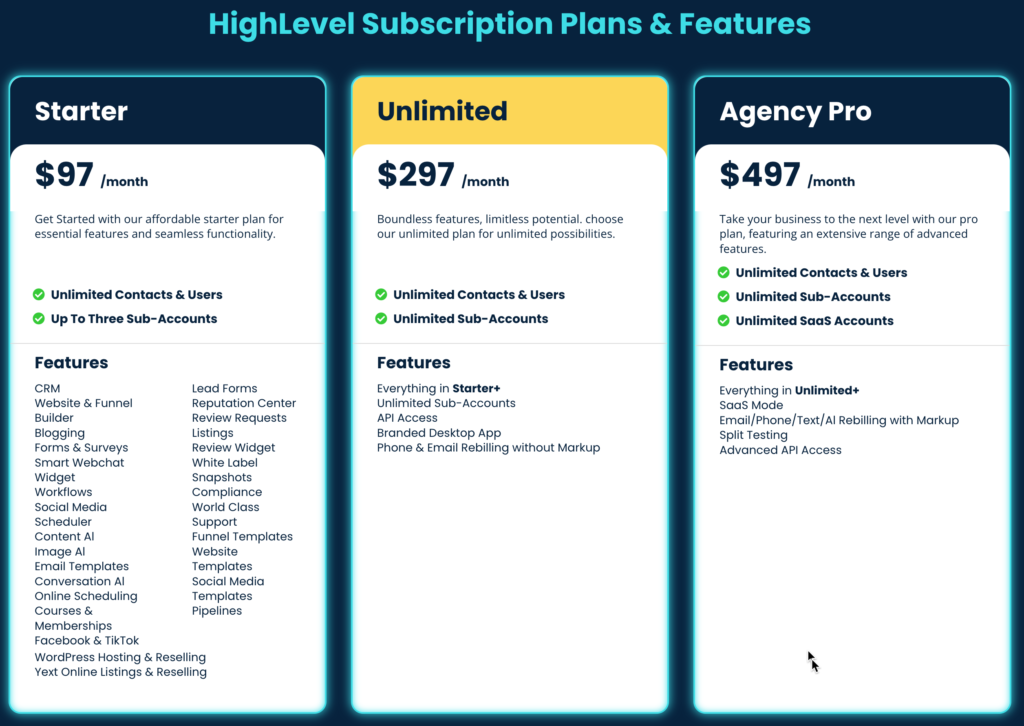
- Sign up for Agency Unlimited ($297/mo) — gives you unlimited sub-accounts for clients
- White-label your domain — connect app.youragency.com by adding a CNAME record in your registrar
- Configure DNS records — add A records, MX records, and verify SPF/DKIM for email authentication
- Set up SMTP — connect Mailgun, SendGrid, or Amazon SES for reliable email delivery
- Integrate Twilio — purchase a local or toll-free number for two-way SMS and call tracking
- Connect Stripe — enable payment processing for funnels, invoices, and SaaS subscriptions
💡 Pro tip: DNS propagation can take 24–48 hours. Verify all records before going live with any client campaign.
CRM & Pipeline Setup
Your pipeline is the engine that drives sales. A well-structured CRM eliminates manual tracking and gives you real-time visibility into every opportunity.
Steps to build your agency pipeline:
- Map your actual sales process before touching the software
- Create opportunity stages that reflect how deals move in real life
- Add custom fields to capture lead quality data (budget, timeline, service interest)
- Assign team members with ownership rules so no lead falls through the cracks
- Set stage-change notifications to trigger Slack or email alerts automatically
Example pipeline for a marketing agency:
| Stage | Definition | Action |
|---|---|---|
| New Inquiry | Form submit or inbound call | Auto-assign + SMS |
| Discovery Call | Call scheduled | Send calendar reminder |
| Proposal Sent | Deck delivered | Follow-up in 48hr |
| Contract Signed | Payment received | Trigger onboarding |
| Active Client | Delivering services | Monthly check-in |
GoHighLevel Automation Setup
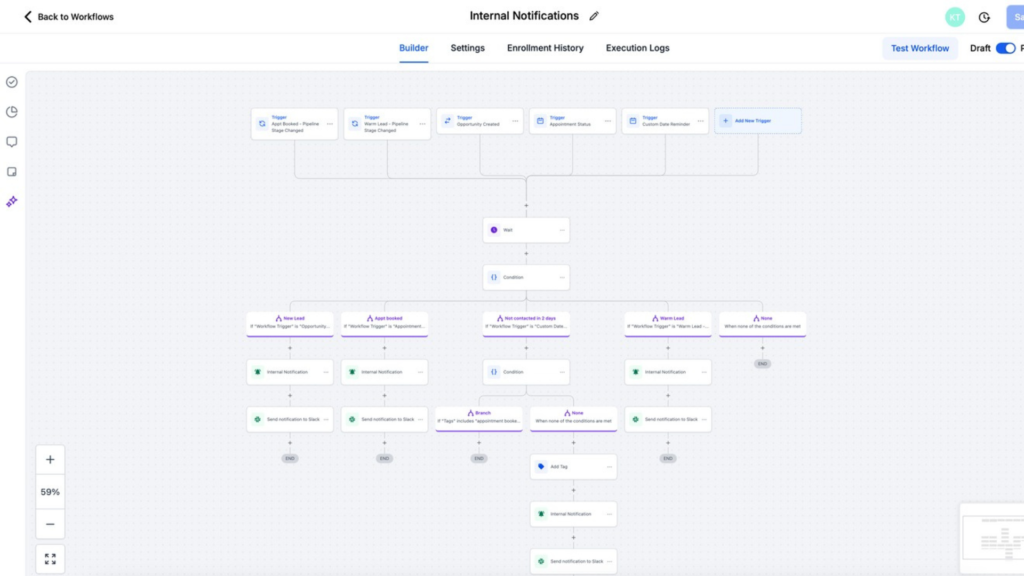
Automation is the most powerful — and most commonly misconfigured — part of any GoHighLevel agency setup. When done right, it generates 30–40% more revenue without adding headcount.
These four workflows are non-negotiable for every agency:
1. Lead Nurture Workflow
- Trigger: New contact submits a form or lands in the CRM
- Day 1: Welcome email + SMS with a relevant case study
- Day 3: Follow-up email with a free resource or offer
- Day 6: Personalized SMS with a direct calendar link
- Day 9: Final “last chance” email with urgency framing
2. Missed Call Text-Back Automation
- Trigger: Inbound call goes unanswered
- Action: Instant SMS within 60 seconds — “Sorry we missed you! Book here: [link]”
- Result: Recover 20–35% of missed opportunities on autopilot
3. Appointment Reminder System
- 24 hours before: Email + SMS with meeting details
- 2 hours before: Final SMS with Zoom or address link
- Result: Reduce appointment no-shows by 40–60%
4. Review Request Workflow
- Trigger: Project stage moves to “Complete”
- Wait 2 days, then send a warm email requesting a Google review
- If no action in 3 days, follow up via SMS
- Result: Consistent 5-star reviews without manual effort
💡 Every workflow needs clear entry triggers, delay logic, and exit conditions. Always test with a real contact before activating for clients.
Funnel & Website Setup
GoHighLevel’s funnel builder handles everything from lead capture to payment collection — no external tools required.
- Choose a proven template — import from the marketplace or start from a snapshot
- Customize branding — update logo, colors, and copy to match your client’s identity
- Add a short form — name, email, and phone. Every additional field drops conversions
- Embed a calendar — connect the GoHighLevel calendar for seamless discovery call booking
- Integrate Stripe — accept deposits or full payments directly on the thank-you page
- Add tracking pixels — install Facebook Pixel and Google Tag Manager for retargeting
Optimization tips that move the needle:
- Place a video above the fold — boosts conversions by 20–30%
- Add photo testimonials — social proof removes hesitation
- Use countdown timers on limited offers — creates genuine urgency
- A/B test headlines every 30 days — small copy changes drive big results
SaaS Mode & Snapshot Setup
SaaS mode is where GoHighLevel setup for agencies becomes a recurring revenue machine. You white-label the platform, package it with your services, and charge clients monthly under your own brand.
- Enable SaaS Mode — found in Agency Settings under the billing tab
- Build industry snapshots — pre-load pipelines, automations, and funnels for specific niches (real estate, dental, fitness, home services)
- Package your offer — bundle the snapshot with setup, training, and ongoing support
- Set pricing tiers — Basic ($297/mo), Pro ($497/mo), Enterprise ($997/mo) are common brackets
- Configure recurring billing — automate invoicing through Stripe with auto-retry for failed payments
- Build a client onboarding process — welcome email, training video, and a live kickoff call
💡 Example snapshot for a home services agency: lead capture form, 5-step nurture workflow, appointment booking system, missed call text-back, and review request automation. Deploy to a new client in under 10 minutes.
The math is compelling. At $397/mo with 20 clients, that’s $7,940/month in pure recurring revenue on top of your service income.
Common GoHighLevel Setup Mistakes
These are the errors that cost agencies time, clients, and money. Most are completely avoidable.
1. Emails Landing in Spam or Not Sending Caused by skipping SMTP warmup or missing SPF/DKIM records. Fix: Verify DNS authentication, warm the domain gradually, and test with mail-tester.com before launching campaigns.
2. Workflows Not Triggering Usually a misconfigured trigger condition or a contact already inside an active workflow. Fix: Review workflow logs, test with a fresh contact, and check for conflicting automations.
3. Domain DNS Errors White-label domains showing security warnings due to missing SSL or incorrect CNAME records. Fix: Verify all records in your registrar, allow propagation time, and confirm SSL is issued in GHL settings.
4. Duplicate Automation Messages Contacts enrolled in overlapping workflows receive the same message 2–3 times. Fix: Use proper exit conditions, add workflow filters, and audit all active automations monthly.
5. Poor Pipeline Structure Stages that don’t reflect the real sales process cause inaccurate reporting and stalled deals. Fix: Map your actual sales conversation before building, then train the team on correct usage.
6. Calendar Booking Conflicts Double-bookings or sync failures with Google Calendar. Fix: Enable calendar sync, set buffer times between appointments, and verify timezone settings per team member.
7. Missing Integrations Data silos form when third-party tools aren’t connected. Fix: Use GoHighLevel’s native integrations first, then Zapier or webhooks for anything custom.
DIY vs Hiring a GoHighLevel Expert
This is the question every agency owner faces. Here’s a realistic comparison:
| Factor | DIY Setup | Hiring an Expert |
|---|---|---|
| Time | 40–60+ hours | 5–10 days, hands-off |
| Cost | Your time + mistakes | $2,000–$5,000 one-time |
| Risk | High — trial and error | Low — proven systems |
| ROI Timeline | 3–6 months | 30–60 days |
| Ongoing Support | Self-managed | Included in packages |
If your time is worth $150/hour and setup takes 50 hours, that’s $7,500 in lost opportunity. Most GoHighLevel setup services cost less — and deliver a system that actually works from day one.
For agencies focused on growth, outsourcing the technical build means more time closing clients and delivering results. The ROI isn’t just financial — it’s momentum.
🚀 Ready to skip the trial-and-error phase? Book a free strategy call and let’s map out your GoHighLevel build together.
GoHighLevel Setup Services — What’s Included
Professional GoHighLevel setup services should be comprehensive, documented, and built to scale. Here’s what a full-service package looks like:
Technical Configuration
- Agency account setup, white-label domain, SMTP integration, Twilio, DNS records, SSL verification
CRM Implementation
- Custom pipelines, opportunity stages, team permissions, and reporting dashboards built to your sales process
Automation Development
- Lead nurture sequences, missed call text-back, appointment reminders, and review request workflows — all tested and live
Funnel Creation
- Landing page design, form integration, calendar booking, Stripe payments, and thank-you page optimization
SaaS Configuration
- SaaS mode setup, snapshot development, pricing tiers, recurring billing, and client onboarding process
Training & Documentation
- Screen-recorded tutorials, written SOPs, team walkthrough, and a 30-day support period
Most agencies see full ROI within the first 30–60 days through increased lead conversions and recaptured time.
📅 Book Your Free Strategy Call — Let’s Build Your GoHighLevel System the Right Way
Frequently Asked Questions
How long does GoHighLevel setup take? A DIY setup typically takes 40–60 hours spread over 2–4 weeks depending on your technical comfort level. Hiring a GoHighLevel expert reduces this to 1–2 weeks with a hands-off experience. Full SaaS mode configuration with custom snapshots adds time compared to a basic CRM setup.
How much does a GoHighLevel expert cost? Professional GoHighLevel setup services typically range from $2,000–$10,000 depending on scope. Basic CRM and automation setup starts around $2,000–$3,000, while comprehensive builds including SaaS mode and custom snapshots run $5,000–$10,000. Monthly retainers for ongoing optimization range from $500–$2,000.
Is GoHighLevel good for agencies? Yes — GoHighLevel was purpose-built for agencies and includes white-labeling, unlimited sub-accounts, and SaaS resell mode. It consolidates CRM, email, SMS, funnels, and automation into one platform, eliminating multiple software subscriptions. ROI is strongest for agencies with 5+ clients who want scalable systems.
Can I sell GoHighLevel as SaaS? Absolutely. SaaS mode allows you to white-label GoHighLevel under your own brand and charge clients a monthly fee. Most agencies price between $297–$997/month per client while paying $97–$297 to GoHighLevel, creating strong profit margins and predictable recurring revenue.
What is a GoHighLevel snapshot? A snapshot is a pre-built template package containing CRM pipelines, automations, funnels, calendars, and forms. You create industry-specific snapshots and deploy them to new clients in minutes rather than building from scratch each time. Snapshots are one of the most valuable assets in a GoHighLevel agency setup.
Do I need technical skills to use GoHighLevel? The interface is user-friendly, but the initial setup requires understanding DNS records, SMTP configuration, Twilio, and workflow logic. Most agencies hire a GoHighLevel expert for the initial build to avoid costly mistakes, then manage the platform independently after proper training.
What is the best GoHighLevel plan for agencies? The Agency Unlimited plan at $297/month is the entry point for serious agencies — it includes unlimited sub-accounts and core features. The SaaS Pro plan at $497/month adds white-label rebilling capabilities, which is essential if you plan to resell the platform and collect payments directly through GoHighLevel.
How do I connect Twilio to GoHighLevel? Purchase a phone number from your Twilio account, copy your Account SID and Auth Token, then paste them into GoHighLevel’s Phone Integration settings. Test by sending a trial SMS from a sub-account. Use separate Twilio numbers for each client to keep communication data clean and compliant.
Conclusion
Your GoHighLevel setup for agencies is the difference between a business that scales and one that stalls. Every missed automation, broken funnel, or misconfigured pipeline has a direct cost — whether it’s lost leads, unhappy clients, or hours burned troubleshooting.
The good news? When the system is built correctly, it works around the clock. Leads nurture automatically, clients onboard seamlessly, and your team focuses on growth rather than firefighting.
Use this guide to build your foundation right — or skip the learning curve entirely and hire a GoHighLevel expert who’s done it hundreds of times before.
Your agency deserves a system that actually works. The first step takes 20 minutes.