
How High Level Automation Team Automated Healthcare Workflows for CareStar Healthcare in Stockbridge, Georgia
Healthcare operations run on documentation. Patient forms, insurance verification, medical records, consents, referrals—every interaction generates paperwork that must be processed, stored, and tracked.
For most healthcare organizations, this work happens manually. Staff print forms, chase signatures, fax records between facilities, and toggle between multiple software platforms to complete a single task.
The result is predictable: bottlenecks, burnout, and operational costs that scale with patient volume.
CareStar Healthcare in Stockbridge, Georgia faced this exact challenge. Their staff was capable. Their patient care was strong. But their administrative infrastructure couldn't keep pace with operational demand.
High Level Automation Team built a HIPAA-compliant GoHighLevel automation system designed to eliminate manual document handling while maintaining full regulatory compliance.
This case study documents that implementation.
Client Overview
CareStar Healthcare is a healthcare organization based in Stockbridge, Georgia, serving patients across a range of medical and administrative needs.
Their operational model is document-intensive. Every patient interaction requires intake forms, consent documentation, insurance verification, and coordination with external providers.
Like most healthcare organizations, CareStar relied on a combination of paper-based processes and disconnected digital tools to manage this workload.
Staff spent significant time on administrative tasks: printing forms, collecting signatures, faxing records to referring physicians, and manually tracking document status across multiple systems.
This approach worked at smaller scale. But as patient volume increased, the administrative burden became unsustainable.
The Problem – Manual Healthcare Operations at Scale
CareStar Healthcare was losing hundreds of hours each month to manual administrative processes.
Here's what was broken:
- Paper-based document workflows – Forms were printed, signed by hand, scanned, and filed. Every document required multiple manual steps.
- Repeated signing and re-signing – Patients often needed to sign the same forms multiple times due to errors, lost paperwork, or version updates.
- Manual faxing of medical records – Staff faxed records to referring providers, insurance companies, and external facilities manually. Each fax required individual attention.
- Fragmented software stack – The team used separate tools for patient management, document storage, faxing, and communication. No single system connected these workflows.
- No automated notifications – Staff had to manually check document status, follow up with patients, and remind team members about pending tasks.
The operational impact was measurable:
- High administrative overhead that didn't scale with patient growth. Every new patient added proportional manual workload.
- Increased manpower costs as more staff time went to paperwork instead of patient-facing work.
- Staff burnout from repetitive, low-value tasks that pulled focus from meaningful clinical support.
- Slower processing times that created delays in patient care coordination and referral management.
This wasn't a staffing problem. It was a systems problem. More employees wouldn't solve it. Better infrastructure would.
The Objective
CareStar Healthcare needed operational efficiency without compromising compliance.
Specifically, they required:
- Reduced administrative workload – Eliminate repetitive manual tasks that consumed staff time.
- HIPAA compliance maintained – Any automation had to meet healthcare privacy and security requirements.
- Centralized system architecture – Consolidate disconnected tools into one auditable platform.
- Faster document processing – Speed up workflows without increasing error rates or compliance risk.
- Lower operational costs – Reduce both software expenses and labor costs associated with manual processes.
The solution needed to be healthcare-specific. Generic business automation wouldn't account for fax requirements, signature workflows, or compliance constraints unique to medical operations.
This required purpose-built healthcare workflow automation designed around real regulatory requirements.
The Solution – HIPAA-Compliant Automation System
High Level Automation Team designed an end-to-end healthcare GoHighLevel system integrated with HIPAA-compliant tools for faxing, document handling, and workflow automation.
Every component was built to reduce manual work while maintaining full audit readiness.
Centralized Document Handling & E-Signing in GHL
The foundation was a secure document management system inside GoHighLevel.
Patient forms, consent documents, and administrative paperwork were digitized and stored within the CRM. Documents could be sent electronically for signature, tracked in real-time, and automatically filed once completed.
This eliminated the print-sign-scan-file loop that consumed hours of staff time daily.
Status tracking gave administrators instant visibility into which documents were pending, which were completed, and which required follow-up. No more hunting through email threads or physical filing cabinets.
Digital signatures reduced turnaround time from days to minutes. Patients could sign documents from their phone. Staff could track completion without manual check-ins.
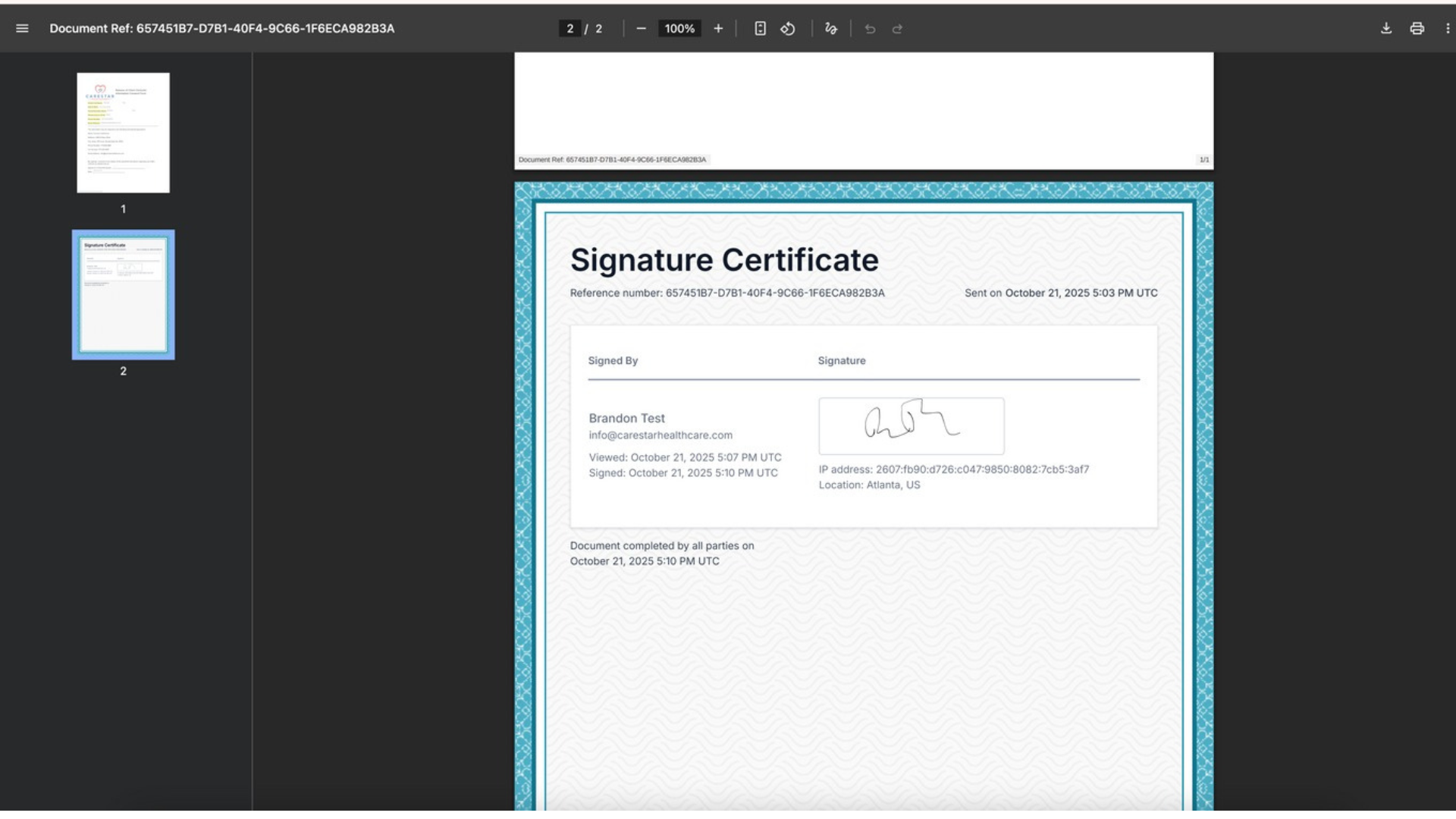
Digital signature certification showing HIPAA-compliant e-signing workflow with secure document handling
The system was designed for healthcare operations—every document action was logged, access was controlled, and data handling followed HIPAA-compliant protocols.
Automated Faxing via Documo Integration
Faxing remains standard practice in healthcare. Insurance companies, referring physicians, and many medical facilities still require faxed documentation.
Manual faxing is time-intensive. Staff must print records, load them into a fax machine, dial numbers, confirm transmission, and manually log the activity.
High Level Automation Team integrated Documo, a secure healthcare fax platform, directly into the GoHighLevel system.
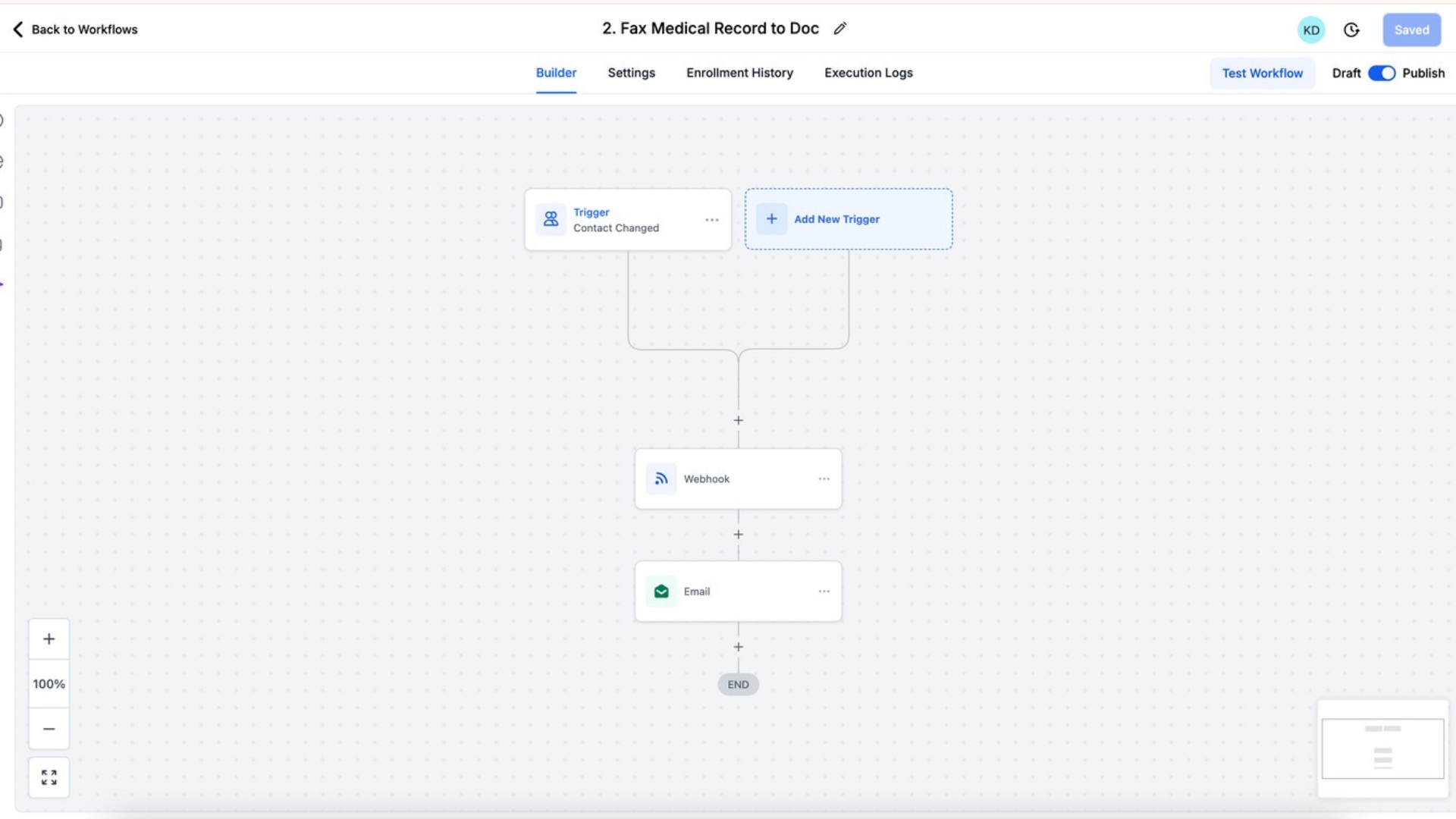
When specific workflow triggers occurred—patient status changes, referral requests, insurance verification needs—the system automatically generated and faxed the required documentation.
Zapier connected GoHighLevel and Documo, enabling automated data transfer and fax initiation based on predefined conditions.
Staff no longer manually handled outbound faxes. The system sent them automatically, logged transmission confirmations, and stored records for compliance auditing.
This single integration eliminated hours of manual fax work weekly while maintaining the secure, documented transmission healthcare operations require.
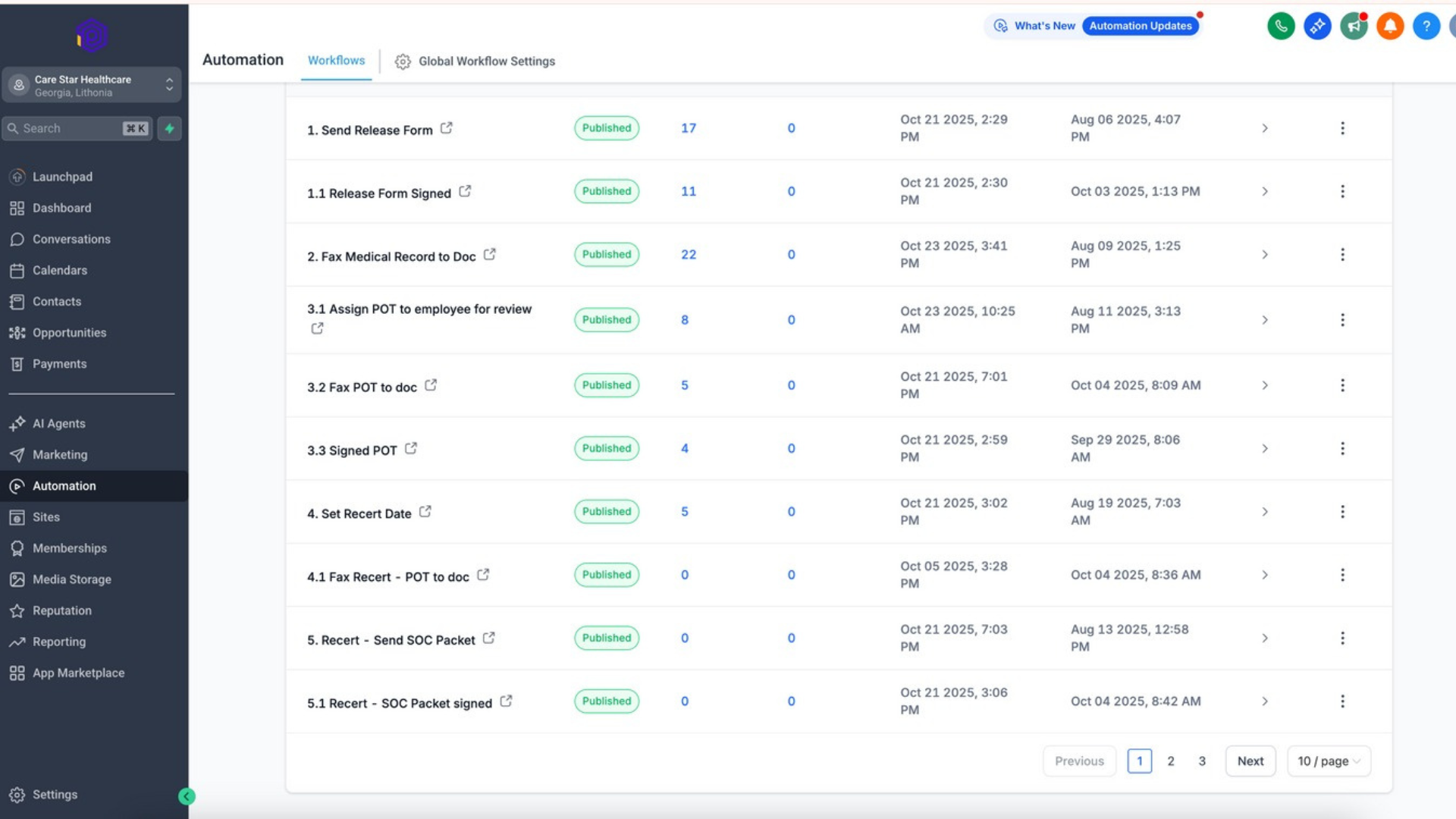
Automated healthcare workflows showing multi-step processes, conditional logic, and status-based triggers
Workflow Automation & Status-Based Notifications
Manual follow-up consumes significant staff bandwidth in healthcare operations. Checking document status, reminding patients about pending forms, alerting team members about completed tasks—all of this happens through manual effort in most organizations.
High Level Automation Team built automated notification workflows triggered by specific status changes.
When a patient completed a form, the system automatically notified the appropriate staff member. When a document required review, the assigned administrator received an alert. When a referral was ready for processing, the workflow triggered the next step without human intervention.
This reduced the mental load on staff. They didn't need to constantly check dashboards or remember who to follow up with. The system told them exactly what needed attention and when.
Patients received automated updates about their application status, upcoming requirements, and next steps. This reduced inbound phone calls from patients seeking status updates.
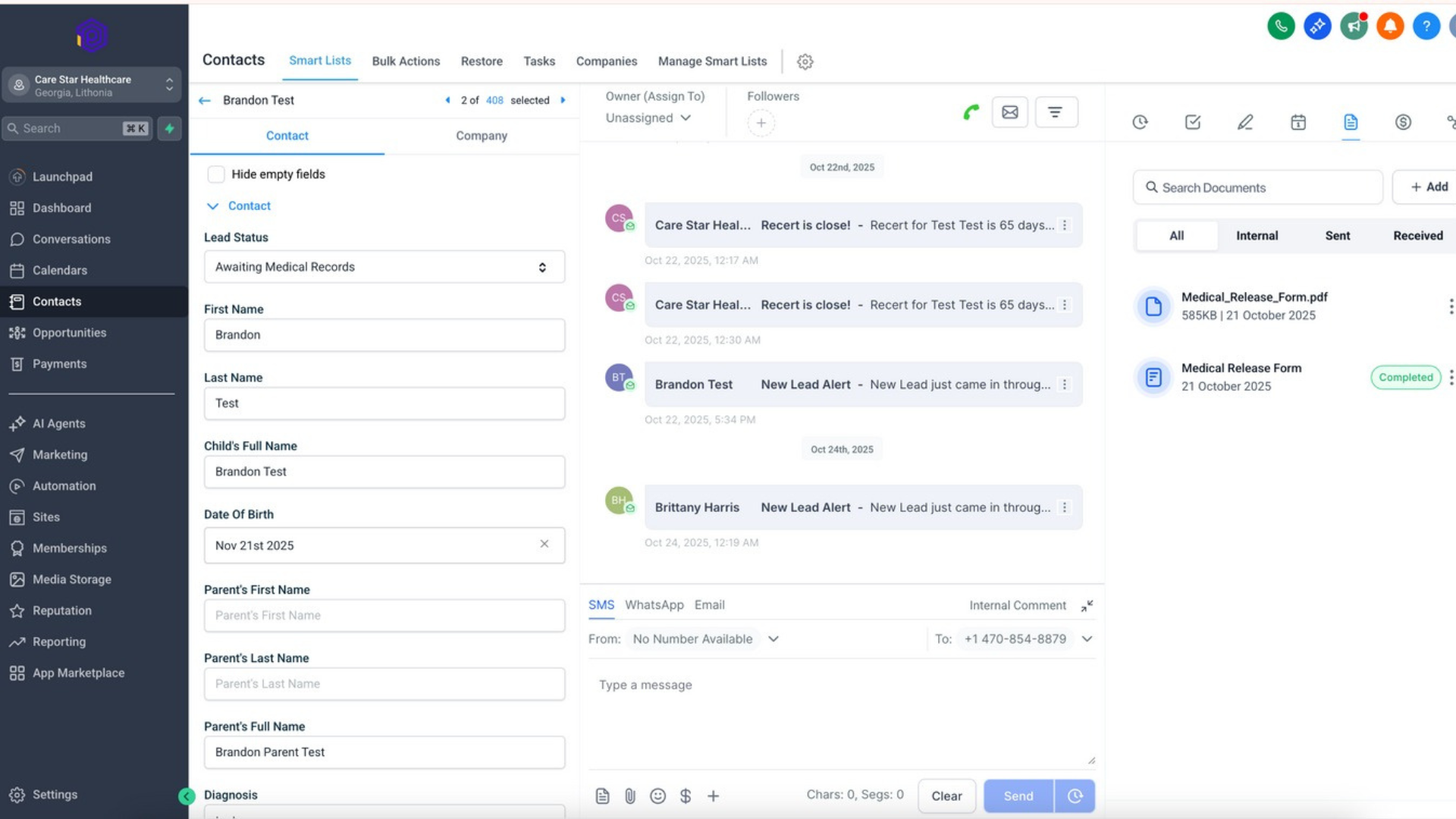
HIPAA-compliant contact management and document tracking system with real-time status visibility
Operational visibility improved across the organization. Administrators could see real-time workflow status without manually compiling reports or chasing updates from team members.
Smart list segmentation enabling automated patient categorization and targeted workflow triggers
HIPAA-Compliant System Architecture
Healthcare automation carries regulatory requirements that don't apply to most industries.
Every system component had to meet HIPAA standards for data security, access control, and audit logging.
High Level Automation Team designed the architecture with compliance as a foundational requirement, not an afterthought.
GoHighLevel was configured with role-based access controls. Staff members could only access the data necessary for their specific responsibilities.
Document handling included encryption at rest and in transit. All patient data movement between systems followed secure protocols.
The integration layer between GoHighLevel, Documo, and Zapier was built to maintain compliance across the entire workflow. No protected health information was exposed to non-compliant systems or stored in unsecured locations.
Audit logs tracked every system action. Who accessed which records, when documents were sent, which workflows executed—all of this was logged and available for compliance review.
This wasn't generic business automation adapted for healthcare. It was purpose-built healthcare workflow automation designed around regulatory requirements from the start.
Tools & Technology Stack
The system was built on a focused, healthcare-appropriate technology stack.
GoHighLevel – HIPAA-compliant CRM and workflow automation platform serving as the central system for document management, patient tracking, and process orchestration.
Documo – Secure healthcare fax platform enabling automated, compliant fax transmission integrated directly into workflows.
Zapier – Automation middleware connecting GoHighLevel and Documo, enabling triggered workflows and secure data movement between platforms.
The stack was intentionally minimal. Each tool served a specific compliance-critical function. No unnecessary integrations. No fragile connections that could break under operational load.
Simple. Secure. Purpose-built for healthcare operations.
Results & Operational Impact
The system delivered measurable operational improvements within the first 90 days.
Administrative tasks that previously required manual staff time now ran automatically
The same team could process substantially higher patient volume without adding headcount
Consolidating multiple tools into one integrated system reduced total software spend
Workflows that previously took days now completed in hours or minutes
What Changed Operationally
- Reduced manual errors and delays – Automated workflows eliminated human error in data entry, fax transmission, and status tracking
- Improved staff capacity – Team members could handle increased patient volume with existing headcount
- Faster document turnaround – Workflows that previously created bottlenecks now operated automatically
- Enhanced compliance posture – Centralized audit logs and access controls improved regulatory readiness
- Better patient experience – Faster processing times and automated updates reduced patient wait times and inquiries
These aren't projected improvements. These are documented operational outcomes measured against baseline performance before implementation.
CareStar Healthcare could now handle increased patient volume with existing staff. Document workflows that previously created bottlenecks now operated automatically. Staff time shifted from administrative tasks to patient-facing work.
The healthcare GoHighLevel system didn't just improve efficiency. It changed operational capacity.
Why This Automation Worked
Most healthcare automation projects fail because they prioritize technology over process. They focus on features, not operational reality.
This system worked because it was designed process-first.
Process Mapping Before Automation
High Level Automation Team documented existing workflows before building automation. Where did documents enter the system? Who needed to review them? What triggered the next step? The automation was built to support actual operations, not theoretical ideal states.
Compliance-First Architecture
HIPAA requirements shaped system design from the beginning. Every workflow, every integration, every data movement was evaluated for regulatory compliance before implementation.
Elimination of Tool Sprawl
Instead of adding more software to an already fragmented stack, the system consolidated multiple tools into one HIPAA-compliant platform. This reduced complexity and improved reliability.
Real-World Testing Under Operational Load
The system was tested with actual patient workflows before full deployment. Edge cases were identified. Error handling was verified. Staff were trained on realistic scenarios.
Designed for Healthcare Operations Specifically
This wasn't generic business automation applied to healthcare. It was purpose-built for medical administrative workflows with full awareness of industry-specific requirements like faxing, signature workflows, and compliance documentation.
Systems thinking, not software thinking. That's why it worked.
Who This System Is For
This case study is relevant if you operate:
- A healthcare organization with document-intensive workflows
- An administrative team handling patient forms, insurance verification, or medical records coordination
- Operations that still require faxing to external providers or facilities
- A fragmented software stack creating inefficiency and compliance risk
- A growing patient base that's outpacing current administrative capacity
If your staff spends more time on paperwork than patient-facing work, the problem isn't your team. It's your infrastructure.
Healthcare workflow automation exists to reduce administrative burden while maintaining compliance. When designed correctly, it works.
Final Takeaway
Automation does not replace compliance. It enforces it.
Most healthcare organizations avoid automation because they fear regulatory risk. But manual processes create their own compliance exposure: lost documents, inconsistent workflows, missing audit trails.
A properly designed healthcare GoHighLevel system doesn't increase risk. It reduces it. Automated workflows are consistent. Digital signatures create audit trails. Centralized systems eliminate data scattered across disconnected platforms.
For CareStar Healthcare in Stockbridge, Georgia, the breakthrough came from recognizing that efficiency and compliance aren't competing goals. They're complementary when the system is designed correctly.
HIPAA-compliant CRM automation should create operational clarity, not complexity. It should reduce administrative burden while improving audit readiness. And it should deliver measurable results in work hours saved, costs reduced, and staff capacity improved.
That's what healthcare automation looks like when it's done right. That's what High Level Automation Team builds.
Ready to Automate Your Healthcare Workflows?
If your healthcare organization is struggling with manual document processes, we can help. Book a free strategy call to discuss how HIPAA-compliant GoHighLevel automation can reduce administrative burden while maintaining full regulatory compliance.
Book Your Free Strategy Call